Helping design and engineering professionals discover, evaluate and specify technologies and processes that shorten the design cycle and enable success.



Digital Engineering April 2026
In the latest issue of Digital Engineering, we take a look at the latest innovations in design for additive manufacturing, including the use of natural language inputs, social media cosplayers, and AI integration. The issue also includes a feature…

January Special Focus Issue: Design for Additive
In this Special Focus Issue of Digital Engineering, learn about the latest advancements in design for additive manufacturing, including new software tools, additive in automotive, custom medical devices, and more.
STL files cannot include any information about desired color, desired material, surface texture, internal density gradient, internal fine structure, or other parameters that could be highly useful. So, some years ago several groups with smart, forward-thinking members began developing smart, forward-looking file formats for just this purpose. The two main versions are AMF and 3MF; this post will describe features of the 3D Modeling Format, 3MF.
 Logo for the 3MF Consortium, the industry group that is developing the 3MF file format for enhanced 3D printing. Image courtesy 3MF Consortium.
According to the Microsoft 3MF documentation page, 3MF is “a set of conventions for using XML to describe the appearance and structure of 3D models for the purpose of manufacturing (3D printing).” In general terms, 3MF is designed to be complete, simple, extensible, unambiguous, human-readable and freely accessible with respect to royalties, patents and licensing. The group now comprises fourteen founding companies including 3D Systems, EOS, FIT AG, GE Global Research, Materialise, nTopology, PTC, Siemens PLM Software, Stratasys and Ultimaker; additional companies are involved as associates.
A 3MF file holds metadata describing such basic information as the part title, designer and date of creation; mesh data – the body of 3D geometry constructed from a set of vertices, defined in a way that sets all face-normal vectors to face outward; data on base material groups and material types within those groups; data on color (without specifying a material); ways to define composites of materials (which types and in what ratio); data on texture and where to place it; information that maps materials to individual faces; ways to map the same component information to other sections of a part (saving file storage space); and slicing instructions that can be more accurate than sliced mesh data.
The 3MF extensions so far are: 3MF Materials and Properties Extension, 3MF Slice Extension, 3MF Production Extension, and 3MF Beam Lattice Extension. The latter was announced just this past April and provides an elegant non-hardware-specific solution to represent both small-scale lattices and larger truss structures – a key advancement for lightweighting.
All these details help software developers add the “Save as 3MF” option to 3D CAD software packages. On the other side of the equation, developers of 3D printer systems use the format to guide them in creating software for slicing and setting up prints, as well as directing the printer hardware to create parts with properties that can vary voxel by voxel.
Currently, when you save a SOLIDWORKS file as 3MF, in the Save As window, you can click on Options and choose whether to include materials and/or appearances (which includes color). More features will be coming, particularly since HP and Dassault Systèmes announced in February they would align their future technology roadmaps.
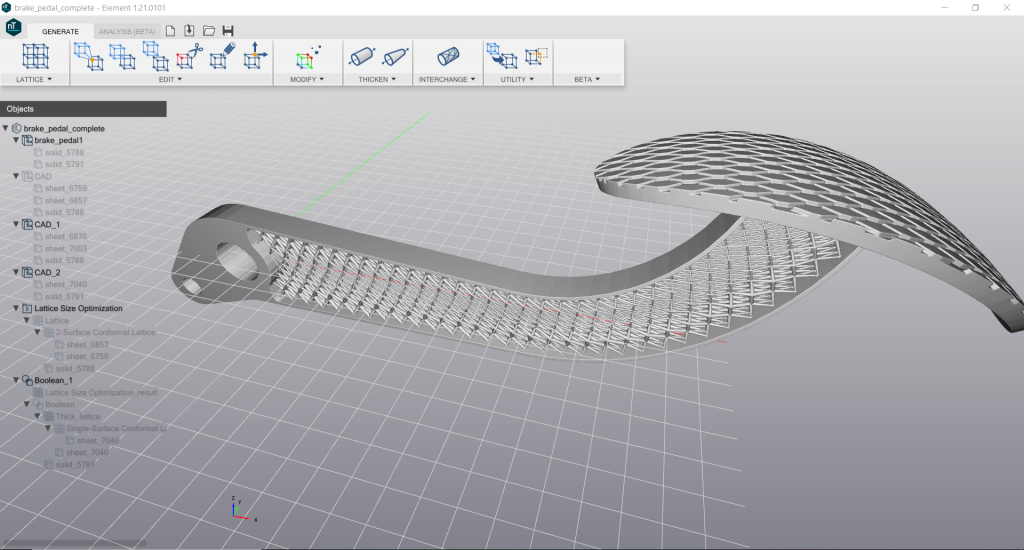 Internal lattice structure of a 3D printed brake pedal, designed with nTopology Element Pro software and saved as a 3MF file for intelligent 3D printing. Image courtesy nTopology.
Spencer Wright, another consortium representative who, among other jobs, coordinates partnerships and integrations at nTopology, explains that the 3MF Beam Lattice extension is key to any workflow that includes engineered lightweighting. “Lattice-specific software like nTopology Element Pro can enable big design improvements,” he notes, “but exporting those designs as STLs is cumbersome, resource intensive, and inflexible. 3MF’s Beam Lattice extension allows engineers to use the right tool for the job at every point in their workflow, and the file sizes are literally one one-thousandth what the corresponding STL would be.”
Printing on Stratasys PolyJet systems, such as the Objet500 Connex3 and higher models, means you can print in multiple materials and colors, blended from base materials and palettes that achieve as many as 500,000 unique colors. The proprietary system software walks you through steps that let you select surfaces, regions or sub-assemblies on the imported STL model and assign colors, digital materials, Shore-A hardness and more.
3D Systems offers several versions of its full-color-capable Color Jet Printer (CJP) line. Currently, when users import a polygonal model such as STL, OBJ, VRML 1/2, PLY, ZPR, ZBD, they can import color/texture information stored in or along with those formats, depending on the exact one used. They also can activate several tools in 3D Systems’ 3D Sprint part-preparation software to assign color to parts, regions or faces.
As more 3D printing equipment supports color, texture, multiple materials and other developments, 3MF will play a key role in simplifying the process for everyone.


DE's editors contribute news and new product announcements to Digital Engineering. Press releases may be sent to them via [email protected].
Follow DE
Join over 90,000 engineering professionals who get fresh engineering news as soon as it is published.






About Us · Contact Us · Editorial Team · Advertising · Privacy Policy · Subscriber Services · © 2026 Digital Engineering 24/7 · Peerless Media