Helping design and engineering professionals discover, evaluate and specify technologies and processes that shorten the design cycle and enable success.



May 2026 Special Focus: Artificial Intelligence in Design and Simulation
In this Special Focus Issue, learn about the latest developments in the integration of artificial intelligence into engineering workflows.

April 2026 Special Focus Issue: Generative Design
In this Special Focus Issue, Digital Engineering takes a look at how generative design solutions can be used across different types of design problems and with a variety of manufacturing approaches to accelerate design space exploration, and…
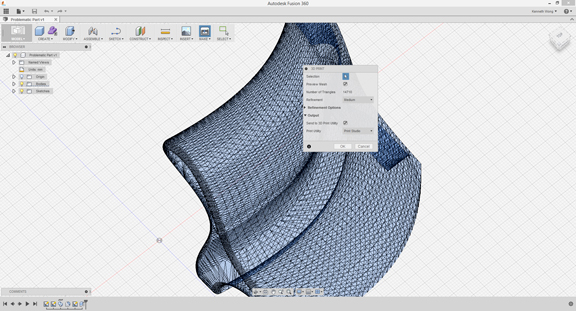 Autodesk Fusion 360's Make command initiates the meshing process.
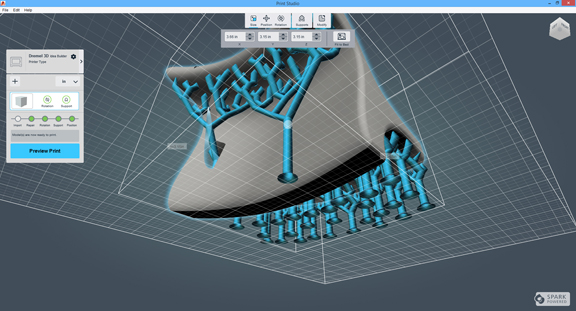 Autodesk Print Studio automatically generates the support structures for 3D printing.
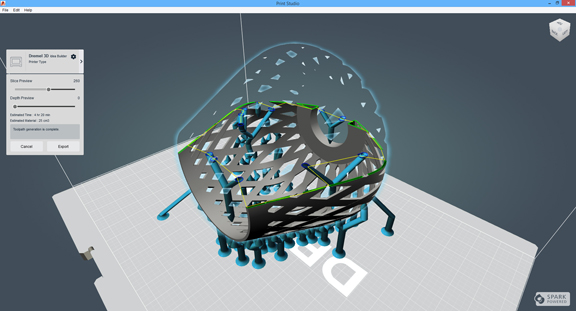 Print Studio offers a preview of how the part will be printed.
This week, I intentionally created a part that wouldn't sit still on a flat surface. I did it in Autodesk Fusion 360, by lofting an odd spline profile and using yet another odd spline profile to execute a cut through the geometry. The ugly, unsightly part I produced would serve no practical purpose (I'm pretty sure of it.) I devoted my time creating the part because I wanted to see what happens to such a part in the 3D printing process.
Autodesk Fusion 360 is a thin client CAD program. It uses the cloud to store your CAD models; it uses the local machine's computing resources to run the program. I downloaded and installed the trial version to understand how it shepherds a model through the printing process. The wobbly, unstable part was my strategy to bring out the software's ability to automatically generate support structures to prop up the design in the print chamber.
Fusion 360 gives you the Make command, which signals to the software you're ready to produce your part. The command initiates the meshing process, with the option to specify low-res, medium, or fine-grained mesh. If your design contains small details (like embossed texts or patterns), you'd need to select the fine mesh. If you're printing the part just to analyze its general morphology, you may be able to get away with a low-res mesh.
After meshing, Print Studio launches to carry you through the printing process. The Print Studio interface mimics the print chamber of a typical 3D printer. The model preparation begins with geometry interrogation. If you have thin walls that could collapse or geometry with gaps, the software will issue alerts and urge you to fix them, either through its automatic geometry-healing mechanism or through manual operations guided by you.
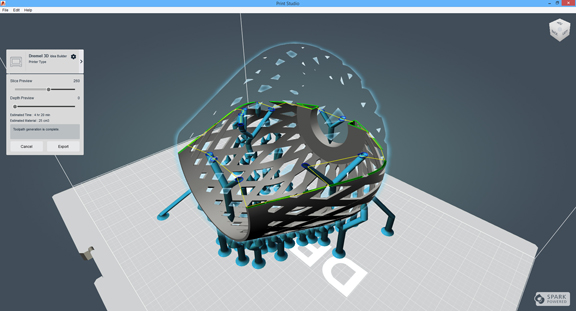
Since a 3D printer builds the geometry one slice at a time from the ground up, the software repositions the 3D model for optimal printing. To deal with parts like mine, it uses support structures (which can be removed or dissolved after printing) to prop it up during the printing. If you're an experienced printer, you could decide to further refine the support structures generated by Print Studio by deleting or adding pillars and branches.
For meshing and tool-path generation, Fusion uses your local machine's processing power, so if you have an older machine with slower CPUs, you could face some delays during these two stages. The tool-path generation allows you to preview the 3D printing process, much in the same way a computer-aided manufacturing (CAM) package lets you see how a part will be machined from a block of metal. You can play back the simulation using a slider bar.
In the engineering and design community, 3D printing could become as commonplace as 2D printing in ordinary households. Competition among desktop 3D printer providers is driving the prices down. Offices are acquiring the necessary hardware for in-house use. Microsoft is planning to support 3D printing straight from its Windows OS. All the signs point to an era of impromptu 3D printing.
CAD software plays a crucial role in promoting 3D printing. Functions found in Autodesk Print Studio may be precursors to the kind of print-enabling tools soon to be incorporated into most mainstream mechanical modeling programs.
For more, watch my video report below:


Kenneth Wong is Digital Engineering's resident blogger and senior editor. Email him at [email protected] or share your thoughts or suggestions at digitaleng.news/facebook.
Follow DE
Join over 90,000 engineering professionals who get fresh engineering news as soon as it is published.






About Us · Contact Us · Editorial Team · Advertising · Privacy Policy · Subscriber Services · © 2026 Digital Engineering 24/7 · Peerless Media