Helping design and engineering professionals discover, evaluate and specify technologies and processes that shorten the design cycle and enable success.




Sponsored
Artificial Intelligence for Design and Engineering Workflows
In this white paper, learn how artificial intelligence and machine learning can improve design and simulation.

Technology Focus: Designing for Optimization & Simulation
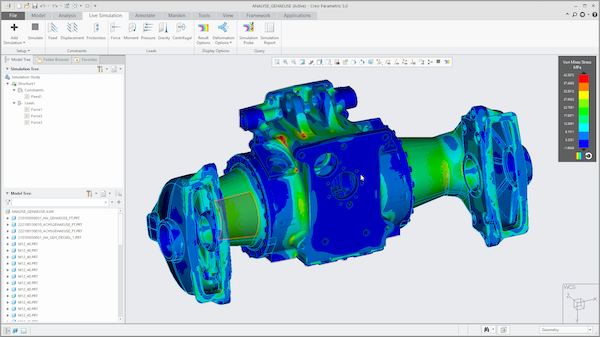
Simulation is pervasive, with people from different departments and backgrounds discovering new ways to put it to use, in all of its varied forms.
As they say in business, time is money. In the business of designing new products, any time spent waiting on systems to run simulations or render 3D models is downtime driving up costs and eating into engineering productivity.
As a result, it’s essential to equip engineering organizations with adequate workstation horsepower. Rising demand for multidisciplinary, complex products coupled with fast-moving time-to-market cycles are prompting engineers to elevate their game, leaning into generative design, rendering, and simulation tools as part of a tightly coupled design, iterate, test, and validate cycle.
Increasing interest in smart, connected products also ups the ante for keeping local engineering workstations up to date with the latest CPU, GPU, storage, and memory options while creating demand for high-end systems deployed at the edge to collect industrial data and perform real-time analytics powering predictive insights.
With renewed focus on engineering productivity, a training track (Tips to Optimize Performance & Hardware for Creo/Creo Simulation Live) at the recent PTC LiveWorx conference did a deep dive into how to properly configure and optimize a workstation to support modern design workflows with PTC’s Creo CAD platform. More PTC customers are designing IoT-enabled products and practicing model-based product development, a practice PTC defines as orchestrating core CAD and related design work within the extended Creo portfolio and based on its unified 3D model. These modern design workflows are critical to building competitive products, making it incumbent on organizations to invest in workstations that fully empower engineers to efficiently and effectively get the job done.
Investing in a regular workstation upgrade cycle ensures a number of benefits. Engineers are able to iterate designs faster, and with more happening in the realm of digital work, there’s less reliance on costly, physical prototypes. Enabling greater simulation earlier in the design process also enables engineering teams to discover flaws early in the process, when it’s easier and less costly to make changes.
“When you look at the totality of cost factors impacting product design—quality, prototypes, labor, and time-to-market—the price of a single workstation pales in comparison to the benefits it can deliver”, said Scott Hamilton, an industry strategist at Dell and one of the presenters of the LiveWorx tutorial.
“Engineers are mission-critical employees because they are designing the products that make money for the company,” Hamilton said. “Making them as productive as possible is extremely important.”
Hamilton breaks most workstation workloads into two categories—interactive work like design and visualization, and computational work where engineers branch out into areas like rendering, analysis, and simulation. “While interactive work depends on accelerated CPU clock speeds to get the best experience displaying inputs and effects in real time, computational jobs are better suited for systems that boost more CPU cores for faster processing,” he said.
Nevertheless, it’s not just a matter of deciding between workstations boasting more cores or higher clock speeds. “When choosing the right workstation, it’s important to strike a balance between a variety of factors based on the needs of the application, demand for concurrency, and with an eye toward accommodating future needs,” Hamilton said.
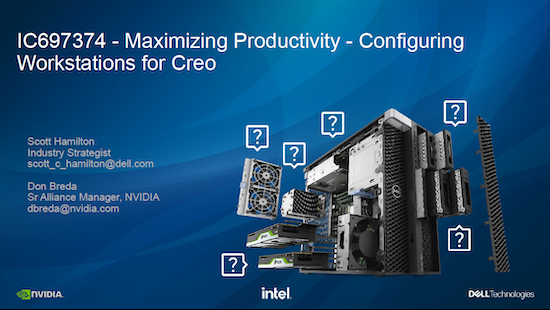
As part of the training track, Hamilton and co-presenter Don Breda, senior alliance manager at NVIDIA, made the following workstation configuration recommendations to optimize Creo workflows:
CAD: CPU with clock speeds greater than 3.0 GHz with four cores; 32+GB of RAM; 512 GB of SSD storage (SATA or NVME); NVIDIA RTX™ A2000 or A3000 GPU
CAE: CPU with clock speeds greater than 3.0 GHz with 8 to 12+ cores to support simultaneous simulations; 32 to 64+ GB of RAM, ECC recommended; 1 TB of SSD storage (SATA or NVME); NVIDIA RTX™ A2000, A3000, A4500, A5500, A6000 GPU
Computer-aided visualization: CPU with clock speeds greater than 3GHz with four GPU-accelerated cores and 8+ CPU-accelerated cores; 32+ GB of RAM; 1-2 TB of SSD storage (SATA or NVME); NVIDIA RTX™ A4500, A5500, A6000 GPU
The NVIDIA RTX professional GPU portfolio features large GPU memory with ECC along with multi-GPU and memory expandability. Hamilton and Breda also cited other ways engineers could benefit from coupling Dell workstations with RTX GPUs. “For example, in Creo Parametric, the model is visualized in OpenGL, while Creo Simulation Live (based on Ansys Discovery Live) workflows require an NVIDIA GPU running the CUDA general programming model. Engineers doing generative design workflows in Creo, either desktop or cloud-based, or creating photorealistic images of their models in Creo Render Studio, are also accelerated with CUDA on NVIDIA GPUs,” Hamilton and Breda said.
In fact, engineers running Creo on Dell workstations configured with NVIDIA RTX™ 4000 SFF Ada Generation GPUs saw a 2.5x performance boost while Dell workstations sporting the ultra high-end NVIDIA RTX™ 6000 Ada Generation clocked a 3.3x boost for similar workloads, according to Dell estimates.
With the right workstation, engineers can improve their productivity and optimize the performance of software like PTC Creo. You can learn more about Dell solutions for PTC here, and learn more about the PTC LiveWorx program here.


Dell sells personal computers (PCs), servers, data storage devices, network switches, software, computer peripherals, HDTVs, cameras, printers, MP3 players, and other electronics.
Artificial Intelligence for Design and Engineering Workflows
In this white paper, learn how artificial intelligence and machine learning can improve design and simulation.

Beth Stackpole is a contributing editor to Digital Engineering. Send e-mail about this article to [email protected].
Follow DE
Join over 90,000 engineering professionals who get fresh engineering news as soon as it is published.






About Us · Contact Us · Editorial Team · Advertising · Privacy Policy · Subscriber Services · © 2026 Digital Engineering 24/7 · Peerless Media