Helping design and engineering professionals discover, evaluate and specify technologies and processes that shorten the design cycle and enable success.


Sponsored
Design for additive manufacturing (DFAM) techniques, such as topology optimization and lattice structure design, both output STL meshes—so working with this file type is becoming increasingly important for designers and engineers.
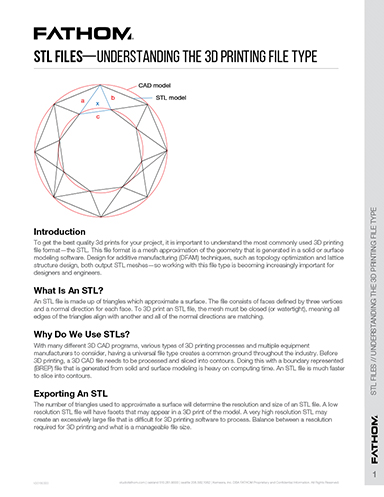
An STL file is made up of triangles which approximate a surface. The file consists of faces defined by three vertices and a normal direction for each face. To 3D print an STL file, the mesh must be closed (or watertight), meaning all edges of the triangles align with another and all of the normal directions are matching.
With many different 3D CAD programs, various types of 3D printing processes and multiple equipment manufacturers to consider, having a universal file type creates a common ground throughout the industry. Before 3D printing, a 3D CAD file needs to be processed and sliced into contours. Doing this with a boundary represented (BREP) file that is generated from solid and surface modeling is heavy on computing time. An STL file is much faster to slice into contours.
The number of triangles used to approximate a surface will determine the resolution and size of an STL file. A low resolution STL file will have facets that may appear in a 3D print of the model. A very high resolution STL may create an excessively large file that is difficult for 3D printing software to process. Balance between a resolution required for 3D printing and what is a manageable file size.

The FATHOM team is driven by advanced technologies that enhance and accelerate today's product development and production processes—we're changing the way products are being designed and manufactured by helping designers and engineers…
STL Guidelines To Get The Best 3D Printed Parts
Created by FATHOM's Application Engineering Team, this 4-page STL guideline for 3D printing and additive manufacturing will help you get the best quality parts for your project. The easy-to-read PDF includes sections on why STL files are used, export best practices, difficulties you should expect to encounter, and much more.




About Us · Contact Us · Editorial Team · Advertising · Privacy Policy · Subscriber Services · © 2026 Digital Engineering 24/7 · Peerless Media