Helping design and engineering professionals discover, evaluate and specify technologies and processes that shorten the design cycle and enable success.


Sponsored

Cut Retrieval-Augmented Generation (RAG) Hallucinations by 50%
Most teams hit the same wall with enterprise AI: LLMs that hallucinate, pipelines that don’t scale, and infrastructure that’s harder to design than the models themselves.

What Is Intelligent BOM Management? A Guide to Smarter Product Development
Learn how intelligent Bill of Materials (BOM) management helps teams collaborate, reduce errors, and bring innovative products to market faster with cloud-based PLM tools.
Dear DE Reader:
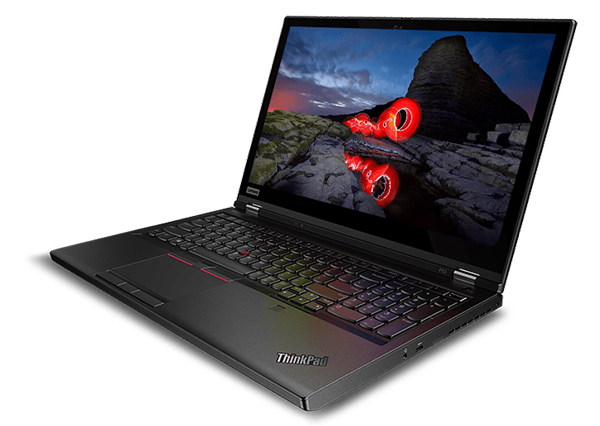
Mobile workstations have come a long way. The first generations were about what compromises could be made while still offering mobility; now it is about fine-tuning hardware features to match specific requirements. Lenovo has released a new 15-in. model of its popular ThinkPad P Series. The combination of features and form factor are a story worth telling as our Editor’s Pick of the Week.
Traditionally the very high end features are reserved for 17-in. workstations, the no-compromise units that offer the biggest screen, the largest memory and storage, and the most expensive/powerful CPU/GPU (graphics processing unit) options. Yet the ThinkPad P53 15-in. model will cause many engineers to think twice about opting for a 17-in. model for power and mobility. Lenovo is offering the latest NVIDIA mobile GPU, Quadro RTX 5000, in a 15-in. mobile form factor. It brings power, allowing the P53 to run AI (artificial intelligence) research, deep learning routines and real-time ray tracing. The secret is the inclusion of specific compute cores. The RTX 5000 offers RT Cores (Real Time) for ray tracing at the blink of an eye, and Tensor Cores, to make quick work of the matrix-based calculations common in AI, deep learning and machine learning.
Lenovo matches the GPU power of the RTX 5000 with the choice of Intel Xeon or 9th Generation Core CPUs, including the new Core i9. These monster CPUs are matched with up to 128GB of memory and up to 6TB storage. Remember, all this power is going inside a 15-in. mobile workstation, not a desktop tower.
Many professionals will want the Lenovo ThinkPad P53 for its ability to turn weeks of AI research into a day of data crunching, but there are other very visual reasons to put the P53 at the top of your sourcing list. There is a new OLED Touch display, combining excellent graphics with Touch, becoming more popular for high-end applications. There is Dolby Vision HDR for vibrant colors and the deepest black possible.
This is a professional’s computer in other ways. It features Lenovo’s ThinkShield for security: infrared facial recognition, hardened fingerprint reader, and integrated security hardware. Like every Lenovo mobile workstation, the P53 is rigorously Mil-Spec tested with 12 methods and 22 procedures. Lenovo adds more than 200 other quality tests to ensure safety and efficiency.
If you are creating product content for augmented or virtual reality, you need top-of-the-line color capabilities. The P53 includes Pantone factory color calibration, a factory-line service using Minolta colorimeters. Lenovo also offers unique color profile information stored in the cloud, for fast access to recalibration tools when required or to switch between color profiles.
There is more to love about the P53 than fits in an email. Be sure to read today’s product brief for details on other specifications about the Lenovo ThinkPad P53 and its siblings the P1 (ultra-light 15-in.), and the P73 (17-in. model that is lighter than previous 17-in. models).
Thanks for reading; we’ll be back next week with another Editor’s Pick of the Week.
—The DE Editors


We are proud to be the world's largest PC vendor. Our portfolio also includes workstations, servers, storage solutions, IT management software, smart TVs, tablets, smartphones, and even apps.As the world becomes faster, more demanding, and…

Making the Case for Engineering Workstation Upgrades
In this Making the Case whitepaper, Lenovo outlines how upgrading to the latest generation of professional workstations can provide a return on investment through increased engineering efficiency and greater flexibility.

DE's editors contribute news and new product announcements to Digital Engineering. Press releases may be sent to them via [email protected].
Follow DE
Join over 90,000 engineering professionals who get fresh engineering news as soon as it is published.






About Us · Contact Us · Editorial Team · Advertising · Privacy Policy · Subscriber Services · © 2026 Digital Engineering 24/7 · Peerless Media