Helping design and engineering professionals discover, evaluate and specify technologies and processes that shorten the design cycle and enable success.



May 2026 Special Focus: Artificial Intelligence in Design and Simulation
In this Special Focus Issue, learn about the latest developments in the integration of artificial intelligence into engineering workflows.

Design & Simulation Software Guide 2025
In this Special Issue, Digital Engineering presents its second annual guide to design and simulation software vendors.
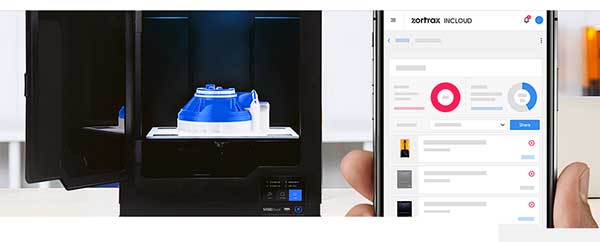
Zortrax inCloud is a cloud-based service that enables advanced, remote management of Zortrax 3D printers. It’s available to everyone who registered a Zortrax machine through the Zortrax ID system. With the inCloud, it is now possible to upload models and start the printing process on Zortrax devices from anywhere in the world using a web interface. And this is just a fraction of what Zortrax inCloud can do.
Operating Zortrax 3D printers remotely is the core functionality of Zortrax inCloud. This can take place through several options and features. The underlying idea was to let the users work with their printers just as though the machines were standing right beside them. It is possible to:
The “Multiprint” tool allows you to begin the printing on all your 3D printers at once. This solution is aimed primarily at businesses running large 3D printing farms as it can be used to launch mass 3D printing operation as fast as possible. Through the “Multiprint,” you can choose which of the available printers are to be used for mass printing and begin the process on all of them. All the chosen printers must work in the same technology and with the same filament.
Users can also remotely access cameras installed the M Series Plus machines to check if the previously printed models have been removed from build platforms, and the machines are ready to go.
Each time a model is transferred to the printer via the inCloud service, an appropriate amount of transfer is used up. How much transfer a user actually has depends on the chosen subscription plan. In a free subscription, it is possible to transfer 1GB worth of models. Paid plans come with 3GB of transfer for Standard Plan, 16GB for Professional Plan and 50GB for Enterprise Plan. Available transfer in each subscription plan renews monthly; however, purchasing additional GB of transfer is still possible during the ongoing work.
Zortrax inCloud, besides being a remote printing management system, is also useful for resource optimization. To streamline the workflow, a professional or enterprise user can create an “Organization” on the Zortrax ID account. We wanted the “Organization” to serve as a digital registry of all the 3D printing resources available in a business. And we mean human resources as well.
So, managers or team leaders can add individual users to their “Organizations”. This is a straightforward process done through e-mail invitations. Once added, the users gathered in the “Organization” can be organized into “Teams”.
Each “Organization” can have multiple “Teams”, and users can be quickly transferred from one “Team” to another. Then, 3D printers available on the enterprise Zortrax inCloud account can be assigned to each of the “Teams”. Managers can always access a neatly arranged data on which machine is assigned to each “Team”, and how it’s used throughout the project. A space in Zortrax inCloud where the track records for each 3D printer are located is called “Timeline”.
The “Timeline” contains a log of activity for each 3D printer connected to the inCloud account. A user can see when the printer was working and when it wasn’t.
Sources: Press materials received from the company and additional information gleaned from the company’s website.


DE's editors contribute news and new product announcements to Digital Engineering. Press releases may be sent to them via [email protected].
Follow DE
Join over 90,000 engineering professionals who get fresh engineering news as soon as it is published.






About Us · Contact Us · Editorial Team · Advertising · Privacy Policy · Subscriber Services · © 2026 Digital Engineering 24/7 · Peerless Media