Helping design and engineering professionals discover, evaluate and specify technologies and processes that shorten the design cycle and enable success.



April 2026 Special Focus Issue: Generative Design
In this Special Focus Issue, Digital Engineering takes a look at how generative design solutions can be used across different types of design problems and with a variety of manufacturing approaches to accelerate design space exploration, and…

Electrum utilizes the 3DEXPERIENCE platform on the cloud to develop their new electric motorcycle
Electrum, a new brand of electric motorcycles, utilizes the 3DEXPERIENCE platform. Their mission is to support Indonesia’s shift to low-carbon, sustainable transport and to ultimately help the country’s government achieve its vision of net…
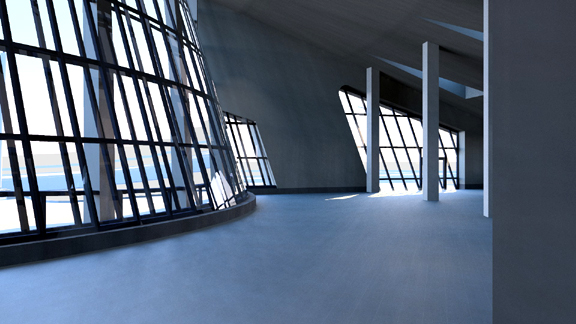
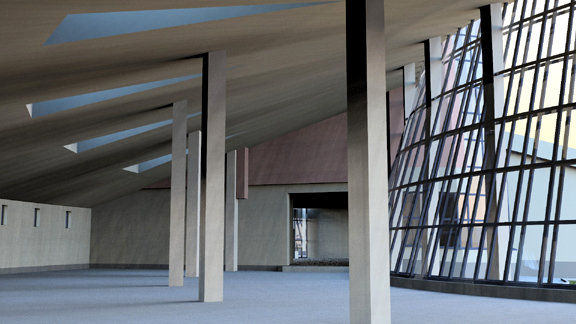
In my technology Utopia, this is how I might produce photo-realistic renderings:
Autodesk Project Neon, launched this week, comes pretty close to my vision. (By the way, don't confuse Autodesk's Neon with Nevada Department of Transportation's Project Neon like I did.) Described as "a rendering service," Project Neon lets you upload your scenes saved as AutoCAD 2010 or 2011 3D DWG files, then render them into JPEG or PNG images.
"By harnessing the power of the cloud, customers no longer have to wait for long periods of time to generate single or multiple views of their designs," explains Autodesk. "The Project Neon service eliminates the need for customers to purchase and maintain expensive hardware for their rendering needs."
First Impression
I promptly downloaded the two sample DWG files from Autodesk, then went through the prescribed work flow to produce the images above. No software download; no installation. A standard web browser was all I needed.
I think Neon is a proof of concept, a preview of what's possible under the cloud-hosted model. The software provides four rendering settings: draft mode (grainy preview), standard, high, and best. My renderings produced at "high" setting in Neon are nowhere near what you'd get with a specialized renderer like Bunkspeed SHOT or Luxion KeyShot. But that's easily fixed with the right partnership between Autodesk and someone else (like NVIDIA).
One minor quirk I noticed with the premiere release of Neon: It doesn't save any uploaded files. So once you've grabbed your renderings from a session, even if you want to render additional views from the same file, you'll be required to upload that file again.
That's either the developers' oversight or their deliberate attempt to sidestep the "security and IP issues" people invariably bring up in cloud-computing discussions. (My guess is, it's the latter.) In a commercial release, I'm sure the service provider, whether it's Autodesk or someone else licensing Autodesk's technology, would let users store files they'd repeatedly use.
In the current release of Neon, you need to do quite a bit of preparatory work in AutoCAD. If you try to upload a DWG file that doesn't meet the specifications, you'll get an error message. In order for Neon to be able to render your file, you need to set the scene up (in 3D, not 2D) with at least one source of light (the default light source won't do) and one named view (so Neon can use that to create the perspective you want). All your Xrefs and images (like the ones needed for material textures) must be included as an eTransmit package (.zip).
My Neon-Colored Thoughts
In my view, AutoCAD is not an ideal software for scene composition. It's not meant for easy repositioning of geometric objects, nor is it for previewing the effects of lights and shadows. The professionals might prefer to construct their scenes in a program like 3ds Max; hobbyist may use something straightforward and simple like Google SketchUp (one of the most commonly used architectural concept tools now). I'm not sure that DWG is the right format for scene descriptions either. I believe these requirements in current version of Neon are just placeholders for better substitutes while its creators refine the software.
On the other hand, Neon could easily be delivered as an optional service or a Web-connected plug-in for Autodesk Inventor and Revit users. The ability to press a button and get a rendered view of your mechanical assembly or architecture scene in short order is appealing to many, especially to those who need the renderings but don't want to invest in the type of high-power workstations and server clusters needed to churn them out on premise. There's one undeniable benefit to remote rendering: Your CPU won't grow sluggish or freeze up while you're rendering.
Despite its experimental nature and limitations, Autodesk Project Neon, I believe, exemplifies how rendering would be done in the future. This Neon is not the bright-lit Broadway finale we're waiting for. It's just the beginning.


Kenneth Wong is Digital Engineering's resident blogger and senior editor. Email him at [email protected] or share your thoughts or suggestions at digitaleng.news/facebook.
Follow DE
Join over 90,000 engineering professionals who get fresh engineering news as soon as it is published.






About Us · Contact Us · Editorial Team · Advertising · Privacy Policy · Subscriber Services · © 2026 Digital Engineering 24/7 · Peerless Media