Helping design and engineering professionals discover, evaluate and specify technologies and processes that shorten the design cycle and enable success.



May 2026 Special Focus: Artificial Intelligence in Design and Simulation
In this Special Focus Issue, learn about the latest developments in the integration of artificial intelligence into engineering workflows.

April 2026 Special Focus Issue: Generative Design
In this Special Focus Issue, Digital Engineering takes a look at how generative design solutions can be used across different types of design problems and with a variety of manufacturing approaches to accelerate design space exploration, and…
Each release includes new features and multiple enhancements. Starting now, in the 2018.1 update, there are orange dots to indicate improvements to a specific feature. Hover over this dot to get more information about what’s new.
Here are a few of the new enhancements: Now AutoCAD remembers your previous plot settings and you can set them as the default for all plots. Saving drawings as PDFs is simpler than now. Once settings are applied, just click on the Save as PDF button. Now, when plotting drawings, AutoCAD will automatically create PDFs of those drawings. It names these PDFs based on the drawing and layout name to identify and reference it at a later time. Autodesk has also simplified the way to apply named page setups to layouts. By right-clicking on a drawing, apply a named page setup to multiple layouts from Quick View in a simple and easy workflow. It's also possible to apply or edit a named page setup from the Layout tab menu.
Now it's possible to drag files like DWGs, PDFs, and images from the Finder directly on to the canvas in AutoCAD.
For more info, visit Autodesk.
Sources: Press materials received from the company.


DE's editors contribute news and new product announcements to Digital Engineering. Press releases may be sent to them via [email protected].
Follow DE
Join over 90,000 engineering professionals who get fresh engineering news as soon as it is published.






About Us · Contact Us · Editorial Team · Advertising · Privacy Policy · Subscriber Services · © 2026 Digital Engineering 24/7 · Peerless Media
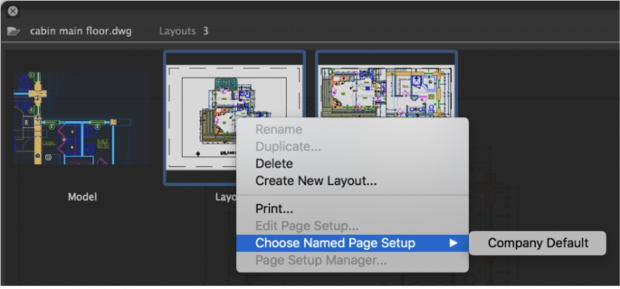 Named Page Setup feature in updated AutoCAD for Mac. Image courtesy of Autodesk.