Helping design and engineering professionals discover, evaluate and specify technologies and processes that shorten the design cycle and enable success.


Sponsored

May 2026 Special Focus: Artificial Intelligence in Design and Simulation
In this Special Focus Issue, learn about the latest developments in the integration of artificial intelligence into engineering workflows.

April 2026 Special Focus Issue: Generative Design
In this Special Focus Issue, Digital Engineering takes a look at how generative design solutions can be used across different types of design problems and with a variety of manufacturing approaches to accelerate design space exploration, and…

 Dear DE Reader:
It's always notable news when a new version of a major engineering CAD application gets released. And that's what today's Pick of the Week write-up has in store for you. So let's get to it.
Autodesk recently let loose the AutoCAD 2017 Fall Update both for its AutoCAD 2D/3D CAD and drafting software as well as its 2D drafting software AutoCAD LT. While its less bewitching official tag is AutoCAD 2017.1, the Fall Update has a number of new and improved features that'll beguile users. An important note is that this update is specifically for those of you with a subscription license or maintenance plan, so you might want to check in on that perpetual license.The quick rundown of the goodies in this update include PDF imports with SHX font conversion, better support for high-resolution monitors, off-screen selection and a nifty little convenience called New-Feature Highlighting. The latter is simply this: A clear visual indicator of where you'll find the new features. You can turn it off when you get accustomed to the update. Delightfully simple.
The PDF import improvements address a long-standing annoyance: The PDF file format does not recognize SHX fonts, so it converts text originally formatted in SHX into wireframes. The AutoCAD 2017 Fall Update debuts an SHX text recognition tool that lets you select PDF-imported wireframes representing SHX text and convert them into AutoCAD text objects. It comes with setting options to help you manage fonts and control some settings during the conversion. Also, there's a complementary Express Tool that you can use to combine multiple individual text objects into a single multi-line text object.
Better support for high-resolution monitors translates into improved everything for 4K monitors and pixel densities. In other words, interface elements that you use all the time will scale and display appropriately.
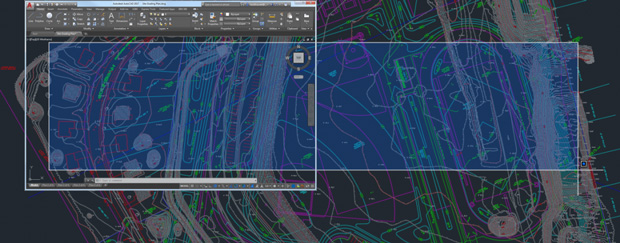 The AutoCAD 2017 Fall Update release debuts a new off-screen selection functionality. With it, selected objects stay within the selection set even if you pan or zoom them off the screen. Image courtesy of Autodesk Inc.
Off-screen selection sounds user-friendly. What it means is that beginning with the Fall Update when you select a part of your drawing, it stays in your selection set even if you go to another part of your drawing and start panning or zooming around.
There's a bunch more going on in the AutoCAD 2017 Update like improved linetype gap selection and snappier 3D navigation performance. Read today's Pick of the Week write-up to start learning more on this release. Download the the preview guide for the full skinny and watch a video for a quick overview. Good stuff.
Thanks, Pal. – Lockwood
Anthony J. Lockwood
Editor at Large, DE


Anthony J. Lockwood is Digital Engineering's founding editor. He is now retired. Contact him via [email protected].
Follow DE
Join over 90,000 engineering professionals who get fresh engineering news as soon as it is published.






About Us · Contact Us · Editorial Team · Advertising · Privacy Policy · Subscriber Services · © 2026 Digital Engineering 24/7 · Peerless Media