Helping design and engineering professionals discover, evaluate and specify technologies and processes that shorten the design cycle and enable success.


Alert!
Digital Engineering ceased publication on July 1, 2026. This website remains available as an archive of engineering content.
For inquiries or information, please email [email protected].

May 2026 Special Focus: Artificial Intelligence in Design and Simulation
In this Special Focus Issue, learn about the latest developments in the integration of artificial intelligence into engineering workflows.

Design & Simulation Software Guide 2025
In this Special Issue, Digital Engineering presents its second annual guide to design and simulation software vendors.
Workstation makers tend to promote their offerings as essential hardware for running finite element analysis (FEA) and computational fluid dynamics (CFD). So in this article, we decide to turn the table on them. We ask them if they use FEA and CFD in the design of their workstations, and how the results shape their design decisions, from material selection to motherboard placement.
Fifteen to 20 years ago, Dell Technologies engineers would build mockup systems in labs for testing, recalls Travis North, senior distinguished thermal engineering technologist, Dell Technologies. But by 2012 or 2013, digital simulation became the primary product development tool, he said. Dell’s CFD workload involves FloTherm, Ansys Icepak and Flowmetrics EFD software.
Thermal analysis on new workstation designs typically begin before the new generation of CPUs and GPUs arrive. As original equipment manufacturer (OEM) partners of the leading microprocessors, Dell and other workstation makers get the specifications of the upcoming chips. These, along with the P-Q Curve from the fan suppliers, serve as input for thermal analysis.
“For example, the specs say the new chip has a 300-watt maximum power, with a heat flux of over 2 cm and a TCase of 72 C. For us, these are the boundary conditions required for all thermal analysis. We can use these to determine the power and airflow for the cooling fans in our fixed desktops, skin temperature for mobile workstations, and the rough areas for the heat sinks,” he says.
North recalls analyzing roughly 30 iterations of the most recent Dell Precision 5570 mobile workstation.
“Let’s say we’re working with a 30-watt [graphics processing unit (GPU)] and a 60-watt CPU. Based on that 90 watts of power, we could calculate the airflow throughout the system, the fan required, the foot height and the vents. What we’re really after are the velocities,” North says.
Velocities determine frictional losses and heat dissipation. It defines the Delta P of the system. Typically, the strategy is to minimize the frictional losses and use all the air to remove the energy out of the system, North explains.
At Lenovo, engineers conduct stress analysis with FEA and thermal analysis with CFD, says Albert Makley, director of ThinkStation development and technical solutions, Lenovo. Though simulation gives guidance on design direction, it is always verified with physical tests, he adds.
“Think of the heat pipe, which is a hollow copper piece with a water chamber. As soon as the heat from the CPU reaches it, the vapor starts moving from the hot plate up into the fins, then it will wick back down to the evaporator. A pressure of 50 kPa versus 55 kPa can dramatically change the dynamics within that vapor chamber. That’s extremely hard to simulate accurately,” says Makley. “But we can get approximate temperatures in the simulation; and in the prototype phase, when we get test results, we revisit the solution.”
In one instance, Makley recalls the simulation showing acceptable airflow results with a fan, but in the physical test, the fan’s airflow was blowing at a 45-degree angle.
“That meant when we put a duct around it, the fan was operating at a much lower volume of air. So we went back to the simulation model to make adjustments,” he says.
In the simulation, enclosures are assumed to be perfect. However, in reality, they invariably have air leaks through cracks and crevices. “So in your simulation, your thermal results may be passing, but in reality, you find out they don’t,” Makley warns.
A laptop, despite its name, is not always used on a lap. How and where a system is used will significantly impact performance. It might be used on a pillow, or outlet vents could be close to a wall.
“Further, at a given altitude above sea level, the density of the airstream is reduced, impacting the cooling capability of the airflow. The conditions are also very different for using the machine on a submarine,” says North. “Once, we actually simulated a laptop running inside a backpack to determine how long it takes to heat up.”
In 2006, Dell acquired the gamer-focused PC maker Alienware. Designed to appeal to the gaming crowd, Alienware boxes feature brightly lit light panels and brackets—a departure from the classic Dell Precision workstations. An example of Dell’s simulation-driven innovation is the Alienware Element 31 gaming machine, revealed at Computex 2021.
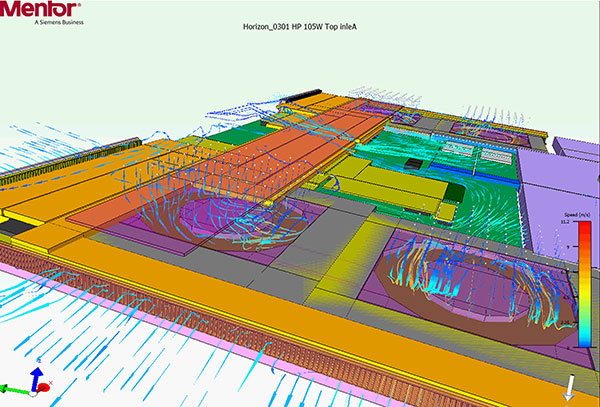
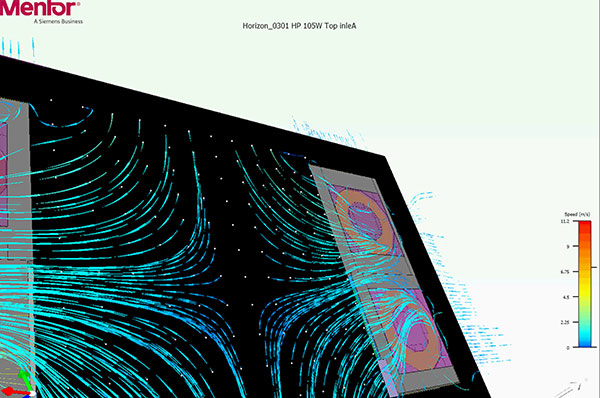
“The CPU and GPU location were pushed back toward the hinge. That’s to keep the heat sources away from the keyboard,” explains North. “It helps us achieve a robust frame rate, but more importantly, the QWER keys are the primary controls for League of Legends players, so it’s important for these users to keep these primary keys cool.”
Lenovo engineers use specially formulated dust, representing the particles present in real-world usage to observe how it cycles through the system and back out the vent, Makley says. “We have design features that are meant to repel dust away from the critical components.”
Sometimes you might find him and his colleagues pouring water onto the Lenovo ThinkPad prototypes. “That’s how we simulate someone spilling drinks over their laptop,” says Makley. “We wanted to see if the water would drain through the holes we’d strategically placed at the bottom of the keyboard.”
Dell has published its sustainability goals for 2030. “For every product a customer buys, we will reuse or recycle an equivalent product. One hundred percent of our packaging will be made from recycled or renewable material,” the company promises.
“We have a process that helps us project the expected lifespan of every single capacitor and inductor on the motherboard,” North says.
For North’s team, it’s an ongoing challenge to realistically model the heat loads in the data centers, the heat distribution in the display panels and the novel cooling methods. “Going forward, you’ll likely see more liquid cooling and phase-change cooling,” he says.
For North, it’s about using energy in the most efficient manner.
“If I have five watts going to the fan, I want all that energy pushing on the hot components to force the heat out of the box. What I don’t want is that energy pushing through tight spaces to get to the heat sources. That’s energy loss from friction,” he observes.


Dell sells personal computers (PCs), servers, data storage devices, network switches, software, computer peripherals, HDTVs, cameras, printers, MP3 players, and other electronics.
Artificial Intelligence for Design and Engineering Workflows
In this white paper, learn how artificial intelligence and machine learning can improve design and simulation.

Kenneth Wong is Digital Engineering's resident blogger and senior editor. Email him at [email protected] or share your thoughts or suggestions at digitaleng.news/facebook.
Follow DE






About Us · Contact Us · Editorial Team · Advertising · Privacy Policy · Subscriber Services · © 2026 Digital Engineering 24/7 · Peerless Media