Helping design and engineering professionals discover, evaluate and specify technologies and processes that shorten the design cycle and enable success.



Digital Engineering April 2026
In the latest issue of Digital Engineering, we take a look at the latest innovations in design for additive manufacturing, including the use of natural language inputs, social media cosplayers, and AI integration. The issue also includes a feature…

January Special Focus Issue: Design for Additive
In this Special Focus Issue of Digital Engineering, learn about the latest advancements in design for additive manufacturing, including new software tools, additive in automotive, custom medical devices, and more.
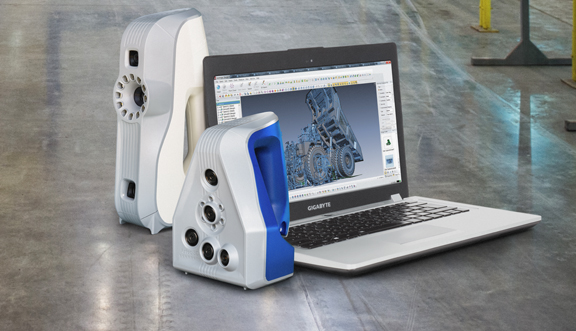 Artec 3D scanners: The previous generation Eva (taller, on the left) and the latest generation Space Spider (blue-coated, on the right). Photo courtesy of Artec 3D.
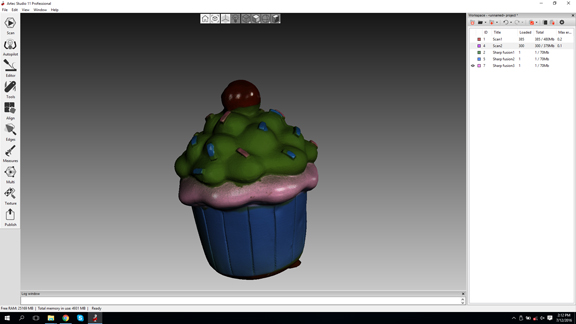 Texture-mapped 3D scan result, processed in Artec Studio 11 software with autopilot.
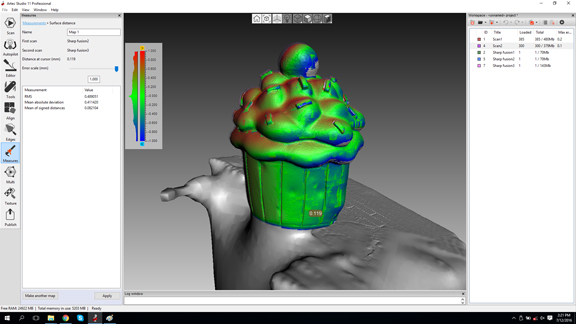 The comparison feature in Artec Studio 11 highlighting the contour and surface deviations between two scans.
I kept crossing path with Artec 3D at difference tech conferences, even though I didn't realize it. In a number of engineering and design software shows, I noticed the company's Shapify booth, beckoning attendees to get scanned in 3D. If you happen to like the result, you can order a 3D avatar from the Shapify site. So I did, and in a week duly received my own Kenneth Wong action figure.
One week later, I received a note from Artec 3D's PR agency: Would I like to examine the company's technology myself? So, on a sunny day made for locomotive travel, I jumped on the Southbound Caltrain toward Palo Alto, where Artec 3D keeps a branch office.
Artec 3D's latest handheld scanner, the Space Spider, is shaped like an iron you might use to smooth a wrinkled shirt. (Check out this Black & Decker model D2030 for comparison.) Just like an iron, it too takes some time to warm up. In the case of the Space Spider, it takes three minutes -- a huge improvement over the previous generation, the Spider, which takes roughly 40 mins before it's ready to scan.
Anna Galdina, Artec 3D's sales manager for North America, explained, "The warmup is necessary if you need precision and accuracy [0.05 mm]. But if you're using the scanner to capture an object's rough shape, you can start using it right away."
The form factor, which mimics a standard iron, has certain advantages. The flat surface at the bottom houses the blue LED beam projectors. The curved handle offers a firm grip with a single hand, leaving the other hand free. The scanner, like many others in the same class, must be attached to a reasonably powerful PC to operate. For easy scanning of small objects, it's best to position it on the rotating stand that comes with the scanner. Therefore, having one free hand to spin the stand or move the mouse as you scan is an important consideration.
The scanner sends its scan data to Artec 3D's post-processing software Artec Studio. The latest version, Artec Studio 11, comes with an autopilot mode, which makes mesh-model creation easy enough for beginners and novices. The autopilot tackles two potential hiccups in the workflow: It can automatically detect and remove the base surface (wherever your target happens to be resting). It also lets you manually erase the noise (tiny surfaces and polygons accidentally captured as you're scanning your target).
The software is GPU-accelerated, for both NVIDIA and AMD hardware. It makes a difference in the speed with which the software can align the scan data from different scan sessions and generate the mesh model.
The scanner captures not just the target's shape but also it's colors. Therefore, the resulting model is texture-mapped for realism. It has also some features to automatically patch holes or gaps in the geometry. But bear in mind that the software must use nearby geometry as samples to figure out the best surface to use in its patching operations. Therefore, the results could be unpredictable if nearby geometry doesn't offer sufficient data. The software comes with some Photoshop-like tools for appearance control, so you can adjust the contrast or brightness of the textured model.
Artec Studio 11 has a comparison feature, which lets you compare a scan to another digital 3D model. You can set up the degree of deviation you'd like to see between the two. And you can view the differences in surfaces and contours in a color-coded mode. The tool is useful for those seeking to ensure what is manufactured or made matches what was submitted to production in CAD.
The Space Spider has good tracking -- the ability to recognize and maintain focus on the contour of the target object. Handheld scanners with poor tracking often have trouble staying locked onto the target. Having to abort and restart scans due to lost tracking could be a hassle.
Handheld 3D scanners work best with small or midsize still objects (like vases or tabletop sculptures) that can easily rest on a flat surface. With larger objects (like motorcycles, museum statues, or humans), the operator needs to walk around the target to scan, and the target would have to remain still for the duration of the scan. A setup like Artec 3D's Shapify booth, which uses rotating walls with scanners that go around the target, is more effective for larger objects.
Since the scanner needs to be powered by a PC, operating it outdoor (where an outlet is not easily available) or operating it while walking around is less than ideal. The Space Spider -- or any other handheld 3D scanner, for that matter -- could see a much wider use and more diverse applications if it were designed to run from its own built-in power source, with its own memory for scan data storage and transfer.
At $27,600, the Space Spider is a lot more expensive than a Black & Decker iron, but perhaps a reasonable investment for professional service providers who need to routinely digitize real-world objects. Older models Spider and Eva are priced $22,600 and $19,800, respectively.


Kenneth Wong is Digital Engineering's resident blogger and senior editor. Email him at [email protected] or share your thoughts or suggestions at digitaleng.news/facebook.
Follow DE
Join over 90,000 engineering professionals who get fresh engineering news as soon as it is published.






About Us · Contact Us · Editorial Team · Advertising · Privacy Policy · Subscriber Services · © 2026 Digital Engineering 24/7 · Peerless Media