Helping design and engineering professionals discover, evaluate and specify technologies and processes that shorten the design cycle and enable success.





Digital Engineering April 2026
In the latest issue of Digital Engineering, we take a look at the latest innovations in design for additive manufacturing, including the use of natural language inputs, social media cosplayers, and AI integration. The issue also includes a feature…

January Special Focus Issue: Design for Additive
In this Special Focus Issue of Digital Engineering, learn about the latest advancements in design for additive manufacturing, including new software tools, additive in automotive, custom medical devices, and more.
There was a time—not that long ago—when using a computer for milling meant learning how a specific toolpath would work out in the finished part. Computer-aided manufacturing (CAM) required an apprenticeship because not everything about the process was visible on the computer screen; intuitive knowledge was required. The tremendous variation in both software processes and milling equipment mean one-on-one training was needed to gain the required insight.
The last few years have brought many changes to CAM processes. The milling machines are more complex, offering four or sometimes five separate axes to program. There is more standardization in processes, allowing software vendors to automate more of the process. Manufacturers expect these new complex mills and CAM programs to create more complex parts. CAM software has become more visual, taking advantage of advancements in monitors, increased processing power, and the complex visualization capabilities of today’s graphics processing units (GPUs).
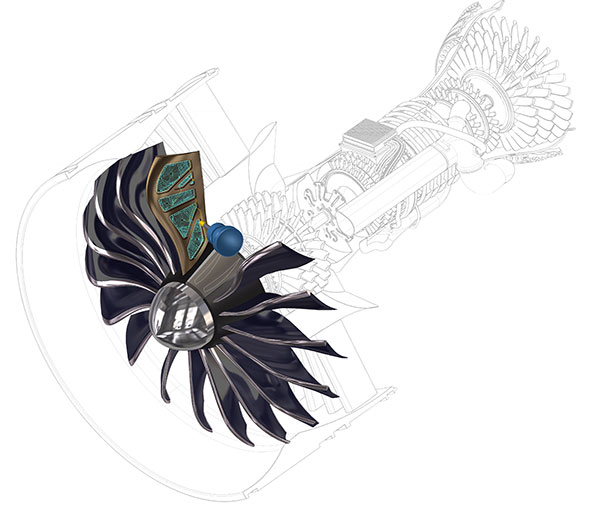
The result is the need for a full visualization of the milling process, says Michael Buchli, a senior product and portfolio manager for Dassault Systemès SolidWorks. “The key to running toolpaths today is to know when the tool comes in and goes out,” he says. “The visualization of this is more important than ever.”
Buchli describes the process of a top-end mill like the Matsura 330 as challenging for both the designer and the shop floor machinist. The designer needs to understand the mass issues, to prevent an unmillable design from moving forward.
“I want to see the finish, like a basic simulation in finite element analysis,” Buchli says, speaking as if he were the designer. “It is about comparing the real part with the toolpaths” using visualization. “I want to see the stresses, the gotchas,” he adds.
For the machinist, running a five-axis mill means being in charge of a cutting device moving very fast, “much faster than mills from 25 years ago.” The machinist needs the visualization to understand the complexities of the project ahead of time. “You can’t afford trial and error in the shop,” Buchli says.
The evolution of CAM in daily practice means users need repeatability and consistency. “The companies really taking advantage of manufacturing technology have their processes dialed in,” says Buchli. In general, these are the larger companies, who have kept pace with software and hardware trends. The small, independent shops are less likely to have the computation horsepower to drive complex milling with full visualization.
A contemporary graphics processing unit (GPU) in a workstation means you have the equivalent of a second processing system under the hood. The CPU is best at running multiple algorithms and working with constantly changing data. The GPU excels at running a single algorithm simultaneously on thousands of processors.
Ben Mund with MasterCAM says CAM software vendors have found it easier to program CAM software to take advantage of GPUs than computer-aided design (CAD) software vendors, because of the nature of the process. The better graphics from a high-end GPU don’t make the mill run faster, but they do provide faster generation of complex toolpaths. “When you generate a toolpath in CAM, the visualization is generated after the process,” says Mund. CAD must “always be immediately visual,” which is a much more complex task.
Mund says MasterCAM works closely with leading GPU vendor NVIDIA. “Toolpath visualization is complex; having the best GPU is critical,” says Mund. “The better and faster you can display the information, the better you will understand what is happening.”
CAD programs are generally up to date with screen resolution standards, and already support 4K resolution. When CAM programs offer 4K, it becomes much easier for both the designer and the machinist to “finesse the operation,” Mund says. “You can really dig into the model” from a machining standpoint, to improve throughput or to provide a more aesthetic outcome.
When 4K resolution monitors were first introduced, their hefty price tag meant only the largest companies could afford to place them strategically within the organization. Today 4K monitors like those from Dell are mainstream, and should be considered the primary monitor for all engineering staff. The company offers many different 4K and 8K monitors, ranging from 24 inches all the way to 86 inches, including the new Dell UltraSharp U4919DW, a QHD 49-inch ultra-wide monitor. The curved, widescreen monitor has a resolution of 5120 x 1440 pixels and can display signal inputs from two different computers.
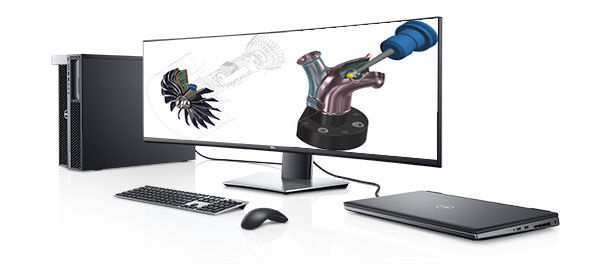
“4K” refers to the horizontal screen resolution of 4,000 pixels, double the resolution of FHD (Full High Definition) monitors. The increased pixel density means intricate details are revealed in very high fidelity without the need to zoom in.
A powerful visual subsystem driven by GPUs and high-resolution monitors is “a big benefit to MasterCAM,” says Ben Mund. “The better you can display the information, the better you will understand what is happening.”


DE's editors contribute news and new product announcements to Digital Engineering. Press releases may be sent to them via [email protected].
Follow DE
Join over 90,000 engineering professionals who get fresh engineering news as soon as it is published.






About Us · Contact Us · Editorial Team · Advertising · Privacy Policy · Subscriber Services · © 2026 Digital Engineering 24/7 · Peerless Media