Helping design and engineering professionals discover, evaluate and specify technologies and processes that shorten the design cycle and enable success.



May 2026 Special Focus: Artificial Intelligence in Design and Simulation
In this Special Focus Issue, learn about the latest developments in the integration of artificial intelligence into engineering workflows.

April 2026 Special Focus Issue: Generative Design
In this Special Focus Issue, Digital Engineering takes a look at how generative design solutions can be used across different types of design problems and with a variety of manufacturing approaches to accelerate design space exploration, and…
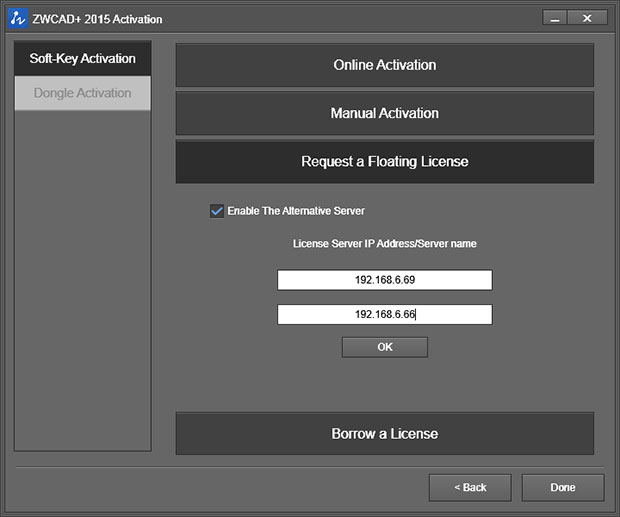
 The License Manager in ZWCAD+ 2015 SP2.1 will now automatically try to obtain your floating license from an alternative server when the preferred server is down. Image courtesy of ZWCADUSA and ZWCAD Design Co. Ltd.
ZWCADUSA, the North American distributor of the ZWCAD line of MCAD and AEC (architecture, construction and engineering) solutions from ZWCAD Design Co. Ltd., recently announced the SP2.1 release of ZWCAD+ 2015. The SP2.1 release has new features intended to enhance design efficiency, according to the company. Among these are Flip Dimension Arrow, 3GB OS Switch, support for BMP/JPEG plotters and a more efficient Reference and License Manager. In related news, ZWCADUSA also announced a flexible payment program called “Freedom of Choice.”
ZWCAD+ 2015 for mechanical design engineers, introduced earlier this year, offers libraries of standard-based parts and mechanical tools for design and drafting, an image processing engine that lets you insert and manipulate large images quickly and design management capabilities such as document tabs and file compare. ZWCAD+ 2015, the company reports, offers a streamlined code base and efficient hardware footprint that can open and save file sizes of 100MB or more in seconds.
ZWCAD+ 2015 features DWG compatibility, vocal annotations, the ability to customize commands to different mouse operations and a SmartSelect capability that enables designers to find similar entities with property selections. Miscellaneous features include automatic BOM (bill of materials) generation; wizards for minimal-click creation of section lines, direction symbols and detail views; and the ability to generate shafts and gears directly from geometric parameters.
The new Flip Dimension Arrow function unveiled in ZWCAD+ 2015 SP2.1 is intended for large projects that require many annotations. It addresses the visual clutter that irregular annotation layouts can cause by making the annotations easier to navigate, which, says ZWCADUSA, can enhance efficiency by helping users spot the note they need quickly.
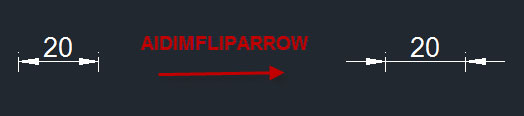 The new Flip Dimension Arrow function introduced in ZWCAD+ 2015 SP2.1 makes navigating the visual clutter of irregular annotations and locating what you’re looking for easier. Image courtesy of ZWCADUSA and ZWCAD Design Co. Ltd.
The 3GB OS Switch is designed for engineers using 32-bit workstations. With the switch, users can allocate more memory to ZWCAD+, which results in the software operating more fluidly, especially with large drawings. The newly added support for BMP/JPEG plotters lets users print raster images like BMP and JPEG.
The ZWCAD+ 2015 Reference Manager now supports right-click menus and report export as well as a tree path, which facilitates the management of external resources. The ZWCAD+ 2015 SP2.1 License Manager has been made more intelligent, according to the company. It can now try to obtain a floating license from an alternative server automatically when the preferred server is down. This improvement, adds the company, makes managing network licenses much simpler and solves problems with unstable servers.
 ZWCAD+ 2015 SP2.1 introduces a new 3GB OS Switch. With it, users of 32-bit design workstations can allocate more memory to ZWCAD+ 2015. Image courtesy of ZWCADUSA and ZWCAD Design Co. Ltd.
“Users’ voices can always be heard by us,” said Daniel Huang, product manager of ZWCAD+, in a press statement. “This new update fixes many bugs that users have reported to us, [and] they will experience a more stable and efficient product.”
The new “Freedom of Choice” payment program offers U.S. and Canadian ZWCAD users the option to own, rent or rent-to-own ZWCAD+ 2015. Rental prices start at $26.99 per month (with a one-year commitment), and permanent licenses begin at $799. Rent-to-own pricing is a combination of both options -- after three years of renting, users own a perpetual license.
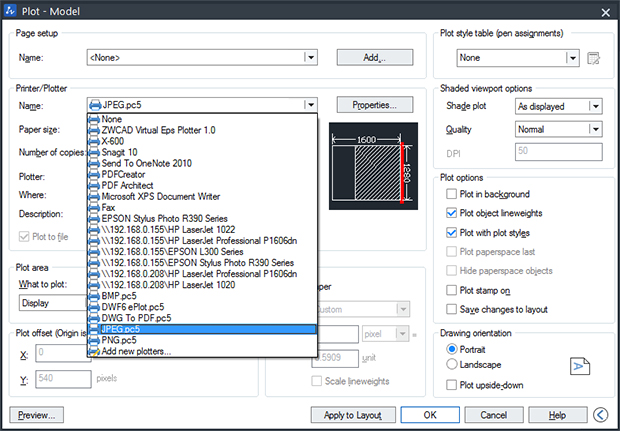 Beginning with the new SP2.1 release, ZWCAD+ 2015 now supports printing of raster images in such formats as BMP and JPEG. Image courtesy of ZWCADUSA and ZWCAD Design Co. Ltd.
"Rather than force a single choice and deem it best for all customer situations, ZWCADUSA is now allowing the customer to decide which payment choice is best for them,” said, Yatin Suri, managing director, ZWCADUSA, in making the announcement. “ZWCAD+ 2015 is now the most affordable and payment-friendly high-powered CAD solution in North America."
The ZWCADUSA “Freedom of Choice” options are available immediately, as is ZWCAD+ 2015 SP2.1.ZWCAD+ 2015 Mechanical can be purchased from the company's e-store for $1,299. For further details, click here.
Watch a video overview of what's new in ZWCAD+ 2015.
Check out the features of ZWCAD+ 2015.
Download a 30-day trial of ZWCAD+ 2015.
Read about the growing use of ZWCAD+ in steel manufacturing.
See why DE's editors selected ZWCAD+ 2015 SP2.1 as their Pick of the Week.
Sources: Press materials received from the company and additional information gleaned from the company's website.


Anthony J. Lockwood is Digital Engineering's founding editor. He is now retired. Contact him via [email protected].
Follow DE
Join over 90,000 engineering professionals who get fresh engineering news as soon as it is published.






About Us · Contact Us · Editorial Team · Advertising · Privacy Policy · Subscriber Services · © 2026 Digital Engineering 24/7 · Peerless Media