Helping design and engineering professionals discover, evaluate and specify technologies and processes that shorten the design cycle and enable success.



April 2026 Special Focus Issue: Generative Design
In this Special Focus Issue, Digital Engineering takes a look at how generative design solutions can be used across different types of design problems and with a variety of manufacturing approaches to accelerate design space exploration, and…

Electrum utilizes the 3DEXPERIENCE platform on the cloud to develop their new electric motorcycle
Electrum, a new brand of electric motorcycles, utilizes the 3DEXPERIENCE platform. Their mission is to support Indonesia’s shift to low-carbon, sustainable transport and to ultimately help the country’s government achieve its vision of net…
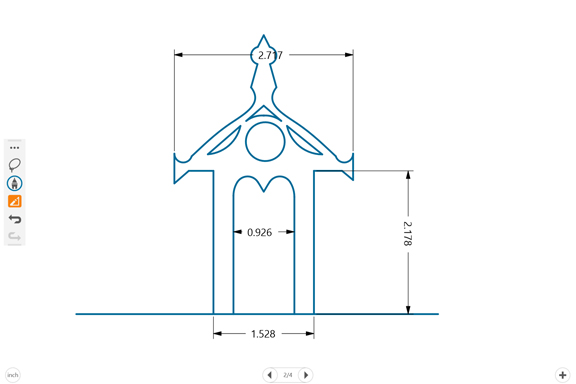 Catchbook from Siemens PLM Software is a 2D drawing app for tablet users.
Siemens PLM Software, the makers of NX and Teamcenter, takes on the challenge. Built on top of its Drawing Constraint Manager technology, the company's Catchbook app is available for touch-enabled tablets running on iOS, Android, and Windows. So I downloaded it onto my Microsoft Surface Pro to test it out. The automatic shape conversion makes all the difference.
Catchbook gives you the option to draw in the auto-convert mode (my name, not the company's). Once this mode is activated, the software automatically converts your freehand drawings into precise lines, arcs, and circles. So even though you may be drawing semi-straight lines, imperfect circles, and squiggly arcs, your drawings are converted into mathematically accurate lines, smooth curves, and well-defined circles.
Catchbook is not a parametric CAD program, but the objects in the program exhibit some parametric-like behaviors. For instance, if you drag and reposition your circles and arcs, the lines attached to them will adjust themselves to retain their coincident, concentric, and angular relationships. This feature makes Catchbook ideal for concept exploration, where you can morph and deform a design into an entirely new one with geometry realignment.
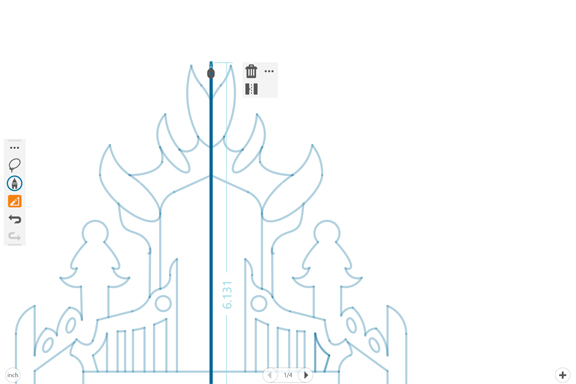
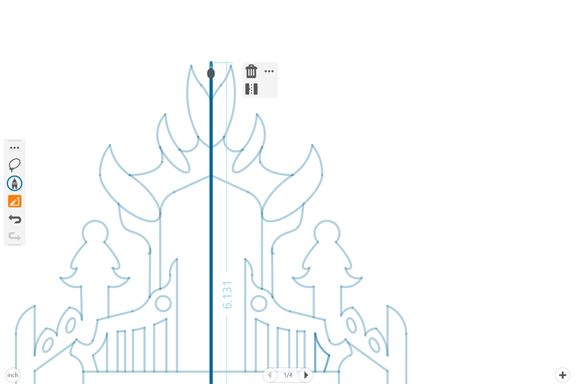 The Mirror function in Catchbook lets you replicate geometry easily in symmetrical setups.
To erase an object (like a line segment or a curve), you can simply draw a crisscrossing line over it, the way you might indicate people to disregard something in a pen-and-paper drawing. Catchbook recognizes that gesture as the erase command, so it wipes out whatever that's drawn before. It may seem like a minor touch, but it goes a long way to mimic the natural way engineers used to draw before the digital era. For drawing complex objects, you can import a photo as a reference to trace over it. For designs with symmetrical features, you may use the Mirror command to replicate left-sided items on the right side, or vice versa.
You can adjust the brush and pen in Catchbook by size or color. Compared to art-centric digital drawing apps (like Sketchbook from Autodesk, for instance), the variety and style available in Catchbook is quite limited. But the choices are sufficient for drawing engineering schematics. Even though the app is not meant to be a simulation program, you may be able to conduct some simple clash and collision verification using the rotate feature command.
Catchbook is described as a consumer app and priced accordingly (about $5, free version with some limitations also available). The space is new territory for Siemens PLM Software, which traditionally caters to professional engineers and manufacturers. The debut release of Catchbook shows it's possible to drastically improve the digital sketching process. Robust data transfer between Catchbook and other professional CAD packages will increase its adoption among the professional space. Adding more art-focused features (like paint-brush like tools or filters to transform finished sketches into distinct looks) will make it more appealing to the consumer crowd. But satisfying both user types with the same app may prove difficult.
In 2009, rival Autodesk made a similar move toward the consumer market with the release of SketchBook. Since then, the product has become one of the popular drawing and painting apps among illustrators, artists, and designers. It sets precedence for a professional design software maker who also straddles the consumer market.


Kenneth Wong is Digital Engineering's resident blogger and senior editor. Email him at [email protected] or share your thoughts or suggestions at digitaleng.news/facebook.
Follow DE
Join over 90,000 engineering professionals who get fresh engineering news as soon as it is published.






About Us · Contact Us · Editorial Team · Advertising · Privacy Policy · Subscriber Services · © 2026 Digital Engineering 24/7 · Peerless Media