Helping design and engineering professionals discover, evaluate and specify technologies and processes that shorten the design cycle and enable success.


Editor's Pick of the Week: February 23, 2005
Push-Button Collaboration
Bluebeam provides collaborative file conversions anddelivery options tailored for design engineers
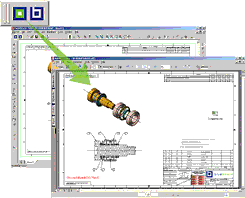
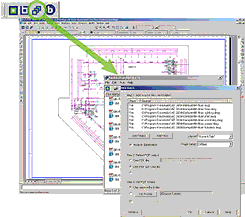
Bluebeam Pushbutton Plus from Bluebeam Software(Pasadena, CA) takes the fussing out of collaboration and communication fordesign engineers. With a click of your mouse, Bluebeam automatically reads aMicrosoft Office or MCAD file and converts it to a high-quality, scalable PDFfilethat you can send to the honcho, your clients, or to anyone with whom youcollaborate. Click another button and Bluebeam batch converts files or bindsmultiple PDFs, MCAD drawings, or Windows files into a booklet. Easy to use,Bluebeam offers virtually no learning barriers between it and productivity,according to the company.
 |  |
| Images courtesy Bluebeam Software |
Bluebeam Pushbutton Plus is optimized for AutoCAD andSolidWorks. Bluebeam Lite works with most major MCAD solutions. All versionswork with Microsoft Office files. Bluebeam works as a toolbar button inAutoCAD, SolidWorks, and MS Office. It also integrates with document managementand workflow systems seamlessly.
Bluebeam Pushbutton Plus automatically reads an MCADfile's orientation, scale, line weights, merged lines, plot style table, andpage size without requiring you to play around with any settings. You canthen convert the file into one of seven formats: PDF, TIF, JPG, BMP, PSD, PNG,and PXL. Further, you can automatically create bookmarks based on drawing orlayout names, or you can use custom bookmarks to link to specific pages, localfiles, web pages, and snapshot views of specific areas of your drawings.
Bluebeam Pushbutton Plus lets you create secure,password-protected PDF files. Its security options let you limit the ability ofPDF recipients to print, copy text or graphics, or annotate PDF files. Afteryou create the file, you can FTP, e-mail, or print it from Bluebeam. Or, youcan simultaneously convert and transmit a file to an FTP server or to e-mail.
The Bluebeam Lite version creates PDF files from mostMCAD applications, including Autodesk LT, Inventor, MicroStation, andUnigraphics, as well as Microsoft Office documents. It automatically detectsyour MCAD program and sets the orientation and resolution automatically.
Complete details, interactive tours, and free 30-daytrial versions of Bluebeam Pushbutton Plus and Bluebeam Lite are all availableat the Bluebeam Software website.
Editor's Pick of the Week: February 16, 2005 Get Control of Design, Manufacture, and Assembly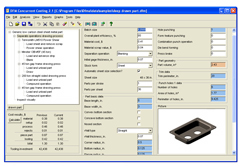 | 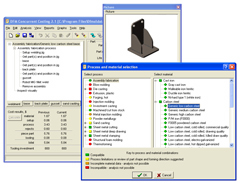 |
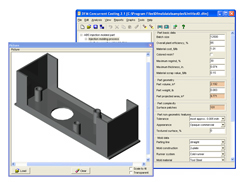
| Image A shows a DFMA cost analysis for making a deep-drawn part. Withthe addition of deep drawing, DFMA software now includes the completerange of processes commonly used to estimate sheet metal part costs.Displayed at lower left of the analysis interface is the estimated costper part, broken down into material, setup, process, and tooling costs.As with all DFMA analyses, engineers can change analysis inputs andrecalculate estimated part costs as design proceeds. | ImageB shows a DFMA cost analysis for making a metal bracket. The questionat hand is whether to make the bracket as a single sand-cast part or asa welded assembly of 4 separate parts. The new Assembly Fabricationfeature in DFMA software allows cost comparisons between single-partand multi-part designs. One step in DFMA analysis, shown color-coded inthe window on top, is selecting compatible processes andmaterials. |
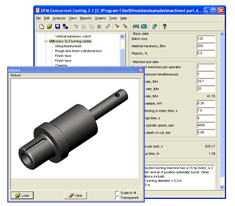 |  |
| ImageC shows a DFMA cost analysis for a machined part. DFMA softwareprovides manufacturing cost estimates at the earliest stages of productdevelopment so engineers can make informed decisions during productdesign. If a solid model for a part is not available, engineers canenter part dimensions using a built-in geometry calculator. | ImageD shows a DFMA cost analysis for an injection-molded part. DFMAsoftware provides manufacturing cost estimates at the earliest stagesof product development so engineers can make informed decisions duringproduct design. If a solid model for a part is not available, engineerscan enter part dimensions using a built-in geometry calculator. |
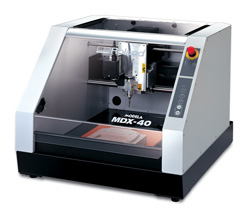
Image courtesy of Roland ASD
The MDX-40 can mill a wide range of low-cost, nonproprietary materialsincluding ABS, delrin, nylon, and tooling board. With this materialflexibility, engineers can create functional prototypes, includingthose with complex snap-fits, that perform like the final manufacturedproduct. This, in turn, enables engineers to subject the prototypes tothermal, structural, and other physical testing to determine how wellproducts will actually perform. Additionally, these materials createdurable, smooth-surfaced prototypes suitable for handling by marketfocus groups.
Operational characteristics of the MDX-40 include a fourth rotary axisfor unattended two- and four-sided milling, a 12- x 12- x 4.12-inchwork volume, and a high-speed 15,000 rpm spindle for creating detailedfeatures with fine tools.
MODELA Player 4, the MDX-40's bundled 4-axis CAM software, acceptsIGES, DXF, and STL files exported from most 3D CAD programs. Engineersuse this software to generate proportional 3D scaling, identify millingdirection, and automatically generate and display the toolpath. MODELAPlayer 4 supports tool changing when used with the Automatic ToolChanger (ATC) and automatic side cutting when used with the Rotary AxisUnit.
Virtual MODELA enables simulation of finished 3D models and accuratelyestimates machining production time. Lighting effects, material color,or bitmap overlays can be added for accurate finished productrepresentation. Access can be directly achieved from MODELA Player orby importing a PRN file.
The MDX-40 has a list price of $10,995. It is available immediately. Leasing optionsare available.Roland Advanced Solutions Division
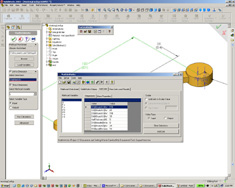
Here's how you use it: After you create a part or assembly file, youinvoke MathInWorks from within SolidWorks to import a Mathcad worksheetinto SolidWorks. You then add links between the Mathcad variables andSolidWorks dimensions, mass properties, or scalar values. Run yourcalculations. Your calculations are stored in an easy to read table.Projects can be saved and re-used with other SolidWorks models later.
Rather than being limited to the rows and columns of a spreadsheet,Mathcad has a "scratchpad" interface that records equations the waythey are normally recorded in industry texts. This allows for betterdocumentation of intellectual property. Its engineering calculationengine is capable of supporting complex mathematics that cannot becalculated by the internal SolidWorks calculation editor or yourstandard spreadsheet. For a review of Mathcad 12, click here.
MathInWorks costs $495 and is available for immediate download at the SolidVision website. Demo versions are also available.


DE's editors contribute news and new product announcements to Digital Engineering. Press releases may be sent to them via [email protected].
Follow DE
Join over 90,000 engineering professionals who get fresh engineering news as soon as it is published.






About Us · Contact Us · Editorial Team · Advertising · Privacy Policy · Subscriber Services · © 2026 Digital Engineering 24/7 · Peerless Media