Helping design and engineering professionals discover, evaluate and specify technologies and processes that shorten the design cycle and enable success.


Sponsored
 Dear Desktop Engineering Reader:
Today’s Check it Out link goes to an on-demand webinar introducing the 2015 version of the Evolve concept modeling and rendering solution from solidThinking, an Altair company. You should check out Evolve because it could change how you develop design ideas.
The penny tour is that Evolve is a 3D hybrid modeling and rendering environment for industrial designers and engineers. It helps you evaluate, research and visualize designs way, way upfront in your new product design process. Whatever your buzzword – sketching, ideation or concept development – Evolve fits right into what is arguably the most important step of all.
Evolve is engineered to operate without the hassles of constraint-based systems and without a bunch of add-on modules to fill in the functionality gaps. It runs natively on Mac OS X and Windows.
“Hybrid” means that Evolve offers freeform surfacing, parametric solid controls and polygonal modeling capabilities, all with construction history to control designs. That means Evolve provides organic surface modeling tools like rounds, solid modeling tools like shelling and polygonal modeling tools for creating complex shapes.
What that means for you is that you have lots options when modeling, fiddling with styling ideas and visualizing your notions with real-time photorealistic renderings. You can mix different approaches, say, surfacing or polygonal modeling, in a design. You can import and export models with other CAD applications like Autodesk or SolidWorks.
The on-demand webinar demonstrates a bunch of the more than 100 new and improved features Evolve 2015 incorporates. (As always, enter full-screen mode to catch all the action.)
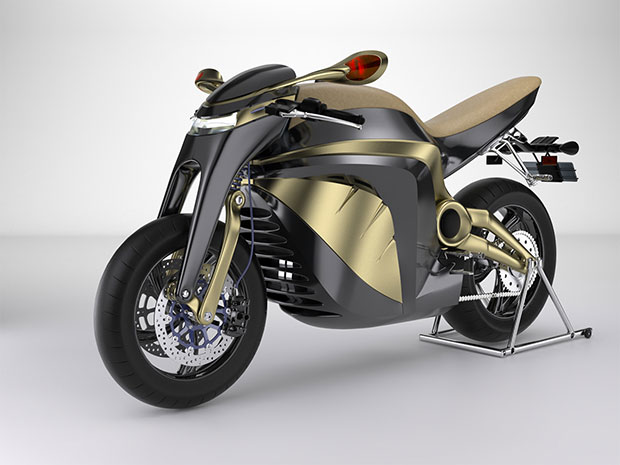 Version 2015 of the Evolve 3D hybrid modeling and photorealistic rendering environment lets you mix and match the strengths of freeform surfacing, parametric solid modeling and polygonal modeling in a single design. Image courtesy of solidThinking Inc.
Evolve appears intuitive. Watching the interplay of organic, parametric and polygonal modeling techniques is terrific fun. A cool new capability is a PolyNURBS toolset with a feature called Nurbify that converts a polygonal model into continuous NURBS surfaces with one click. See it at the 17:35 mark.
Evolve’s interactive rendering technology, covered at the 30:35 mark, seems quite nimble. You have two modes, GPU (graphics processing unit)/CPU accelerated or fully accurate, a user-modified material library and other goodies.
The short of it is that Evolve 2015 is really neat stuff. Hit today’s Check it Out link to see for yourself. BTW, you can request a 30-day trial license from solidThinking. Click the Evolve logo on the upper left of the landing page, then go to Evolve product page and sign up. Watch the webinar then get the trial. Well worth the effort.
Thanks, Pal. – Lockwood
Anthony J. Lockwood
Editor at Large, Desktop Engineering


Anthony J. Lockwood is Digital Engineering's founding editor. He is now retired. Contact him via [email protected].
Follow DE
Join over 90,000 engineering professionals who get fresh engineering news as soon as it is published.






About Us · Contact Us · Editorial Team · Advertising · Privacy Policy · Subscriber Services · © 2026 Digital Engineering 24/7 · Peerless Media