Digital Engineering 24/7

Helping design and engineering professionals discover, evaluate and specify technologies and processes that shorten the design cycle and enable success.


Solid Edge Launches SE University 2016 Rendering Contest

Solid Edge Launches SE University 2016 Rendering Contest
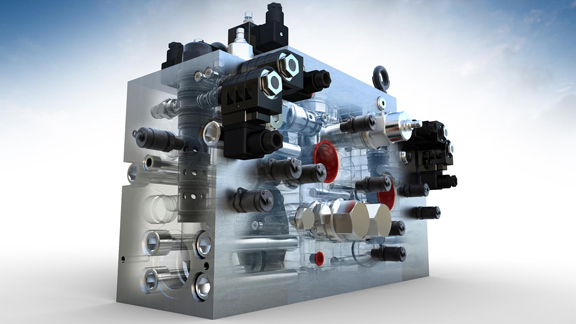
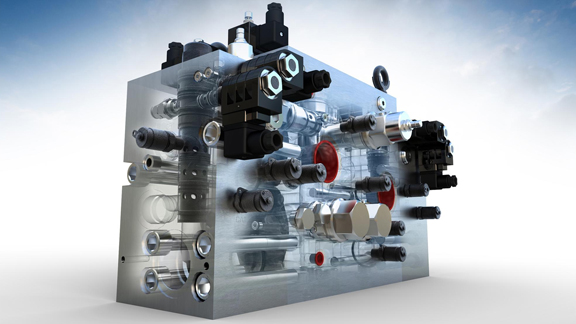
Solid Edge CAD model of rendered in Luxion KeyShot rendering software (image courtesy of Luxion).

Latest Design News

Latest Design Resources

By Kenneth Wong  

August 26, 2016

Solid Edge CAD model of rendered in Luxion KeyShot rendering software (image courtesy of Luxion). Solid Edge CAD model rendered in Luxion KeyShot rendering software (image courtesy of Luxion).

Solid Edge (SE), a division of Siemens PLM Software, has just launched a rendering contest, sponsored by Luxion, Lenovo, and 3D Connexion.

Part of the upcoming SE University conference (Oct 25-27, Indianapolis, Indiana), the contest asks participants to submit "KeyShot rendered images of Solid Edge models."

Contest organizers write, "We recognize that there are a lot of tools available for modeling, but this is a Solid Edge contest, and the point is to encourage Solid Edge users to be creative with your CAD data ... The winners will be announced at Solid Edge University 2016 in Indianapolis. You do not need to be present to win, but we will display winning renderings at the conference."

Winners can expect the following:

  • First Prize: Lenovo Yoga P40 tablet, (estimated retail value U.S. $1,722)
  • Second Prize: Free upgrade to Keyshot Pro 3D rendering software (estimated retail value U.S. $1,495)
  • Third Prize: 3DConnexion SpaceMouse Pro device (estimated retail value U.S. $99)
KeyShot, the renderer bundled with Solid Edge, is developed by Luxion. It relies primarily on the CPU. KeyShot is also bundled with several other 3D programs, including Geomagic Design and SpaceClaim. Josh Mings, Luxion's Director of Marketing, offers some tips for getting the most out of CAD rendering:

  • Prep your 3D Model: KeyShot will maintain the structure of your model and recognizes colors you apply to it as well. Keep this in mind before you import to start applying materials to your models.
  • Use the KeyShot Plug-in: KeyShot has free plugins for all major 3D software. This provide additional capabilities like Luxion's LiveLinking technology to help you keep geometry changes updated in KeyShot without having to re-import models or re-apply materials.
  • Use Material Templates: Material Templates in KeyShot allows you to instantly apply materials to your parts when you import your 3D model. This greatly speeds up the process when using the same materials or CAD library parts.
  • Enable NURBS Mode: With KeyShot Pro, you can have completely smooth CAD geometry (no tessellation) by enabling NURBS mode in KeyShot. Great for close-up product shot or detail visuals.
Tom Salomone, Marketing Manager for Engineering Segment at Lenovo, says, "KeyShot users will be amazed at the rendering speed they can achieve with the Lenovo ThinkStation P910 Dual Processor Workstations. While one can chose dual processors of 22 cores for the P910, more economical users should consider dual Intel Xeon Processor E5-2687W v4 (30M Cache, 3.00 GHz) which would provide 12 cores each.

Disclosure: DE senior editor Kenneth Wong is one of the guest judges for the contest.For the full contest rules, read the contest announcement by SE here.


Read Luxion's announcement of the contest here.


From our Sponsors

Meltio Takes Metal Additive to the Next Level
Meltio's DED technology enables industries to tailor and customize their solutions to create & repair metal parts.
Easing the Transition from ETO to CTO with Configuration Lifecycle Management
Manufacturers are discovering that the Configure-to-Order (CTO) model provides significant benefits when it comes to customization.
Siemens + Altair = The Next Chapter in Design and Simulation
With its acquisition of Altair, Siemens creates a unified simulation portfolio combining generative design with high-performance computing and AI workflows.