Helping design and engineering professionals discover, evaluate and specify technologies and processes that shorten the design cycle and enable success.


Sponsored

Cut Retrieval-Augmented Generation (RAG) Hallucinations by 50%
Most teams hit the same wall with enterprise AI: LLMs that hallucinate, pipelines that don’t scale, and infrastructure that’s harder to design than the models themselves.

What Is Intelligent BOM Management? A Guide to Smarter Product Development
Learn how intelligent Bill of Materials (BOM) management helps teams collaborate, reduce errors, and bring innovative products to market faster with cloud-based PLM tools.
 With so many options and form factors to choose from, there is no such thing as one-size-fits-all professional workstation. A workstation purpose-built for engineering professionals needs to deliver the right mix of performance tuned to today’s 3D modeling and simulation applications with the ability to easily scale to meet future requirements.
So how does this directive translate into actual specs for an optimal workstation configuration? Alex Herrera, a consultant specializing in high-performance graphics and workstations, has laid out a simple set of guidelines that can help engineers discover the best system configuration for their workloads.
More than anything else, a professional workstation must be reliable. With ISV certification, engineers are assured they can get their work done without disruption. If your workflow is heavily dependent on CAD modeling or involves simulation software, look for workstations that are certified by your software vendor.
The certification stamp means the workstation OEM and the software provider team have collaborated to put the various system configurations through exhaustive testing at both the system and board level. Through a series of regression tests, each workstation configuration--both hardware and software--is put through its paces and if results match previous benchmarks, the new configuration is deemed reliable and gets certified. Conversely, if errors are detected, the team works together to address bugs until the entire regression suite passes muster.
The typical multi-stage, multi-iteration CAD workflow or design analysis cycle is a test of workstation performance. Multi-threaded applications like rendering, finite element analysis (FEA) and computational fluid dynamics (CFD) all stand to benefit from modern multi-core CPU technology, which can parallelize tasks across multiple cores.
Yet many common CAD computing tasks--parametric modeling, for example--don’t see the same advantages from parallel execution on multiple cores. Instead, they benefit most from an investment in a superscalar CPU core running at the highest possible frequency. The rule of thumb, then, is to balance CPU spending on core speed and number of cores in the way that best meets the needs of your core design tools.
Despite sharing some core hardware and software technologies, consumer-grade graphics solutions don’t hold a candle to professional GPU horsepower when it comes to meeting the needs of design engineers. Professional GPUs are optimized for CAD applications in terms of both performance and accuracy. Equipping a workstation with an uncertified consumer-grade GPU doesn’t just limit what you can do--it can lead to a dramatic dip in software performance that will hinder any engineers’ productivity.
Memory errors, while not common, can wreak havoc on an engineer’s productivity and cause serious project delays. Beyond providing the largest possible memory configuration, investing in Error Correcting Code (ECC) memory enables your workstation to detect and correct single-bit memory errors.
Hard disk drives are fine for consumer or general office applications, but when it comes to the needs of engineering professionals, it’s time to turn to higher performance storage options. Solid state drives (SSDs) offer compelling advantages in performance and reliability and are becoming a cost-effective storage alternative. Small engineering organizations that manage their own IT should also consider adding RAID to their storage set-up as way to provide cost-effective data protection as well as a way to provide a potentially significant boost in performance.
The workstation you buy today will be better than systems available 12 to 18 months ago, but it will also likely need to be updated in the future to support new processing requirements. Because of this, ease of expansion is a key selection criteria--choose a workstation that can be easily upgraded mid-life via memory or storage expansion or with a new CPU or GPU in order to maximize the investment.
While there is no hard science to configuring the optimal workstation, these are clear guidelines to ensure you make the right choice. After all, a properly configured workstation is the consummate tool for engineers on the path to creative and innovative design.
The Need for Solid State Drives
 Everyone talks about the need for speed, but there’s more to boosting performance than a faster processor. Solid state drives (SSDs) can radically improve performance of CAD applications. Case in point: In tests, SolidWorks reseller CATI was able to boost the performance of SolidWorks by 47% by replacing the 7200 RPM hard drive with an SSD. Further optimizing the hard drive configuration saved two hours and 13 minutes on operations--a 56% improvement.
In need of guidance to zero in on the optimal workstation? Consider the following questions to pinpoint a workstation model that will meet both your engineer and budget needs.
Retire That Four-Year-Old Workstation
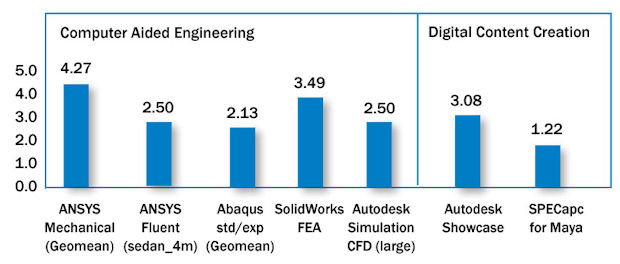 Refreshing a four-year-old workstation provided a 4X performance increase to some common engineering tasks. This graph shows the performance summary of the Xeon E5-2687W vs. X5690.
Management says your four-year-old workstation is fine, but sluggish model regeneration and incomplete renderings tell you otherwise. The Intel benchmark above shows significant performance boosts for FEA and CFD simulation as well as photorealistic editing tasks when upgrading from a four-year-old Intel® Xeon® Processor X5690-based system to a workstation outfitted with the latest Intel® Xeon® Processor E5-2687W v3.
Turbo Charge Design with a Dual-Socket Workstation
 Engineers reliant on simulation or photorealistic imaging software can’t afford performance delays from an inadequately-specked workstation. They will see significant performance gains with a workstation based on the most current dual socket Intel® Xeon® Processor E5-2687W v3 compared to a system configured with the latest single socket Intel® Xeon® Processor E5-1680 v3.
This content is sponsored by Intel.


DE's editors contribute news and new product announcements to Digital Engineering. Press releases may be sent to them via [email protected].
Follow DE
Join over 90,000 engineering professionals who get fresh engineering news as soon as it is published.






About Us · Contact Us · Editorial Team · Advertising · Privacy Policy · Subscriber Services · © 2026 Digital Engineering 24/7 · Peerless Media