Helping design and engineering professionals discover, evaluate and specify technologies and processes that shorten the design cycle and enable success.


Sponsored
 Dear Desktop Engineering Reader:
 People creating technical documentation get no respect. If they do a good job, they hear crickets. If something goes awry, they get grief. A key reason why technical documentation goes bad is that you’re using the wrong tools for the job.
See, you can have dozens of data formats to deal with – CAD models, spreadsheets, graphics files and more. It’s likely that you have to draw and annotate isometric images and crop photos. You have to design and layout a document and publish it in hard copy, to the Web, in PDF format and so forth. How many different applications and formats are we talking about here?
The beauty of today’s Pick of the Week offering is that it has the tools you need to access and repurpose technical design assets from different sources. And it’s low cost – one grand.
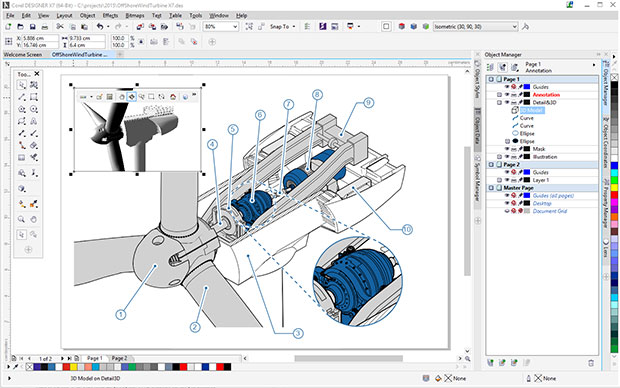
The skinny on the CorelDRAW Technical Suite is that it’s a set of applications for technical design and illustration. It has tools for engineering drawing, page layout and photo editing. It imports and exports more than 100 vector graphics, bitmap images, documents and other data file formats like DWG.
The recently-released X7 edition of the suite sees such enhancements as a new 3D PDF publishing feature. Simply put, by empowering you to embed interactive 3D models in technical documents, 3D PDF transforms your ability to communicate clearly as well as visually.
Two other neat new features in the X7 version of the CorelDRAW Technical Suite are Translation Memory System (TMS) connectivity and an Equation Editor. The TMS capability helps you turn text in your graphics file into a different language, which should make creating localized technical documents for your global workforce and client bases far simpler. The Equation Editor turns mathematical and scientific equations into editable elements.
Hit today’s Pick of the Week link to learn more about CorelDRAW Technical Suite X7. Make sure to go to its dedicated Web resource linked at the end of the write-up for full details and to access lots of short videos on the suite’s features. Most of all, download the complimentary trial version of CorelDRAW Technical Suite X7 and drive it around for a month. CorelDRAW Technical Suite X7 seems to have the tools you need to build and efficient technical documentation process. Give this one a try.
Thanks, Pal. – Lockwood
Anthony J. Lockwood
Editor at Large, Desktop Engineering


Anthony J. Lockwood is Digital Engineering's founding editor. He is now retired. Contact him via [email protected].
Follow DE
Join over 90,000 engineering professionals who get fresh engineering news as soon as it is published.






About Us · Contact Us · Editorial Team · Advertising · Privacy Policy · Subscriber Services · © 2026 Digital Engineering 24/7 · Peerless Media