Helping design and engineering professionals discover, evaluate and specify technologies and processes that shorten the design cycle and enable success.



May 2026 Special Focus: Artificial Intelligence in Design and Simulation
In this Special Focus Issue, learn about the latest developments in the integration of artificial intelligence into engineering workflows.

April 2026 Special Focus Issue: Generative Design
In this Special Focus Issue, Digital Engineering takes a look at how generative design solutions can be used across different types of design problems and with a variety of manufacturing approaches to accelerate design space exploration, and…
Eplan Software & Service has released enhanced fluid software that can now be integrated in the MCAD workflow. 3D data, fluid symbols and electrical actuation can be directly linked to the parts list and the technical specifications of the equipment in Eplan Fluid Professional. According to the company, users will benefit from interdisciplinary engineering and lower planning and documentation costs.
<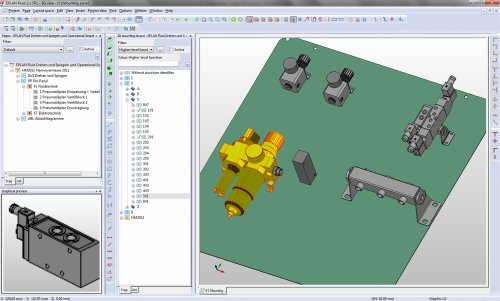
Eplan Fluid Professional combines fluid system planning and new 3D technology. Components that have been placed in the fluid circuit diagram, such as valves or cylinders, can be assembled in 3D and put onto pasteboards using a simple method that is similar to the LEGO principle. The Eplan eTouch technology automatically generates pick-up points for each component and makes it possible to set up fluid circuits quickly. 2D derivations and manufacturing drawings are created automatically as part of the documentation.
The 3D model can be designed in any MCAD system, and an installation space can be defined for the pneumatic components and their main compressed air supply, and then exported to Eplan Fluid Professional using a Step interface. The fluid engineer then selects the components and the connections with direct links to the electrical engineering. Automatically generated parts lists and hose lists are available immediately. If the fluid engineer imports an installation plate, they can position the planned components in the intended installation space in the circuit diagram using drag and drop, and assemble it directly in 3D. The manufacturing information is created using dimensions, such as a pneumatic maintenance unit securing clamp. The fluid engineer then returns the result, including component numbering, to the MCAD model of the overall machine using the Step interface.
Fluid engineers can standardize their engineering design using Eplan Fluid, and save and re-use frequently used subsystems in the form of macros directly in the designing.
For more information, visit EPLAN Software & Service.
Sources: Press materials received from the company and additional information gleaned from the company's website.


DE's editors contribute news and new product announcements to Digital Engineering. Press releases may be sent to them via [email protected].
Follow DE
Join over 90,000 engineering professionals who get fresh engineering news as soon as it is published.






About Us · Contact Us · Editorial Team · Advertising · Privacy Policy · Subscriber Services · © 2026 Digital Engineering 24/7 · Peerless Media