Helping design and engineering professionals discover, evaluate and specify technologies and processes that shorten the design cycle and enable success.



May 2026 Special Focus: Artificial Intelligence in Design and Simulation
In this Special Focus Issue, learn about the latest developments in the integration of artificial intelligence into engineering workflows.

April 2026 Special Focus Issue: Generative Design
In this Special Focus Issue, Digital Engineering takes a look at how generative design solutions can be used across different types of design problems and with a variety of manufacturing approaches to accelerate design space exploration, and…
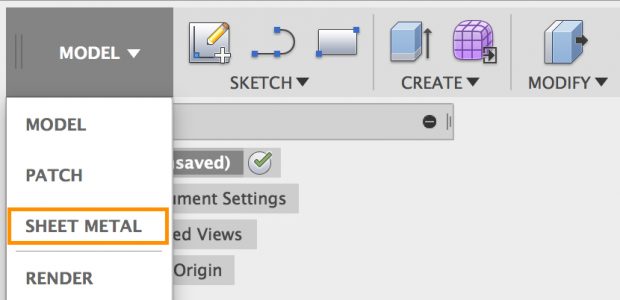
Fusion 360's new Sheet Metal workspace provides a palette of tools for the design and manufacture of parts that you can bend into a 3D part. Bend angles are dictated by a set of rules that you can edit and override. You can also save frequently used ones to your bend for library future use.
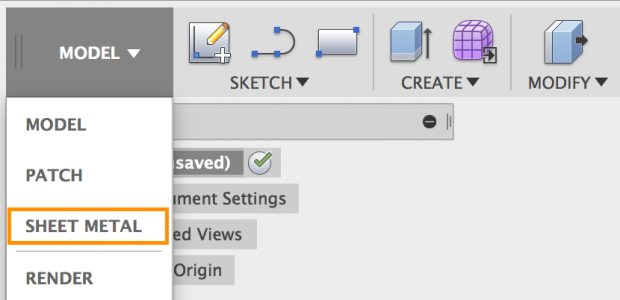 Among the key introductions in the August update of Autodesk Fusion 360 is a toolset for sheet metal design and manufacture. Image courtesy of Autodesk Inc.
Here’s a quick rundown of some of the features in the Sheet Metal workspace:
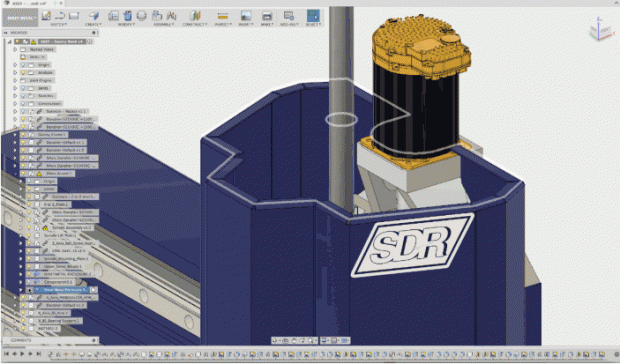 Autodesk says that its new sheet metal design functionality uses familiar Fusion 360 controls to create flanges. Image courtesy of Autodesk Inc.
For design and modeling, key enhancements include a new thread display option and a number of improvements for lofting. The new thread display functionality lets you switch thread displays between “modeled” and “cosmetic” for all components, parts and bodies within the same document. This eliminates the need for performing extra computes on those threads, which, in turn, can speed up your Fusion 360 session, according to Autodesk.
For lofted surfaces, new options enable you to control the continuity for rails as well as when you apply a Zebra analysis on a loft. Now, you can control the continuity independently for both profiles and rails in the surface loft command by selecting what kind of continuity you want for each rail.
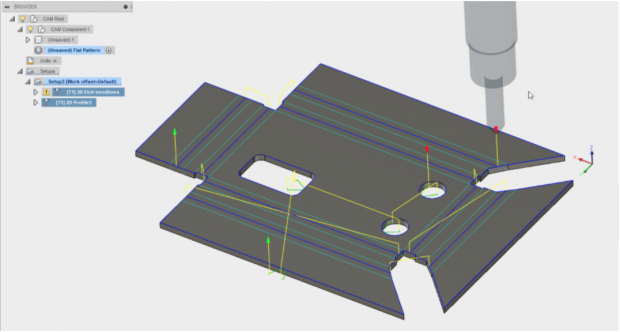 Fusion 360's new sheet metal tools include the ability to bring flat patterns into CAM where you can set up 2D cutting strategies for waterjet, laser or plasma cutters. Image courtesy of Autodesk Inc.
Sketching has been enhanced with the ability to create three-point and centerpoint arc slots. Also new in the Sketch environment is the ability to dimension from the tangent arc to the other edge.
When setting up a shape optimization study in the Fusion 360 Simulation workspace, you can now suppress preserved regions. This, explains Autodesk, provides you the ability to suppress yet preserve a region. This enables you to obtain a quick comparison of what your study would look like without that preserved region and without requiring you to physically modify the design.
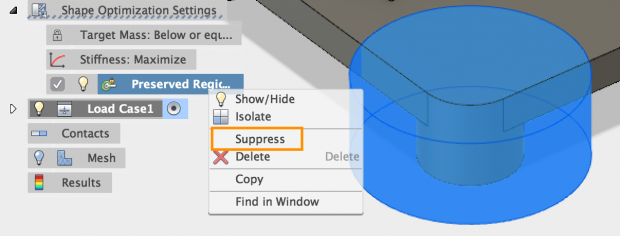 When setting up a shape optimization study in the simulation workspace, Fusion 360 now lets you suppress a preserved region. This enables quick comparisons of what the study would look like without that region and without physically modifying the design. Image courtesy of Autodesk Inc.
Also of interest to current users, Selective Cache is now available. This means that you can now can select exactly which designs and or projects you are working on and Fusion 360 will cache and make them available for offline editing. Selective Cache lets you cache by design, design folder or an entire project.
Fusion 360's HSM CAM system sees improved control for front and back turning confinements. You can now specify the stock front, stock back, model front, model back, chuck front and a new reference origin when you turn a part.
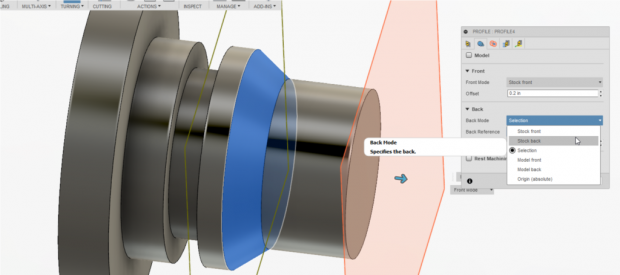 Enhancements to Fusion 360's HSM CAM system enable you to specify the stock front, stock back, model front, model back, chuck front and a new reference origin when you turning a part. Image courtesy of Autodesk Inc.
These are a few of the new features announced on August 8. For more on this update as well as other recent updates, click here.
Watch a video on what's new in the August Autodesk Fusion 360 update.
Go here for details on Fusion 360.
Read DE's Special Digital Issue: Drastically Different Design.
See why DE's Editors selected the Fusion 360 update as their Pick of the Week.
Sources: Press materials received from the company and additional information gleaned from the company's website.


Anthony J. Lockwood is Digital Engineering's founding editor. He is now retired. Contact him via [email protected].
Follow DE
Join over 90,000 engineering professionals who get fresh engineering news as soon as it is published.






About Us · Contact Us · Editorial Team · Advertising · Privacy Policy · Subscriber Services · © 2026 Digital Engineering 24/7 · Peerless Media