Helping design and engineering professionals discover, evaluate and specify technologies and processes that shorten the design cycle and enable success.



May 2026 Special Focus: Artificial Intelligence in Design and Simulation
In this Special Focus Issue, learn about the latest developments in the integration of artificial intelligence into engineering workflows.

April 2026 Special Focus Issue: Generative Design
In this Special Focus Issue, Digital Engineering takes a look at how generative design solutions can be used across different types of design problems and with a variety of manufacturing approaches to accelerate design space exploration, and…
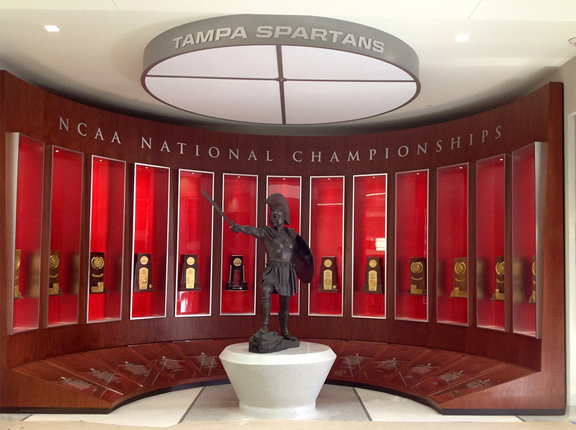
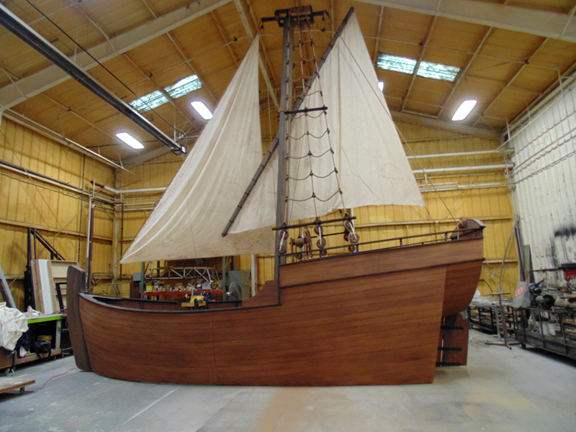
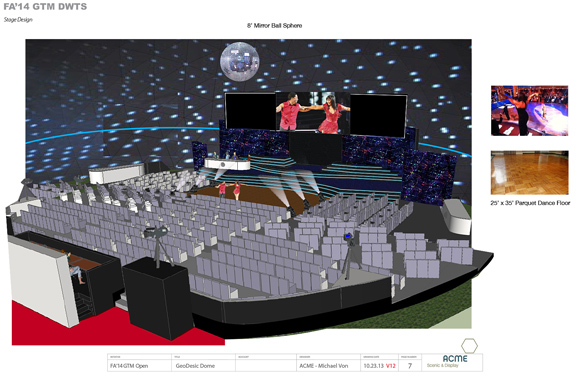
Tom Weiss has an imagination with infinite computing cores. At any given moment, Weiss, project manager for ACME Scenic and Display, may be conjuring up complex theatrical sets, storefront displays, and museum exhibits. He and his colleagues were responsible for the full-sized mammoth and its natural habitat inside Columbia Gorge Discovery Center in Oregon; the Spartan statue guarding the NCAA Championship display inside the University of Tampa, Florida; and the Renaissance castle interior for Sarasota Opera's performance of Otello.
But Weiss had a PC that couldn't keep up with his thinking. The 20-min system boot, jagged graphics, jumpy cursor, and system crashes were beginning to try his patience.
"I'm only as fast as my machine," Weiss said. "Our business is built on the ability to review and edit designs with clients with a really quick turnaround. A computer that can't keep up with the process makes me late to the party."
To communicate his ideas to his clients, Weiss must routinely churn out sets of construction documents, ranging to 30 to 50 pages. "These need to be processed three or four times a day, for each iteration," Weiss explained. "We just don't have time to wait a couple of hours of a new rendering."
To do his job, Weiss juggles SketchUp, SolidWorks, and AutoCAD, along with several web browser windows to download standard parts and components he needs for his assemblies.
Tom Salomone, Lenovo's workstation marketing manager, said, "When [Weiss] first got his previous machine, it probably worked fine. That's true of many engineers. But as they get more software, they want to do more. Their customers ask for more; their bosses want to see more ... They start adding more and more to their models. When models get bigger, they need more performance from the machine. They also upgrade their software to get new features. So as time goes on, the old machine got bogged down."
Weiss eventually purchased a Lenovo ThinkStation S30, configured with 3.6GHz Intel Xeon E5 1620 processors and 32 GB memory.
Salomone pointed out "[The generous memory capacity] lets Weiss keep his files open, run all his programs, and move between them without having to use his disk space. That makes it a lot faster."
When confronted with insufficient memory, a PC typically borrows space from the disk. In such cases, writing data to the hard disk and reading from it puts additional burden on the processors.
The mid-range NVIDIA K2000 Quadro card provides graphics acceleration for Weiss's model visualization. The solid state drive used for storage allows Weiss to access his data and programs faster.
"Now I can perform CAD modeling, rendering, have huge files open, along with my support programs, web resources, and spreadsheets, all at once with no lag time," said Weiss. "I can work as fast as I think without losing time to system hangs."
To get the construction documents he needs, Weiss now runs batch-publishing jobs in the background. The excess firepower in his current machine can accommodate simultaneous operations without interfering with his CAD programs.
"Some commands that used to take a couple of hours now only takes a couple of minutes," Weiss noted.
With a capable workstation, Weiss is now sending his clients 3D PDFs for design review--a move that has garnered many positive comments from the clients, Weiss recalled. "Not only am I seeing a greater output, it's just a more satisfying experience to not have to wait for the machine to keep up with me," he added.
The only downside of the faster machine: Now that it doesn't take 20 minutes to boot, Weiss cannot use Windows start up to go make coffee.
The ACME Scenic and Design case study is also available as a PDF download here.
To hear about Tom Weiss's experience in his own words, and to hear Tom Salomone's tips for configuring a workstation correctly, listen to the podcast below:


Kenneth Wong is Digital Engineering's resident blogger and senior editor. Email him at [email protected] or share your thoughts or suggestions at digitaleng.news/facebook.
Follow DE
Join over 90,000 engineering professionals who get fresh engineering news as soon as it is published.






About Us · Contact Us · Editorial Team · Advertising · Privacy Policy · Subscriber Services · © 2026 Digital Engineering 24/7 · Peerless Media