Helping design and engineering professionals discover, evaluate and specify technologies and processes that shorten the design cycle and enable success.


Alert!
Digital Engineering ceased publication on July 1, 2026. This website remains available as an archive of engineering content.
For inquiries or information, please email [email protected].

Digital Engineering April 2026
In the latest issue of Digital Engineering, we take a look at the latest innovations in design for additive manufacturing, including the use of natural language inputs, social media cosplayers, and AI integration. The issue also includes a feature…

January Special Focus Issue: Design for Additive
In this Special Focus Issue of Digital Engineering, learn about the latest advancements in design for additive manufacturing, including new software tools, additive in automotive, custom medical devices, and more.
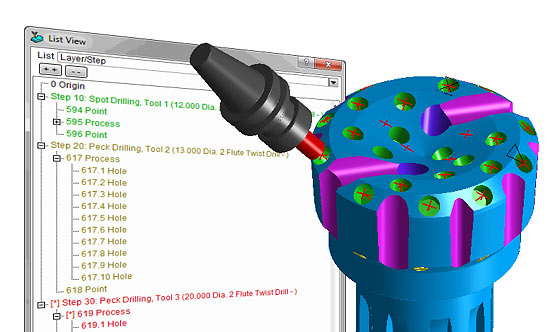 SmartCAMcnc has introduced the 2016 edition of its SmartCAM software family. Image courtesy of SmartCAMcnc.
The SmartCAM CAM portfolio includes applications for CNC (computer numerically controlled) milling, turning, fabrication and wire EDM (electrical discharge machining). Additionally the company offers SmartCAM add-ons for CNC machine code editing and DNC (direct numerical control) communication to the CNC machines. Native format data translators for Autodesk Inventor and SOLIDWORKS as well as CAD file connectors for PTC/Creo and Solid Edge. All SmartCAM products include updated data translators and NC editing software from Predator Software.
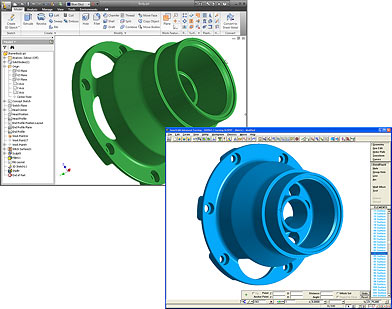 SmartCAM Native Data Translators are optional modules that allow native-CAD design models to be opened directly in SmartCAM. Pictured here is the SmartCAM Autodesk Inventor Connection. Image courtesy of SmartCAMcnc.
SmartCAM v2016 builds on the KBM Library functionality first introduced in SmartCAM v2015 and is available in all SmartCAM products. The KBM Library provides the ability to store and re-use tooling and operation settings, which can then be used for creating new programs. Among its original features are support for storing machine configurations, the ability to add materials directly from a SmartCAM application without an intermediate utility and capabilities to update existing operation parameters stored in the active material.
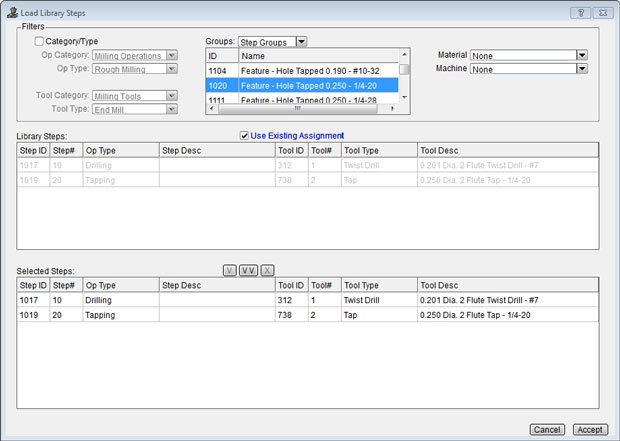 SmartCAM v2016 sees a number of “substantial” enhancements to its Knowledge-Base Machining (KBM) Library, according to the company. Depicted here is the creation of a pending set of steps using the KBM Library. Image courtesy of SmartCAMcnc.
The v2016 version of the KBM Library lets users manage their tool and operation parameters by bringing together all their stored and managed manufacturing data in a single repository. Additionally, the KBM Library's associativity feature allows jobs that use library definitions to be updated to the most current definitions quickly
Improvements to the KBM Library introduced in v2016 include a revised user interface that enables SmartCAM programmers to add multiple tools or multiple steps to the Job Operations Setup with a single action, a new Group Filter feature that displays the set of tools or steps associated with a user-defined filter and a new Manage Library utility that provides maintenance and administration capabilities for library data and group filters.
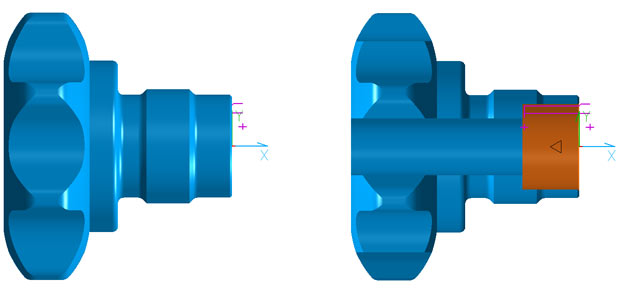 Debuting in SmartCAM v2016 is a new View Section command that can be used to expose hidden elements, making it easier to both view and select such elements. Here, the View Section command reveals bore details in the SmartCAM Turning application. Image courtesy of SmartCAMcnc.
The SmartCAM List View user interface component has been enhanced in v2016 to now display model data in an expandable and collapsible tree structure. CAD and CAM model elements can now be shown from this hierarchical list, which, explains the company, provides a convenient method for viewing as much or as little detail of the model as needed.
v2016 sees improvements in SmartCAM's mill roughing processes. The Group Pocket process now supports separate pocket and island groups, including support for multi-level nested pockets and islands. Also the Group Pocket, the Part Offset and Morph path type options can now be used to produce smoothed, continuously tangent toolpaths suitable for high speed milling (HSM) techniques, according to the company.
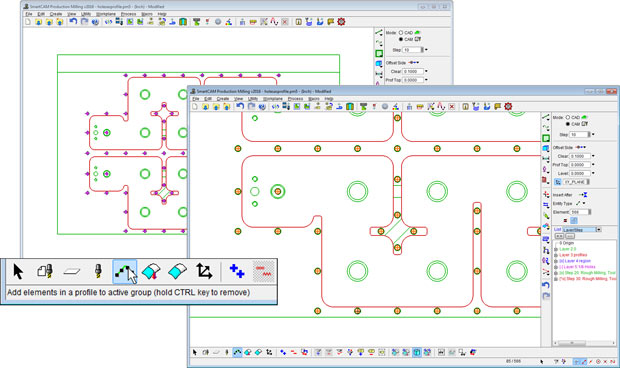 SmartCAM's Profile Group Select tool has been extended to enable the selection of identical holes or hole features that are sequential in the Process Model database. Image courtesy of SmartCAMcnc.
A new View Section command debuts in v2016. This graphics clipping method makes it easier to view and select hidden elements. By way of example, SmartCAMcnc explains that this technique can be particularly beneficial when creating internal bore toolpath processes in SmartCAM Turning and Mill Turn applications.
Additional enhancements in SmartCAM v2016 include an updated ACIS modeling kernel and a number of new customization functions, many of which are user-requested. For additional details on SmartCAM v2016 and the SmartCAM software family, visit SmartCAMcnc.
Go here for more on SmartCAM Milling CAM software.
Go here for some short videos on the basic concepts of SmartCAM Milling.
Go here for more on SmartCAM Turning products.
Go here for more on SmartCAM Advanced Fabrication software.
Go here for more on SmartCAM Wire EDM software.
See why DE's editors selected SmartCAM v2016 as their Pick of the Week.
Sources: Press materials received from the company and additional information gleaned from the company's website.


Anthony J. Lockwood is Digital Engineering's founding editor. He is now retired. Contact him via [email protected].
Follow DE






About Us · Contact Us · Editorial Team · Advertising · Privacy Policy · Subscriber Services · © 2026 Digital Engineering 24/7 · Peerless Media