Helping design and engineering professionals discover, evaluate and specify technologies and processes that shorten the design cycle and enable success.



May 2026 Special Focus: Artificial Intelligence in Design and Simulation
In this Special Focus Issue, learn about the latest developments in the integration of artificial intelligence into engineering workflows.

April 2026 Special Focus Issue: Generative Design
In this Special Focus Issue, Digital Engineering takes a look at how generative design solutions can be used across different types of design problems and with a variety of manufacturing approaches to accelerate design space exploration, and…
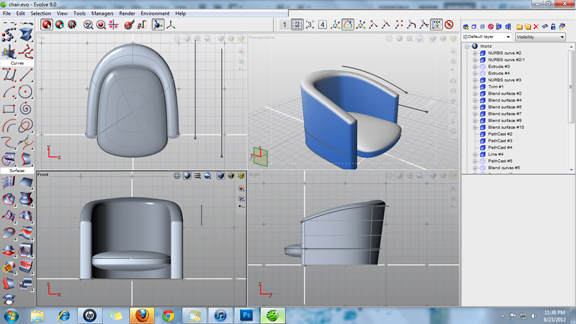
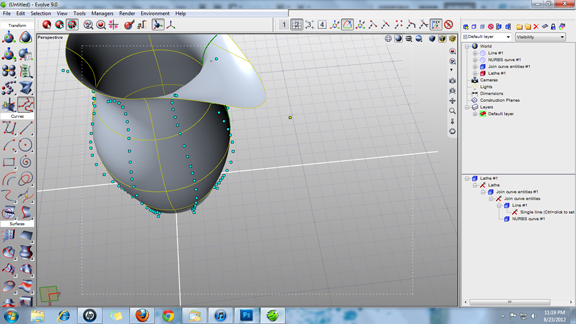
Because of the way they're programed to draw and represent geometry, most mechanical design software programs (MCAD) produce designs that are almost instantly recognizable. They produce clean geometry, with perfect arcs, straight lines, and rounded edges. That's the reason many designers and engineers usually leave their MCAD packages and turn to specialized NURBS modeling programs when they need to create products with undulating curves, flowing lines, and swirly profiles.
SolidThinking Evolve, developed by Altair Engineering, is a NURBS modeler, but one that comes with a feature history -- something CAD users rely on to retrace their steps and modify their designs when necessary. Though its creator Altair is better known for simulation software (the HyperWorks family of products), SolidThinking Evolve turns out to be a gem for conceptual design.
Along with 2D sketching and 3D extrusion tools, SolidThinking Evolve offers a comprehensive set of NURBS modeling tools. They give you different options for working with Splines: revolving a Spline curve into a profile; projecting a Spline onto a curved surface, and using a Spline as a dissecting line to slice through 3D shape, to name but a few. The point-control system gives you a way to easily reshape the surfaces and solids created. By pushing and pulling on points, you may reshape the Spline's curvature and the 3D geometry generated from the spline.
The surface blending tool gives you a way to join together adjacent surfaces. The software is capable of selecting appropriate surfaces to use to join selected edges in a way that preserves curvature continuity. There is a zebra-stripe tool, which you may invoke to verify the quality of surface geometry.
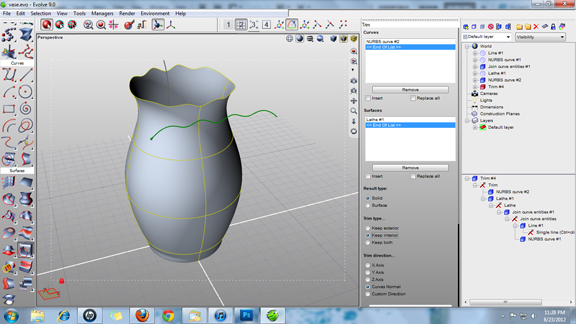
True to parametric principles, SolidThinking Evolve automatically updates its geometry when you altar the underlying construction Splines. Suppose you have used a Spline as the cutting line to trim a curved surface. When trim is completed, if you reposition the cutting Spline, you can expect the trimmed part's geometry to update accordingly.
By default, the software gives you a world browser pane in the far right corner. This window gives easy access to the different features that make up your design, along with the steps you've taken to generate each feature (for example, a profile Spline, followed by an extrusion). You may select any of these steps and adjust the parameter through numeric input or manual manipulation. In doing so, you can redefine the height of a previous extrusion or the radius of a curvature.
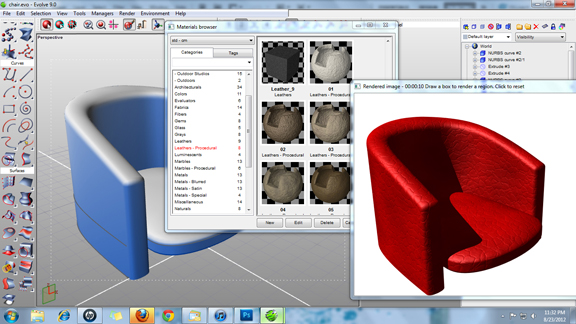
In addition to modeling tools, SolidThinking Evolve also provides a rendering window, complete with preloaded backgrounds, environments, and materials. The function gives you a way to apply finishes to your 3D model and generate a photo-realistic image, complete with shadows and reflections.
Evolve is a sturdy, robust NURBS-based conceptual design package in its own right; but its value increases many folds when it's deployed as a companion to SolidThinking Inspired, an automatic optimization program that lets you seek the best shape for your design based on anticipated load, stress, pressure, and other inputs.
A detailed review of SolidThinking Evolve is scheduled to appear in print in October issue of Desktop Engineering, followed by a review of the optimization function in Inspired.
For more, watch the video report below:


Kenneth Wong is Digital Engineering's resident blogger and senior editor. Email him at [email protected] or share your thoughts or suggestions at digitaleng.news/facebook.
Follow DE
Join over 90,000 engineering professionals who get fresh engineering news as soon as it is published.






About Us · Contact Us · Editorial Team · Advertising · Privacy Policy · Subscriber Services · © 2026 Digital Engineering 24/7 · Peerless Media