Helping design and engineering professionals discover, evaluate and specify technologies and processes that shorten the design cycle and enable success.


Alert!
Digital Engineering ceased publication on July 1, 2026. This website remains available as an archive of engineering content.
For inquiries or information, please email [email protected].

May 2026 Special Focus: Artificial Intelligence in Design and Simulation
In this Special Focus Issue, learn about the latest developments in the integration of artificial intelligence into engineering workflows.

April 2026 Special Focus Issue: Generative Design
In this Special Focus Issue, Digital Engineering takes a look at how generative design solutions can be used across different types of design problems and with a variety of manufacturing approaches to accelerate design space exploration, and…
Autodesk Vault 2023 intends to simplify collaboration. The new features in this latest Vault release are designed to help users focus on their work, easily connect remote users to Vault data, and increase collaboration within more workflows.
AutoCAD Add-in Enhancements
Users can remain inside AutoCAD and access a design’s History, Uses, Where Used and Change Order information. Also, users can perform many routine Vault tasks such as Assign Item, Copy Design, Go To Item, and Go to Folder in the Show Details view.
Instance Properties
Instance Properties in Inventor were introduced to allow you to identify components in the field and other applications where identical components need unique identifiers. Now there is support for Inventor Instance Properties inside of Vault.
Vault 2023 added support, for instance, properties in the Item Bill of Materials. Each model instance with a different instance value shows ungrouped in the Item Bill of Materials list. However, instances without unique property values show as they have in previous releases.
User Interface Enhancements
The Vault client has been updated with a more modern look and feel to provide a more consistent, cohesive visual experience across the Vault Desktop, Web, and Mobile solutions with the additions of a dark and light them in Vault 2023.
Switch between Dark, Light, and Default (Classic) themes to reflect the visual alignment with other adjacent products from Autodesk. The user interface theme controls the color of the application icons, frame, background, property panels, and dialogs. In addition, vault icons have been updated and refreshed to complement the Dark and Light theme interface.
Markup Enhancements
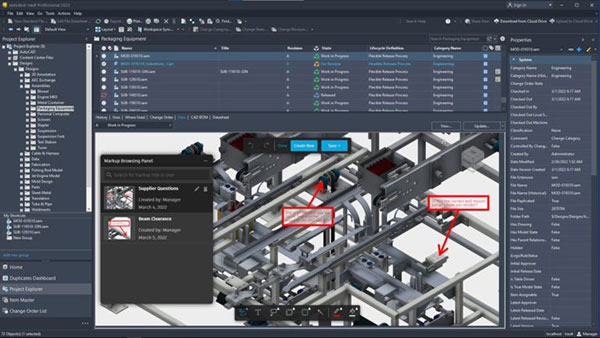
Vault now makes it easier to provide feedback through the Markup capability, including adding comments, information, and suggestions for design changes.
In Vault 2023, Autodesk implements the ability to markup designs in more areas than in the Change Order process. Once the markup is complete, it can be saved data inside Vault for future viewing or saved as an image outside of Vault.
The markup browser panel allows users to view, rename and delete a markup. However, users can only delete the markup they created.
Thin Client users can also collaborate and provide feedback on designs by marking up the visualization directly. Once they have completed their markup, they can save it as an image file and send it to whoever needs it.
Lifecycle State Colors
Vault 2023 introduces color customizations on lifecycle states inside the lifecycle definitions.Users can now scan through a file list and quickly identify files in a particular lifecycle.
In Vault, the Enforce Restriction for Check-In of Design Files feature prohibits users from checking in design files using drag and drop or the Vault client’s Add Files command. Unfortunately, the design file types were hardcoded, making this restriction challenging to enforce because some file extensions may not be considered design files.
In the Vault 2023 release, administrators can define the list of files that can or cannot be checked in when this restriction is enabled. Also, administrators can add the file extensions to the user-defined list for more flexibility.
For more details, visit the blog here.
Sources: Press materials received from the company and additional information gleaned from the company’s website.


Autodesk is a world leader in 3D design, engineering, and entertainment software. They produce software for the architecture, engineering, construction, manufacturing, media, and entertainment industries.

DE's editors contribute news and new product announcements to Digital Engineering. Press releases may be sent to them via [email protected].
Follow DE






About Us · Contact Us · Editorial Team · Advertising · Privacy Policy · Subscriber Services · © 2026 Digital Engineering 24/7 · Peerless Media