Helping design and engineering professionals discover, evaluate and specify technologies and processes that shorten the design cycle and enable success.



May 2026 Special Focus: Artificial Intelligence in Design and Simulation
In this Special Focus Issue, learn about the latest developments in the integration of artificial intelligence into engineering workflows.

April 2026 Special Focus Issue: Generative Design
In this Special Focus Issue, Digital Engineering takes a look at how generative design solutions can be used across different types of design problems and with a variety of manufacturing approaches to accelerate design space exploration, and…
ZWSOFT describes ZWCAD Mechanical 2017 as being its ZWCAD professional-level drafting and design software extended with an additional mechanical module that provides tools for manufacturing. ZWCAD Mechanical, adds the company, delivers consistent and standard-based production results.
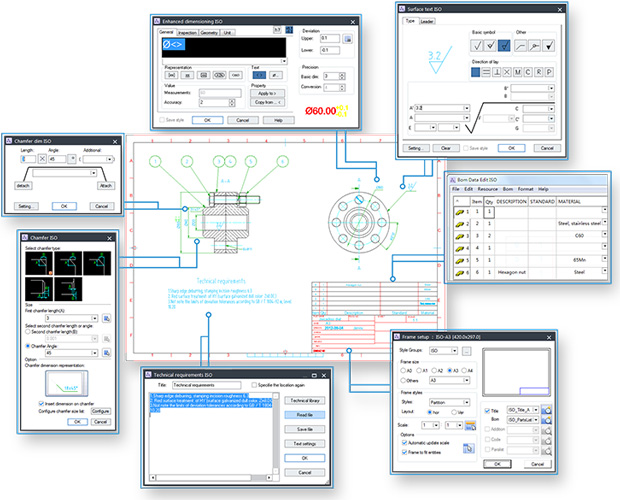 ZWSOFT has announced the availability of ZWCAD Mechanical 2017, its specialized product for mechanical 2D drawings. Image courtesy of ZWCAD Software Co., Ltd. (ZWSOFT).
Additionally, ZWCAD Mechanical supports such international drafting standards as ANSI, DIN, GB, ISO and JIS, and it has functionality for companies to customize standards. The software can open and write DWG/DXF/DWF file formats, and it is compatible with other mainstream design software.
Among the features ZWCAD Mechanical provides are intelligent balloons with associative BOMs so that any change to a balloon updates the BOM. Creating standard-based balloons is said to be quick and easy as aligning and renumbering them, according to ZWSOFT. BOM creation is a one-step operation, and standard parts can be automatically recognized and summarized, adds the company.
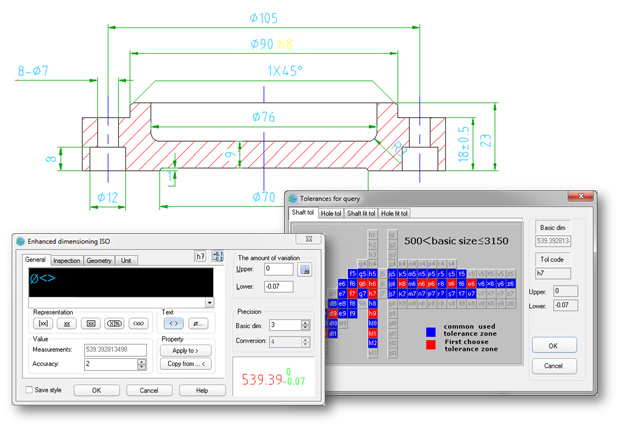
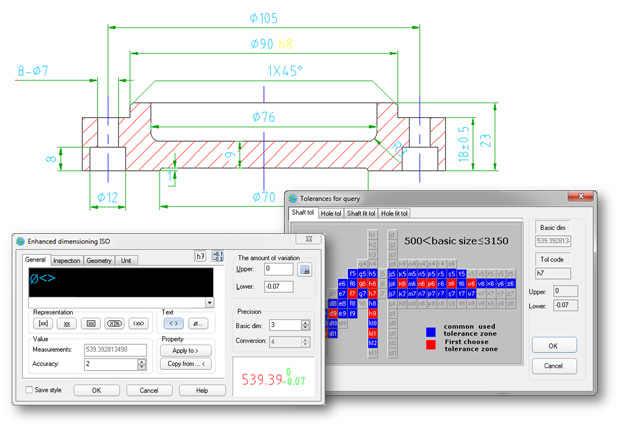 ZWSOFT says its ZWCAD Mechanical 2017 software for 2D drawings provides flexible and advanced dimensioning functions. Image courtesy of ZWCAD Software Co., Ltd. (ZWSOFT).
For annotating mechanical drawings, ZWCAD Mechanical provides flexible and advanced dimensioning functions, says ZWSOFT. As an example, the company cites that, with the software's abbreviated dialog boxes, users can control and expand just those variables relevant to manufacturing as well as integrate tolerance and fit list information. The software's smart dimensioning tools automatically force overlapping dimensions to space themselves appropriately.
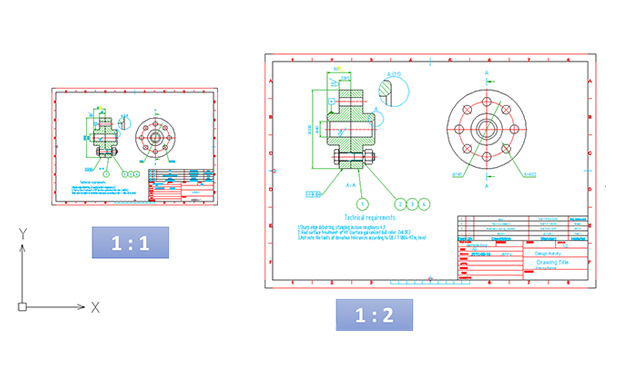 ZWCAD Mechanical supports drawing multiple borders with different scales. You can change the size of annotations and objects according to the scale of border. Image courtesy of ZWCAD Software Co., Ltd. (ZWSOFT).
ZWCAD Mechanical 2017 includes 32 options to create construction lines and seven options to create construction circles. Users can add a centerline to a circle or rectangle by simply selecting objects, and users can draw centerlines to a single entity or multiple entities.
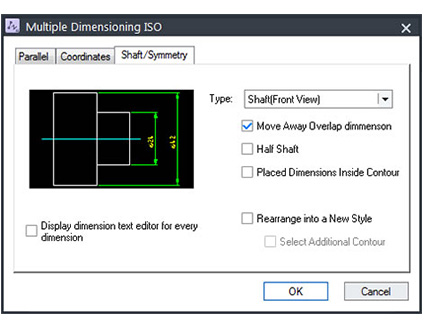 With ZWCAD Mechanical 2017's Multiple Dimensions functionality, you can create multiple dimensions with minimal input as well as space ordinate, parallel or symmetric items properly. Image courtesy of ZWCAD Software Co., Ltd. (ZWSOFT).
Additional ZWCAD Mechanical features include layer management and layer mapping, support for multiple border drawings with adaptive scaling, the ability to create shafts and gears by inputting the geometric parameters and reusable detailing tools. The software comes with a parts library containing screws, nuts, washers, pins, rivets, springs, bearings and the like.
ZWCAD Mechanical 2017 is now available in a 32-bit version. For more information, visit ZWSOFT.
Watch a video overview of ZWCAD Mechanical 2017.
Download a 30-day trial of ZWCAD Mechanical 2017.
See why DE's editors selected ZWCAD Mechanical 2017 as their Pick of the Week.
Sources: Press materials received from the company and additional information gleaned from the company's website.


DE's editors contribute news and new product announcements to Digital Engineering. Press releases may be sent to them via [email protected].
Follow DE
Join over 90,000 engineering professionals who get fresh engineering news as soon as it is published.






About Us · Contact Us · Editorial Team · Advertising · Privacy Policy · Subscriber Services · © 2026 Digital Engineering 24/7 · Peerless Media