Helping design and engineering professionals discover, evaluate and specify technologies and processes that shorten the design cycle and enable success.



Digital Engineering April 2026
In the latest issue of Digital Engineering, we take a look at the latest innovations in design for additive manufacturing, including the use of natural language inputs, social media cosplayers, and AI integration. The issue also includes a feature…

January Special Focus Issue: Design for Additive
In this Special Focus Issue of Digital Engineering, learn about the latest advancements in design for additive manufacturing, including new software tools, additive in automotive, custom medical devices, and more.
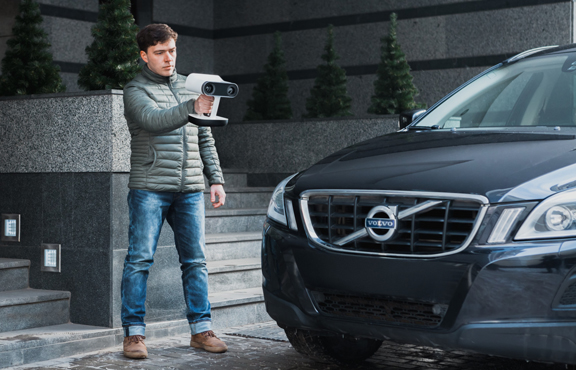 With Artec 3D's handheld scanner Leo, you do not need to attach the device to a computer to use it (image courtesy of Artec 3D).
What makes Artec 3D's handheld scanner Leo much better than its predecessors is not what's added to it but what's missing -- the cord.
Usually, you expect handheld devices to be portable and mobile. But that's not the case with many of the handheld scanners available in the market.
These devices don't usually have sufficient on-board processing power to align the partially scanned images into a cohesive whole. To do that, they have to borrow compute capacity from a full fledged laptop or desktop. That means, you need to keep the device attached to a computer during the scan session. Since they typically don't come with displays, they also need to borrow the computer's screen to show you the scan progress, scan quality, and other visual cues. These constraints severely limit where and how you can use the handheld scanner.
Artec 3D's Leo, which I had a chance to try out in the company's booth at the recent NVIDIA GPU Technology Conference, may be the first handheld scanner that's truly portable.
The device has a built-in touch panel screen; and it has sufficient internal compute capacity to execute the scan without the help of a computer. That means you can truly be detached, and you're free to roam.
The reason Artec 3D is at GTC is the GPU inside the device. Leo has a NVIDIA Maxwell GPU inside, along with a Quad-core ARM Cortext CPU. The scanner also contains an inertial system with accelerometer, gyro, and compass, so the device understands its own position relative to the environment and the target. The built-in battery gives you mobility without the need for a power plug. You may also extend the battery life with supplementary battery modules.
Leo comes with a touch-panel display, which can also be mirrored to another PC screen wirelessly. The scanned data is saved on a 256 GB SSD drive. You can, therefore, complete the scan session on the device itself before offloading the data to a PC or server back at the office. You have the option to extend the storage with micro SD card.
Normally, shiny surfaces and flat-colored objects present a challenge to scanners because the geometric features are difficult to make out. But Leo comes with 3D HDR technology to overcome this.
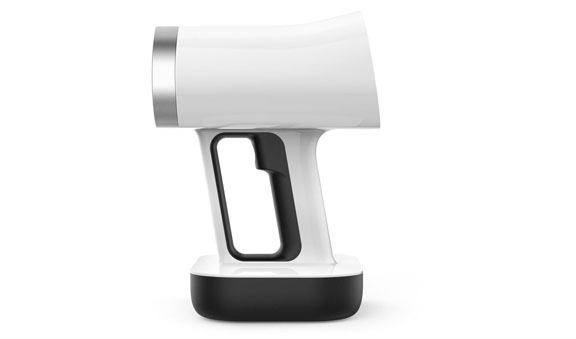 A side view of Artec 3D's scanner Leo (image courtesy of Artec 3D).
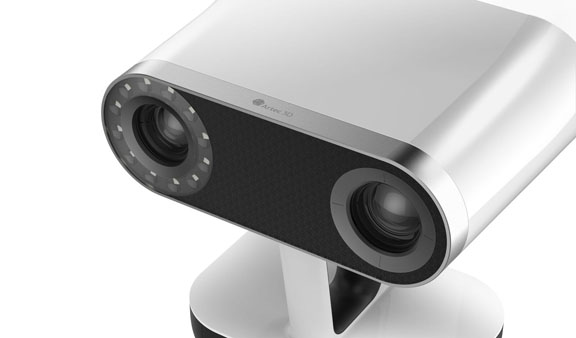 A top view of Artec 3D's Scanner Leo (image courtesy of Artec 3D).
You use LEO and other Artec 3D scanners in conjunction with the Artec Studio scan-processing software. The program has an Autopilot feature, which guides beginning users through the scan process. Version 12 allows direct export to Geomagic Design X and SOLIDWORKS 3D CAD programs. It also exports to popular 3D formats, including OBJ, STL, and ASCII. The software is compatible with tablets and mobile devices.
Handheld scanners that require a computer to run are not easy to operate in outdoor settings, where a power plug is not always readily available. Besides, the need to keep the device and the computer fairly close to each other creates an awkward scanning experience when you need to move around a stationary object to capture it from all angles. (For example, try scanning a statue in a park while you hold the scanner in one hand and the computer in another.)
Leo, on the other hand, is made for such operations. The price tag for Leo's freedom and mobility is $25,800.
For more on Leo's predecessors Eva and Spider, read the blog post here.


Kenneth Wong is Digital Engineering's resident blogger and senior editor. Email him at [email protected] or share your thoughts or suggestions at digitaleng.news/facebook.
Follow DE
Join over 90,000 engineering professionals who get fresh engineering news as soon as it is published.






About Us · Contact Us · Editorial Team · Advertising · Privacy Policy · Subscriber Services · © 2026 Digital Engineering 24/7 · Peerless Media