Helping design and engineering professionals discover, evaluate and specify technologies and processes that shorten the design cycle and enable success.



May 2026 Special Focus: Artificial Intelligence in Design and Simulation
In this Special Focus Issue, learn about the latest developments in the integration of artificial intelligence into engineering workflows.

April 2026 Special Focus Issue: Generative Design
In this Special Focus Issue, Digital Engineering takes a look at how generative design solutions can be used across different types of design problems and with a variety of manufacturing approaches to accelerate design space exploration, and…
« Page 1 |2
Interface Issues
Customizable tool shelves help you organize AliasStudio’s daunting array of tools more to your own liking, creating collections of tools together in an order that makes sense to you. You might create a shelf of your favorite drawing tools, or the tools you use most when building keyboard buttons. This saves you from bouncing around between different sections of AliasStudio’s rather large tool palette.
Pop-up “marking menus” also offer you common tools and operations — edit points, change brush sizes, etc. — at the touch of a key.
AliasStudio’s look and feel is a bit atypical but not (usually) troublesomely so. You’ll click ‘Go’ instead of ‘OK’ to execute commands, for example, and the look and operation of windows and dialog boxes are a few degrees off the Windows standard.
AliasStudio’s tools have icons and labels, but no combination of settings lets me read both at once. At the default settings, the labels read “arker(prush(feflood fil.” If I make the icons huge the text mostly fits, but the icons themselves become noticeably blurry. If I turn off icons altogether, I’m completely lost and the text in the shelves still doesn’t display completely. I know: I harp on this stuff; but in an application this awesome and expansive — and this potentially intimidating — these kinds of user-interface issues really stand out, especially when you are learning the program.
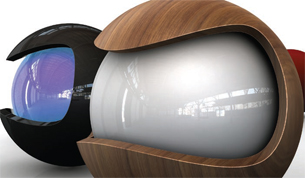 AliasStudio’s real-time hardware rendering supports HDRI image-based lighting. |
Rendering in Real Time
The thing that really blew me away last time was AliasStudio’s real-time preview rendering. And it’s still stunning, replete with reflections and specular highlights, per-pixel bump and displacement mapping, self-shadowing, and ambient occlusion. Taken together, those mean photo-real renderings on your screen, in real time. It’s easy to say you don’t need this, I suppose, by why on earth wouldn’t you want it?
Other real-time settings provide some fast and visual ways to check your surfaces for pinching and unsightly bumps.
And when it comes to ‘real’ renders at high resolution, AliasStudio’s output is even more impressive.
So What Else is New?
This release contains no real surprises. It’s basically a tightening-up of loose bolts.
The ability to load large data sets as lightweight “reference” data is a big improvement for those working on complex designs.
Printing has been improved, as have the color manipulation tools and the drawing canvas. There’s a new and improved alignment tool for working with 3D surfaces, a new pastel brush, better blending and hole patching, and an assortment of improvements to snapping and extending lines and surfaces.
AliasStudio 2009, ranging in price from $5K to $65K depending on the package, also adds a new dynamic measurement tool so you can double-check the depth of that bezel at the design-review meeting.
Whether all this adds up to a reason to upgrade depends on your personal needs and wants.
AliasStudio is an amazingly broad application, one that can take you from preliminary pencil sketch to design drawings to 3D render to manufacture-ready output in a single package. It doesn’t do everything. It isn’t a parametric modeler. It doesn’t have a fully editable history tree. It doesn’t automatically create exploded views. It doesn’t generate a bill of materials (BOM). But, for a designer, it’s hard to think of a comparable app. AliasStudio very nearly does it all.
More Info:
Autodesk AliasStudio 2009
Autodesk, Inc.
San Rafael, CA
Download a trial version ofAliasStudio from Autodesk
Contributing Editor Mark Clarkson, a.k.a. “the Wichita By-Lineman,” has been writing about all manner of computer stuff for years. An expert in computer animation and graphics, his newest book is Photoshop Elements by Example. Visit him on the web at markclarkson.com or send e-mail about this article c/o [email protected].
« Page 1 |2


Contributing Editor Mark Clarkson is Digital Engineering's expert in visualization, computer animation, and graphics. His newest book is Photoshop Elements by Example. Visit him on the web at MarkClarkson.com or send e-mail about this article to [email protected].
Follow DE
Join over 90,000 engineering professionals who get fresh engineering news as soon as it is published.






About Us · Contact Us · Editorial Team · Advertising · Privacy Policy · Subscriber Services · © 2026 Digital Engineering 24/7 · Peerless Media