Helping design and engineering professionals discover, evaluate and specify technologies and processes that shorten the design cycle and enable success.



Cut Retrieval-Augmented Generation (RAG) Hallucinations by 50%
Most teams hit the same wall with enterprise AI: LLMs that hallucinate, pipelines that don’t scale, and infrastructure that’s harder to design than the models themselves.

What Is Intelligent BOM Management? A Guide to Smarter Product Development
Learn how intelligent Bill of Materials (BOM) management helps teams collaborate, reduce errors, and bring innovative products to market faster with cloud-based PLM tools.
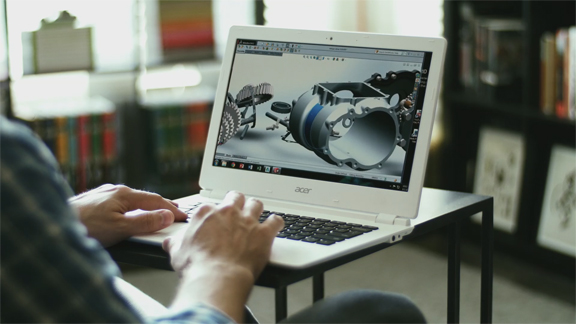
Normally, you would think long and hard before you attempt to run a Windows-based CAD program on a Google Chromebook. Though affordably priced (starting $199), the lightweight notebook has very limited local storage capacity and runs in Google Chrome OS. That presents challenges for those trying to install and run Windows-based design and engineering software titles that demand graphics acceleration, generous hard-disk space, and ample memory. But what if you use Chromebook only as the front-end client device to access a virtual workstation hosted elsewhere?
That's the setup NVIDIA, VMWare, and Google are advocating at VMWorld (San Francisco, August 24-26), a virtualization conference. In a press announcement today, the three jointly announced, "a collaborative effort to deliver high-performance virtual desktops and workstation-class graphics to Google Chromebooks." Billed as a technology preview, the virtualization solution lets you use the latest Chromebooks powered by NVIDIA Tegra K1 mobile processors to remotely run Windows programs using VMWare's virtualization software.
Victoria Rege, NVIDIA's product marketing manager for NVIDIA Grid, said, "We've noticed Chromebook is very popular among our education users, because of its affordable price. The goal is to show people that Chromebook can be used in enterprises and businesses as well, including manufacturing and construction." Rege points out that, for some businesses, the Chromebook is a better hardware choice for interns and contractors who don't necessary need a dedicated workstation.
While Chromebook's adoption in education is understandable, the use of Chromebook in manufacturing, construction, and professional design industry is at the present unproven. Most people in these industries rely on workstations to run graphics-heavy programs like AutoCAD, SolidWorks, and similar titles. Compared to the touch-driven tablets, however, Chromebook's mouse-and-keyboard input system offers a closer match to CAD programs' current software interface; therefore, Chromebook may offer an easier transition in the virtualized environment as a client device.
In today's blog post titled "How, With Google and VMware, We’re Unlocking Full Potential of Cloud-Hosted Desktops," NVIDIA wrote, "We’re working with VMware and Google to enhance Chromebooks as an endpoint by enabling a new low-latency, high-frame-rate access from the client receiver to NVIDIA Tegra K1-based devices ... Tegra K1-based Chromebooks will be the first to fully support these new capabilities."
For more on the rise of virtualization and remote desktops, read about NaviSite's Desktop as a Service solutions and OTOY's app-streaming platform.
For more, watch NVIDIA's demo video below:


Kenneth Wong is Digital Engineering's resident blogger and senior editor. Email him at [email protected] or share your thoughts or suggestions at digitaleng.news/facebook.
Follow DE
Join over 90,000 engineering professionals who get fresh engineering news as soon as it is published.






About Us · Contact Us · Editorial Team · Advertising · Privacy Policy · Subscriber Services · © 2026 Digital Engineering 24/7 · Peerless Media