Helping design and engineering professionals discover, evaluate and specify technologies and processes that shorten the design cycle and enable success.


Sponsored
 Dear Desktop Engineering Reader:
 At the risk of understatement, finding and subduing flaws in a disobedient electronic device is a key engineering job in today’s electromechanical world. But designing robust, neighboring device-friendly actuators, sensors, solenoids, transformers and stuff like that is not particularly efficient when you’re looping in a cycle of design to analysis to redesign. Today’s Pick of the Week short circuits the seemingly eternal cycle of importing designs, running electromagnetic analyses, modifying the design and exporting it for analysis yet again.
Infolytica just released an updated edition of MagNet for SolidWorks, its 3D electromagnetic field solver for SolidWorks from Dassault Systèmes. MagNet for SolidWorks embeds inside of SolidWorks. What that means for you is that you can simulate, analyze and modify electromagnetic devices within the SolidWorks design environment and without all that monkeying around with importing, exporting and re-analyzing designs.
This software is the real McCoy. It’s based on the company’s standalone MagNet 2D/3D electromagnetic field simulation platform. This, among other things, means that it uses proven finite element techniques to return accurate solutions of Maxwell's equations quickly.
MagNet for SolidWorks handles non-linear analyses, second-order time stepping, core losses, proximity effects and eddy currents. You can execute simulations of AC or time harmonic electromagnetic fields as well as magnetostatic fields. It has a nifty feature that automatically determines current flows and sets up coils.
A cool feature when you’re post-processing is that you can detach and move components while viewing a field solution. You can also slice and peel through field results. MagNet for SolidWorks sports an adaptive meshing strategy that helps you figure out where refinements are needed after each step.
Infolytica says that model setup, visualization and transparency modeling as well as loading large data sets are all faster in the new version of MagNet for SolidWorks. Current users should notice improvements in their ability to set the direction of magnetization and material types for electromagnetic analyses. Also reportedly more efficient are static, AC and transient simulations.
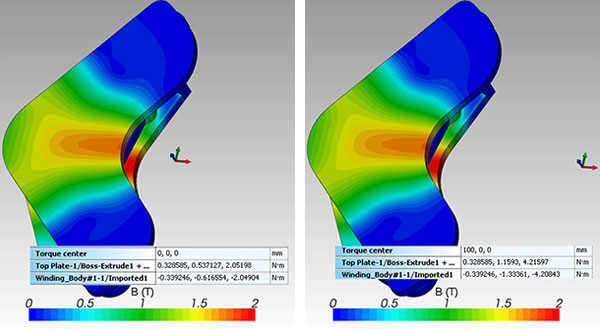 Infolytica Corp., a certified SolidWorks Solution Partner, says that with its MagNet for SolidWorks software you can define the location of a pivot point for any moving parts within a device. Image courtesy of Infolytica Corp.
Today’s Pick of the Week has the skinny on this new edition of MagNet for SolidWorks. Still, make sure to hit the first link at the end of the write-up to get the complete lowdown from Infolytica. While there, hit the Features tab. You’ll find some short and cool videos that demonstrate how you could break out of your endless design, analyze and redesign loop.
Thanks, Pal. – Lockwood
Anthony J. Lockwood
Editor at Large, Desktop Engineering


Anthony J. Lockwood is Digital Engineering's founding editor. He is now retired. Contact him via [email protected].
Follow DE
Join over 90,000 engineering professionals who get fresh engineering news as soon as it is published.






About Us · Contact Us · Editorial Team · Advertising · Privacy Policy · Subscriber Services · © 2026 Digital Engineering 24/7 · Peerless Media