Helping design and engineering professionals discover, evaluate and specify technologies and processes that shorten the design cycle and enable success.


Dassault Systemes SolidWorks Corp. (3DS SolidWorks; Waltham, MA) recently introduced a version of its eDrawings for the iPad. This e-mail-enabled communication tool for sharing of product design information is said to provide users with a fast, reliable, and convenient mechanism to supply eDrawings file representations of 3D models and 2D drawings created with many widely deployed CAD systems.
 |
| Image courtesy of Dassault Systèmes SolidWorks Corp. |
eDrawings, says 3DS SolidWorks, is the only iPad CAD viewer that allows users to view native eDrawings files as well as native SolidWorks parts, assemblies, and drawing files. In addition, eDrawings for iPad allows convenient viewing of DWG and DXF files.
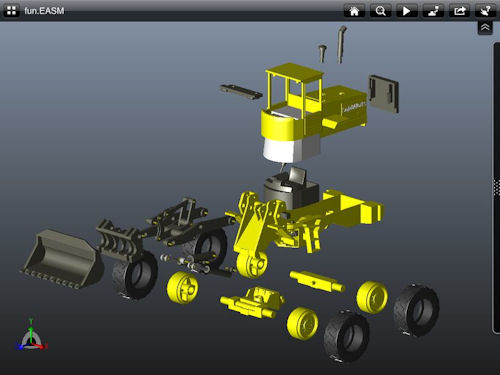
eDrawings for iPad supports multi-touch gestures for panning, zooming, and rotating 2D and 3D models. 3D views can be animated and exploded. It also supports viewing and animating drawings from SolidWorks 3D design software, the free DraftSight CAD software from Dassault Systemes, and AutoCAD DWG and DXF files.
 |
| Image courtesy of Dassault Systèmes SolidWorks Corp. |
With eDrawings for iPad, users can browse assembly component trees, configurations, and drawing sheets. Designs can be viewed in full screen, and double tapping will fit the image on screen. Additional features include the ability to open files from e-mail, iTunes file sharing, and from an internal network; the ability to animate 3D standard views as well as 2D drawing views; and the ability to store files on an iPad through iTunes file sharing.
 |
| Image courtesy of Dassault Systèmes SolidWorks Corp. |
eDrawings for iPad, which comes with sample files, is available worldwide from the Apple iTunes App Store and is priced in local currency based on $1.99 (US). Initially, says 3DS SolidWorks, the user interface is offered only in English; however, it will support eDrawings files in all languages created with eDrawings publishers, SolidWorks, and DraftSight.
Go here to purchase eDrawings for iPad on the Apple iTunes App Store.
Go here for more information on eDrawings.
Go here for more information on DraftSight.
See why DE's editors selected eDrawings for iPad as their Pick of the Week.
Sources: Press materials received from the company and additional information gleaned from the company's website.


Anthony J. Lockwood is Digital Engineering's founding editor. He is now retired. Contact him via [email protected].
Follow DE
Join over 90,000 engineering professionals who get fresh engineering news as soon as it is published.






About Us · Contact Us · Editorial Team · Advertising · Privacy Policy · Subscriber Services · © 2026 Digital Engineering 24/7 · Peerless Media