Helping design and engineering professionals discover, evaluate and specify technologies and processes that shorten the design cycle and enable success.



May 2026 Special Focus: Artificial Intelligence in Design and Simulation
In this Special Focus Issue, learn about the latest developments in the integration of artificial intelligence into engineering workflows.

April 2026 Special Focus Issue: Generative Design
In this Special Focus Issue, Digital Engineering takes a look at how generative design solutions can be used across different types of design problems and with a variety of manufacturing approaches to accelerate design space exploration, and…
Apparently, one of the most desirable characteristics of a workstation is expandability.
In the survey DE and HP began running in June (still ongoing), participants were asked to list "characteristic statements that may be important to the selection of a professional workstation." They were also asked to rate each statement on a scale of 1 to 5, where 5 means the characteristic is extremely important, and 1 means not at all important. When tabulated, the scores showed that the top ranking choice was "reliable/stable/scalable" (70%), closely followed by "performance/computing horsepower" (64%).
Even the write-in responses reflected that factor. Expandable, along with variations such as Scalable and Upgrade, repeatedly appear in the list of more than 200 words submitted as "important factors in the selection of a workstation."
For expandability, you should pay attention to the number of PCI slots, extra memory capacity, and disc drives, according to Tom Salomone, HP's marketing manager for workstations. But perhaps more important, he added, "The other thing they should look for is the ease with which they can do it. You don't want to be there tinkering with the system with lots of tools, risking damage. You want something that's simple to open, it's obvious where the expansion slots are, and you can do it quickly."
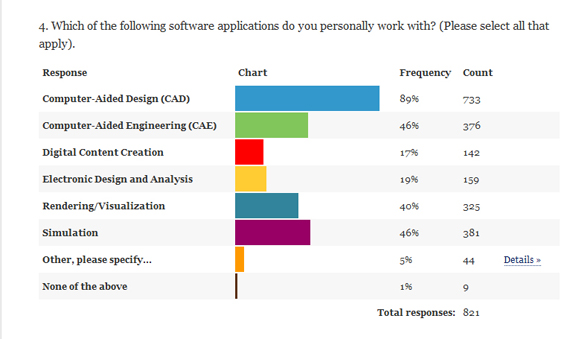
When asked to select the type of applications they run (with the option to pick more than one), participants tell us they're heavily involved in CAD (89%), simulation (46%), computer-aided engineering (46%), and rendering/visualization (40%). The prevalent of simulation and visualization suggest users can benefit from multicore machines, as these applications, especially the latest releases, are written to take advantage of parallel processing.
Salomone distinguished the types of setup recommended for different applications. "With CAD, basically you want the maximum performance from your processor, so you want to figure out the fastest turbo-boost time is," he said. "Most CAE applications scale with the number of cores that are on the processor, so you want most processors and most cores in those processors. Then in rendering and visualization, much like CAE, you need the [additional] cores, but don't need as much memory as CAE would, but the graphics level could be intense."
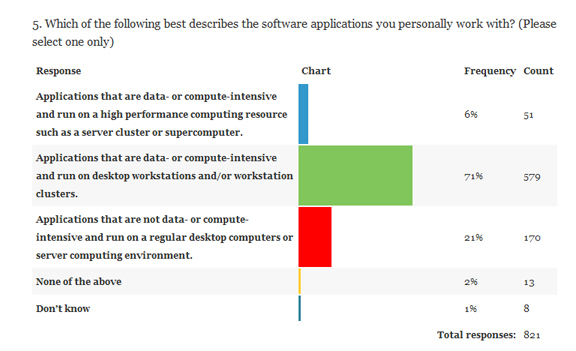
Statistics also showed that the majority of them (70%) work with applications that are data- or compute-intensive and works on workstations and/or workstation clusters. This indicates, in addition to individual workstations, participants may also need to rely on high-performance computing (HPC) resources to get the jobs done.
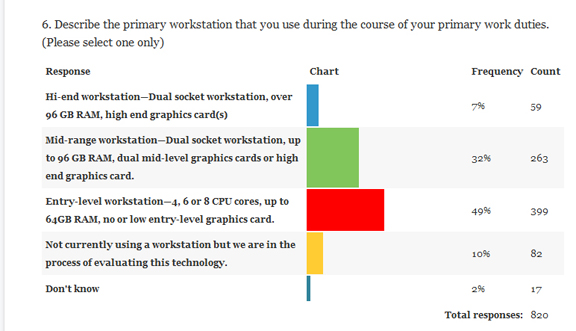
Nearly half of the participants (49%) described their workstations as "Entry level," comprising 4, 6, or 8 CPU cores, up to 64GB RAM, no or low entry-level graphics card. Roughly one-third (32%) described their workstations as "Mid-range" machines with dual socket, up to 96 GB RAM, dual mid-level graphics cards or high end graphics card. Only 7% boasted working with "High-end" machines.
The statistics revealed above are based on partial survey results. The survey is still ongoing. It's set to close on July 17. At the conclusion of the study, participants will be entered into a drawing for an HP Z1, an all-in-one workstation. People who complete the survey will also receive a summary of the detailed findings.
To take the survey, go to www.deskeng.com/workstations.
For more on the survey, along with Tom Salomone's tips on selecting the right workstation for your workflow, watch the video below:


Kenneth Wong is Digital Engineering's resident blogger and senior editor. Email him at [email protected] or share your thoughts or suggestions at digitaleng.news/facebook.
Follow DE
Join over 90,000 engineering professionals who get fresh engineering news as soon as it is published.






About Us · Contact Us · Editorial Team · Advertising · Privacy Policy · Subscriber Services · © 2026 Digital Engineering 24/7 · Peerless Media