Helping design and engineering professionals discover, evaluate and specify technologies and processes that shorten the design cycle and enable success.


Alert!
Digital Engineering ceased publication on July 1, 2026. This website remains available as an archive of engineering content.
For inquiries or information, please email [email protected].

May 2026 Special Focus: Artificial Intelligence in Design and Simulation
In this Special Focus Issue, learn about the latest developments in the integration of artificial intelligence into engineering workflows.

April 2026 Special Focus Issue: Generative Design
In this Special Focus Issue, Digital Engineering takes a look at how generative design solutions can be used across different types of design problems and with a variety of manufacturing approaches to accelerate design space exploration, and…
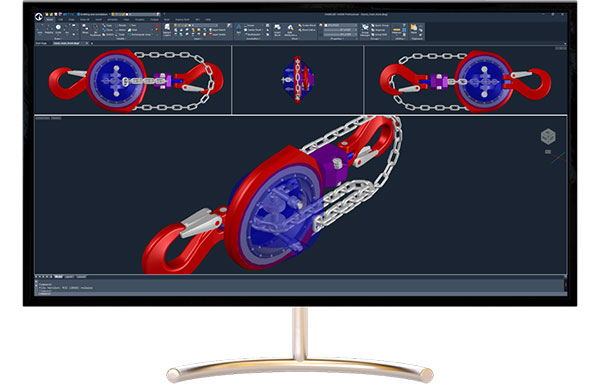
The IntelliCAD Technology Consortium (ITC) has released IntelliCAD 14.0. This major release from IntelliCAD Technology Consortium is focused on performance improvements, interface enhancements, and tools that streamline CAD workflows. The new dark theme gives IntelliCAD a modern look especially during long design sessions or in low-light environments. The updated interface also includes refreshed icons and theme options—Dark, Light, and Gray to personalize the workspace.
Enhancements in IntelliCAD 14.0 include faster performance for common tasks like Copy, Break, Move, and Union, along with support for generating QR codes using the QRTEXT and QRLEADER commands. Table editing now includes auto-fill functionality, and the Data Extraction tool has been improved with a new filter option for refining output.
For users working on multiple monitors, IntelliCAD now supports detachable drawing windows. A new transparency option for the command window adds visual flexibility when working on complex drawings.
Additional updates include support for Autodesk Revit 2025 files, SVG import, and an improved DGN import process. Users working with geospatial data will benefit from new Esriimagery support in the GEO command, after discontinuation of Microsoft Bing Maps access.
IntelliCAD 14.0 also includes application programming interface enhancements for LISP and the .NET platform. A new VLISP command launches the IntelliCAD Lisp Debugger inside Visual Studio Code, and several new LISP functions provide more direct access to object properties. On the .NET side, performance has been improved for specific view-related functions.
“IntelliCAD 14.0 reflects our commitment to listening to real-world feedback from our members and delivering the tools they need most,” says Shawn Lindsay, president of the ITC. “We remain focused on providing an open, dependable platform that developers can build on—and on offering a powerful alternative in the CAD software market.”
To see IntelliCAD 14.0 in action, watch the Overview Movie hosted by Natalia Kukushkina.
IntelliCAD 14.0 is supported on Microsoft Windows 11, Windows 10, and Windows 8, 64-bit versions. IntelliCAD Mobile Viewer versions are available for Windows desktop, Google Android, Apple macOS and iOS.
IntelliCAD users can contact ITC members for details about availability of IntelliCAD software. Companies interested in more details about IntelliCAD and membership in the ITC should contact the ITC directly.
Sources: Press materials received from the company and additional information gleaned from the company’s website.


DE's editors contribute news and new product announcements to Digital Engineering. Press releases may be sent to them via [email protected].
Follow DE
Join over 90,000 engineering professionals who get fresh engineering news as soon as it is published.






About Us · Contact Us · Editorial Team · Advertising · Privacy Policy · Subscriber Services · © 2026 Digital Engineering 24/7 · Peerless Media