Helping design and engineering professionals discover, evaluate and specify technologies and processes that shorten the design cycle and enable success.



May 2026 Special Focus: Artificial Intelligence in Design and Simulation
In this Special Focus Issue, learn about the latest developments in the integration of artificial intelligence into engineering workflows.

April 2026 Special Focus Issue: Generative Design
In this Special Focus Issue, Digital Engineering takes a look at how generative design solutions can be used across different types of design problems and with a variety of manufacturing approaches to accelerate design space exploration, and…
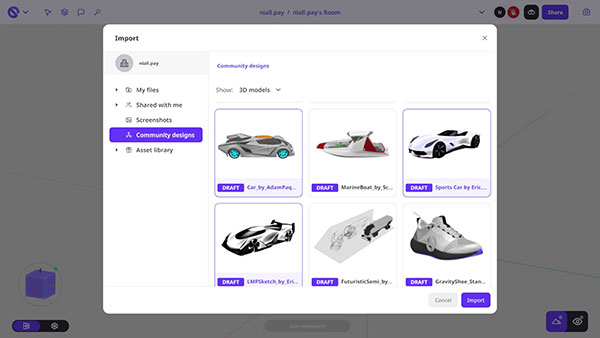
The screen app for Gravity Sketch gets a host of upgrades for 6.6.6. These latest updates make it faster to set up your workspace, easier to iterate without switching contexts, and clearer when you're watching virtual reality (VR) users work, according to Gravity Sketch.
You can use screen to prep a room before heading into VR, or as your primary way of reviewing and collaborating on 3D content.
Setting up for a design diagnostic or collaborative review used to mean importing files one by one. You can now select and import multiple files of the same type in a single action, with a combined stats panel showing each file name, its dimensions, and the total size of everything you’ve selected.
It’s a change that adds up quickly when you’re pulling together several reference models before a session. Gather everything you need from screen, then jump into VR with your workspace already ready to go.
This is available automatically to any user with import permissions on the screen app.
Creating a design variation used to mean heading into VR or working around the limitation with manual exports. You can now duplicate any selected sketch object, control point, or entire layer directly in the screen app, using the duplicate button in the selection toolbar, Ctrl + D, or a right click in the layers menu. A notification confirms the action, and duplicates appear in place.
For physical product design workflows, this is an unlock. Basic edits and variations can happen from screen, which means more directions explored before committing to expensive downstream processes or physical samples. It tightens iteration loops at a stage where speed matters.
The screen app now shows a clear view of the Gumball tool and the specific selection of faces, edges, or points a VR user is working with. The visual display of points and edges in edit mode has also been improved.
These changes make the shared view more transparent for everyone in the room. During live design reviews, screen-based stakeholders can follow the geometry precisely, which means less re-explaining and faster alignment between VR creators and the people giving feedback.
Sources: Press materials received from the company and additional information gleaned from the company’s website.


DE's editors contribute news and new product announcements to Digital Engineering. Press releases may be sent to them via [email protected].
Follow DE
Join over 90,000 engineering professionals who get fresh engineering news as soon as it is published.






About Us · Contact Us · Editorial Team · Advertising · Privacy Policy · Subscriber Services · © 2026 Digital Engineering 24/7 · Peerless Media