Helping design and engineering professionals discover, evaluate and specify technologies and processes that shorten the design cycle and enable success.


Alert!
Digital Engineering ceased publication on July 1, 2026. This website remains available as an archive of engineering content.
For inquiries or information, please email [email protected].

May 2026 Special Focus: Artificial Intelligence in Design and Simulation
In this Special Focus Issue, learn about the latest developments in the integration of artificial intelligence into engineering workflows.

April 2026 Special Focus Issue: Generative Design
In this Special Focus Issue, Digital Engineering takes a look at how generative design solutions can be used across different types of design problems and with a variety of manufacturing approaches to accelerate design space exploration, and…
ZWCAD Software Co. Ltd. (ZWSOFT) has announced the availability of the 2016 edition of ZW3D, its integrated CAD/CAM solution designed for the complete product development process. ZW3D 2016, says the company, delivers much more collaborative product design to connect seamlessly with your upstream and downstream partners. Key new features ZWSOFT highlights include newly developed PMI (product manufacturing information) annotations, 3D sketching and expanded sheet-metal capabilities.
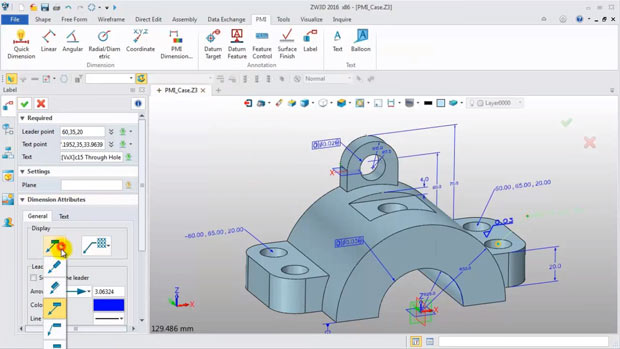
Using ZW3D's new PMI 3D annotation capabilities, designers can now define information such as geometric dimensions, surface finish and material specifications directly on 3D entities. This, the company states, can help simplify manufacturing processes, streamline production, cut quotation time and enhance collaboration with stakeholders who don’t work with CAD.
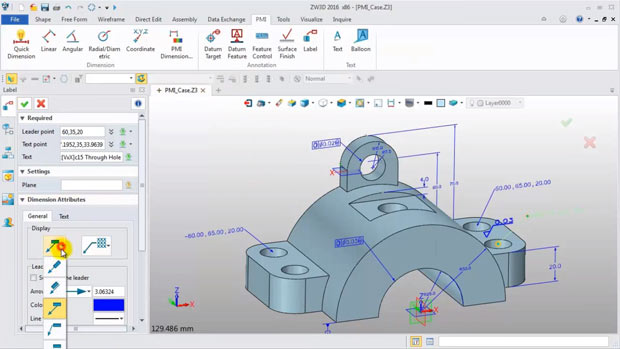 ZW3D 2016's newly developed 3D PMI annotation capabilities can enhance manufacturing process communications by enabling designers to define information such as geometric dimensions and surface finish directly on 3D entities. Image courtesy of ZWCAD Software Co. Ltd.
Designers can use ZW3D 2016's new 3D Sketch feature in an independent environment to snap or constrain sketches to any face or 3D wireframe entity. A 3D sketch can be used as a sweep path or a drive curve of a loft feature. In addition to auto constraints, you can manually add dimensions and constraints as needed. 3D Sketch, adds the company, can help facilitate piping design.
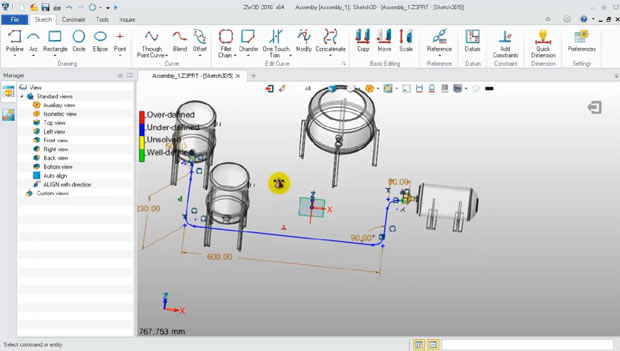 The new 3D Sketch feature in ZW3D 2016 is an independent environment that can be used to create a 3D profile with added dimensions and constraints. Image courtesy of ZWCAD Software Co. Ltd.
New sheet metal features introduced in ZW3D 2016 include the ability to create extruded flanges on both open and closed profiles as well as the ability to create a swept flange with an open sketch along edges of a stationary face.
ZW3D's built-in file translation features have been upgraded in version 2016 to support the latest releases of such applications as CATIA V4/V5/V6, Inventor 2016, NX 10, PTC Creo 3.0, Solid Edge and SOLIDWORKS. It also supports such file formats as ACIS 2016, Parasolid 28.1+, STEP and 3DXML. Additionally, ZW3D comes with healing and freeform tools for finding and repairing imported models. ZW3D designs can be exported in a variety of formats including CATIA, IGES, Parasolid, SAT, STEP, STL and 3D PDF.
ZWSOFT says that ZW3D 2016’s Quick Mill roughing and finishing capabilities see improved accuracy by a factor of 3x. Among the other CAM module enhancements are a new path pattern guide, simplified cut boundary setting and a new region order control parameter for managing the sequence of machining regions.
“We’ve been devoted to developing innovative and better CAD products for over a decade,” said Colin Lin, director of ZW3D Overseas Business in a press statement, “ZW3D 2016 comes with numerous enhancements to be even easier and more intuitive to learn and use. ”
To download a free 30-day evaluation of ZW3D CAD/CAM 2016 and see full details on what’s new in this release, click here.
Watch a video on ZW3D 2016’s new PMI 3D annotation capabilities.
Watch a video on ZW3D 2016’s new 3D Sketch options.
Download the full details on what’s new in ZW3D 2016 (78-page PDF).
Click here to go to the main ZW3D landing page.
See why DE's editors selected ZW3D 2016 as their Pick of the Week.
Sources: Press materials received from the company and additional information gleaned from the company's website.


Anthony J. Lockwood is Digital Engineering's founding editor. He is now retired. Contact him via [email protected].
Follow DE
Join over 90,000 engineering professionals who get fresh engineering news as soon as it is published.






About Us · Contact Us · Editorial Team · Advertising · Privacy Policy · Subscriber Services · © 2026 Digital Engineering 24/7 · Peerless Media