Helping design and engineering professionals discover, evaluate and specify technologies and processes that shorten the design cycle and enable success.



May 2026 Special Focus: Artificial Intelligence in Design and Simulation
In this Special Focus Issue, learn about the latest developments in the integration of artificial intelligence into engineering workflows.

April 2026 Special Focus Issue: Generative Design
In this Special Focus Issue, Digital Engineering takes a look at how generative design solutions can be used across different types of design problems and with a variety of manufacturing approaches to accelerate design space exploration, and…
SIMSOLID, a new simulation program that came online earlier this year, sets out to skip both -- "no geometry editing, no meshing," the company writes.
For a simulation program, SIMSOLID demands a surprisingly small footprint. The installation file is 20MB. The full installed program is less than 40MB. SIMSOLID is a partner product of the browser-based CAD software Onshape. So, once you have installed SIMSOLID, you'd be prompted to connect to your Onshape repository for design files. If you do not use Onshape, you can still import design files as STL, but the CAD-to-FEA transfer is a lot smoother for Onshape account holders.
SIMSOLID currently gives you three types of analysis options -- structural, modal, and thermal. Running analysis is pretty straightforward; it follows the standard steps to define the material, define the fixed or rotation points, add stress, pressure, heat, and loads, then solve the scenario. What's different is the lack of prep work. Since the software doesn't use meshing, you don't need to hunt for and strip out minor features. Well, you can choose to do that in your CAD program, but the volume of details doesn't affect your meshing time, so what's the point? On the other hand, if you're unsure about the minor details' effect on the accuracy of your results, the meshless approach allows you to include everything without paying a penalty in processing.
SIMSOLID has a tremendous time-saving feature for working with assemblies. Based on your geometry, SIMSOLID can deduce what types of joints should connect different parts. So the software can automatically populate the assembly with bonded, sliding, or bolted connectors without your manual intervention. The results can be displayed in still images or animation clips of displacement magnitude, Von Mises stress, major and minor stresses, sheer stress, and more. You may also obtain the numeric stress values of a specific region.
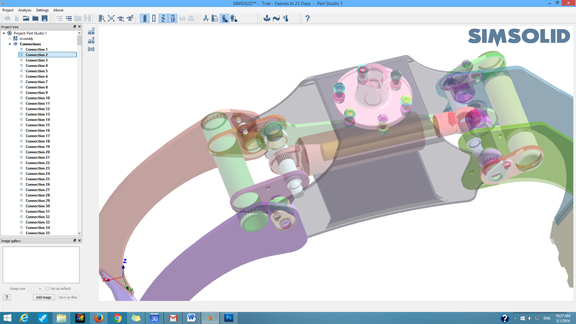 SIMSOLID automatically scans the assembly geometry and generates appropriate connectors for joints.
The UI's tools to rotate the model, assign materials, define loads, and visualize the results are intuitive and simple. The meshless approach speeds up the analysis process by eliminating various steps in the setup. With a minimal number of menu items and input fields, the UI is much more accessible to design engineers who may not be proficient in general purpose simulation software. The conspicuous absence of Undo, however, may need some explanation.
Ken Welch, SIMSOLID's founder and CEO, explained, "We made a conscious decision to leave all the heavy lifting on the CAD side. As such, we have very few chained operations, where it is beneficial to have Undo. Most of our operations are simple apply/modify/delete types, so Undo really does not provide much benefit."
For the most part, the absence of Undo in SIMSOLID doesn't interfere with the normal simulation workflow. However, the Undo gives you the confidence that you won't have to restart a process when human error results in mishaps. Without it, you're required to be more cautious. When I pointed it out, Welch said he'll consider Undo as a user request.
Explaining its technology, SIMSOLID writes, "SIMSOLID does not use the point-wise degrees of freedom (DOF) inherent in traditional FEA. SIMSOLID DOF are functionals with geometrical support in the form of volumes, areas, line clouds, and point clouds. This provides the ability to handle geometrical imperfections, as well as assembly contact imperfections like gaps, penetrations and ragged contact areas ... [The approach allows] very large and/or complex assemblies to be solved quickly on desktop class PCs."
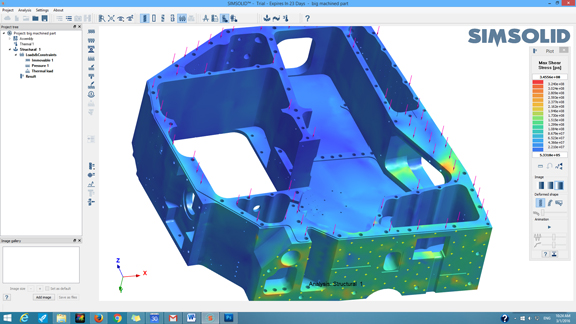 With no need for mesh generation, SIMSOLID lets you run analysis straight on detailed geometry without simplifying it.
The software's ability to accomplish heavy duty simulation using standard desktop machines is clear. For design engineers looking for guidance to counteract structural and thermal loads, SIMSOLID's simple, straightforward approach is ideal. Are results from meshless FEA comparable to those from traditional FEA in advanced simulation jobs? That is a question I'm unqualified to answer, but hope to investigate further with the help of industry experts in the near future.


Kenneth Wong is Digital Engineering's resident blogger and senior editor. Email him at [email protected] or share your thoughts or suggestions at digitaleng.news/facebook.
Follow DE
Join over 90,000 engineering professionals who get fresh engineering news as soon as it is published.






About Us · Contact Us · Editorial Team · Advertising · Privacy Policy · Subscriber Services · © 2026 Digital Engineering 24/7 · Peerless Media