Helping design and engineering professionals discover, evaluate and specify technologies and processes that shorten the design cycle and enable success.



May 2026 Special Focus: Artificial Intelligence in Design and Simulation
In this Special Focus Issue, learn about the latest developments in the integration of artificial intelligence into engineering workflows.

April 2026 Special Focus Issue: Generative Design
In this Special Focus Issue, Digital Engineering takes a look at how generative design solutions can be used across different types of design problems and with a variety of manufacturing approaches to accelerate design space exploration, and…
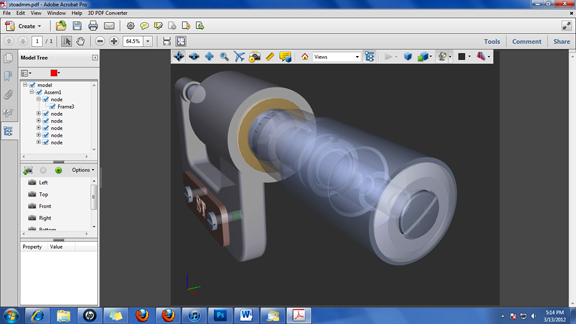
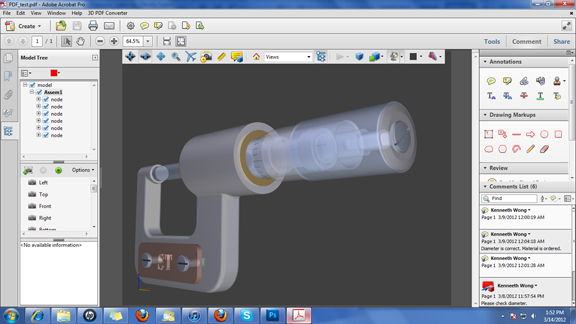
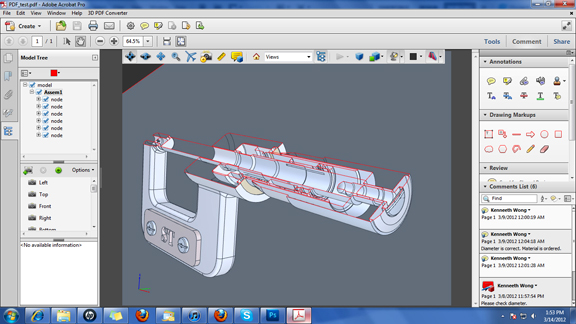
Most people think of Adobe Acrobat as the format for exchanging graphics-rich documents, like the cover of a magazine or a product brochure. With Tetra 4D's plug-in 3D PDF Converter, you could be using it to exchange 3D CAD designs, along with comments and custom views.
Tetra 4D is a founding member of the 3D PDF Consortium, the industry group "with a vested interest in seeing 3D PDF and the PRC [product representation compact] data format continue to be developed as a truly open standard for visualization, collaboration, data exchange, and the long term archiving and retrieval of engineering, manufacturing,AEC/BIM, geospatial, and scientific and cultural and historical information."
Previously, Adobe had actively pursued the manufacturing market, emphasizing Acrobat's ability to convert 3D CAD files into 3D PDF documents. But the company seemed to have diverted its attention elsewhere after Acrobat 9's release. With the formation of 3D PDF Consortium, the move to promote PDF as 3D design exchange format may regain momentum. (For more, read "The Return of Adobe 3D PDF," February 1, 2012.)
With Tetra 4D's 3D PDF Converter installed, you can use Acrobat X Pro to view, inspect, annotate, and republish 3D design files. (Tetra 4D's documentation lists CATIA V6, PTC Creo Elements and Parametric, SolidWorks 2010/2011, Siemens NX 7.5, Inventor 2011/2012, and Solid Edge ST3 formats as supported files. In my tests, the software performs better with neutral formats, such as IGES, STEP, or STL. It sometimes produces error message when converting native CAD files directly.)
Acrobat X Pro allows you to inspect the feature tree of imported assembly models, giving you more than a single piece of geometry or a collection of surfaces and solids. Furthermore, the software let you create customized cross-sectional views to highlight certain internal regions. A slew of display options (shaded, illustrated, solid with outlines, and so on) give you a way to create the look you want for owner manuals, technical illustrations, and instructions.
New version of Acrobat X Pro gives you the option to add comments and annotations and share it with someone for collaborative design reviews. The software also accommodates synchronous collaboration, with more than one users reviewing the same document and comment stream online.
Published documents with embedded 3D designs can be viewed by Adobe Acrobat Reader, available as a free download. If you check off the Reader Extended PDF option during export, recipient will be able to view not only the 3D model but also the nested comments.
Extended use of CAD data, or the use of 3D design data outside engineering, will most likely be driven by the efficiency, accessibility, and robustness of neutral formats, such as Siemens PLM Software's JT, SolidWorks eDrawings, and others. The less cumbersome it is to use, the more likely the format will gain acceptance. In that respect, Adobe's 3D PDF has one serious advantage: The free PDF reader required to view Acrobat-generated 3D files has already been widely adopted by engineers and non-engineers alike.
For another 3D PDF solution, read "Quadrispace: Template-Driven 3D PDF Authoring," August 2011.
For more watch the video clip below.


Kenneth Wong is Digital Engineering's resident blogger and senior editor. Email him at [email protected] or share your thoughts or suggestions at digitaleng.news/facebook.
Follow DE
Join over 90,000 engineering professionals who get fresh engineering news as soon as it is published.






About Us · Contact Us · Editorial Team · Advertising · Privacy Policy · Subscriber Services · © 2026 Digital Engineering 24/7 · Peerless Media