Helping design and engineering professionals discover, evaluate and specify technologies and processes that shorten the design cycle and enable success.


Alert!
Digital Engineering ceased publication on July 1, 2026. This website remains available as an archive of engineering content.
For inquiries or information, please email [email protected].

May 2026 Special Focus: Artificial Intelligence in Design and Simulation
In this Special Focus Issue, learn about the latest developments in the integration of artificial intelligence into engineering workflows.

April 2026 Special Focus Issue: Generative Design
In this Special Focus Issue, Digital Engineering takes a look at how generative design solutions can be used across different types of design problems and with a variety of manufacturing approaches to accelerate design space exploration, and…
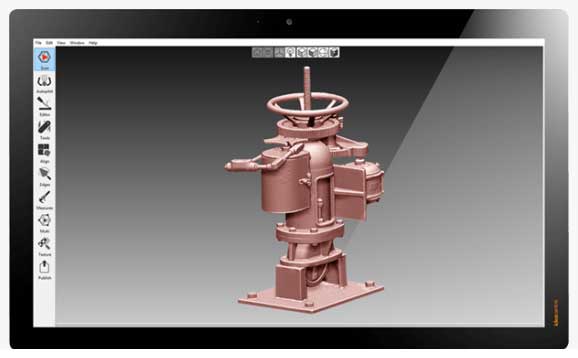
Artec 3D makes available Artec Studio 15, the latest version of its software. New Scan-to-CAD functionality allows for basic quality control and basic reverse engineering operations to be conducted directly in Artec Studio 15. For CGI artists, enhanced color reproduction and model-to-model texture transfers will make creating life-like models easier.
“Our advancements in 3D scanning algorithms help us outpace the industry in accuracy, speed and usability, while our growing number of features save users of all skill levels time," says Artyom Yukhin, president and CEO of Artec 3D. "This year’s Scan-to-CAD features will create a huge leap in productivity for users conducting reverse engineering and inspection tasks.”
New custom groups can now be created in Artec Studio 15, allowing users to work with multiple sets of data at the same time and organize them in custom folders. New automated workflows, including boosted Autopilot and more advanced auto-align functionality, next-generation texture registration and faster project loading that now revolves around each scan having a dedicated CPU will increase user productivity. A visually redesigned workspace and customizable interface allow users to tailor the software to their preferences.
The smart scanning mode for the Micro desktop scanner enables objects to be digitized much faster than if done manually, according to the company. By calculating the most effective scanning path, Smart Scanning Mode captures the optimal quantity of surfaces using the least number of frames to achieve fully automatic, ultra-high-resolution scans and at minimum size for fast processing.
Users can now conduct quick quality control operations within Artec Studio by aligning scans to imported CAD models, including STEP, IGES and X_T formats. Fast surface distance map comparisons and micron-accurate measurements of all created 3D models allow for easy identification of inconsistencies between a scan and CAD model.
Scans can also be fitted with CAD primitives, such as spheres, cones, planes and cylinders. This allows for accurate measurements to be taken between actual scans and these simple geometrical shapes. For more complex processes and tools, users can export to any full package inspection software such as Geomagic Control X.
Artec Studio’s CAD primitives also streamline workflows for reverse engineering. After a scan is completed, primitives can be used to extract key geometrical data in a CAD format that can be immediately used in SolidWorks or other CAD software.
In addition, Artec Studio 15’s Precise Positioning feature lets users position models in the world coordinate system. Correctly positioned models with primitives aligned to the scan data can be exported as popular CAD formats for an easy transition directly into SolidWorks, Geomagic Design X and other CAD software.
With Artec Studio 15, color will be captured and displayed correctly thanks to multiple automated features. Without manually predefining the area of application, the software filters out unwanted color data from behind an object.
Refined algorithms search across multiple scans for correct color substitutes. This feature works similarly to the popular Glare Reduction tool.
Another time-saving feature is model-to-model texture transfer. Users can clone textures from existing models and transfer them directly to new models.
Sources: Press materials received from the company and additional information gleaned from the company’s website.

From its early beginnings over a decade ago, Artec 3D has fast developed into the global leader for handheld 3D scanners in key industries, supplying the most cutting edge 3D technology to major clients in these respective areas.

DE's editors contribute news and new product announcements to Digital Engineering. Press releases may be sent to them via [email protected].
Follow DE






About Us · Contact Us · Editorial Team · Advertising · Privacy Policy · Subscriber Services · © 2026 Digital Engineering 24/7 · Peerless Media