Helping design and engineering professionals discover, evaluate and specify technologies and processes that shorten the design cycle and enable success.


Alert!
Digital Engineering ceased publication on July 1, 2026. This website remains available as an archive of engineering content.
For inquiries or information, please email [email protected].

May 2026 Special Focus: Artificial Intelligence in Design and Simulation
In this Special Focus Issue, learn about the latest developments in the integration of artificial intelligence into engineering workflows.

April 2026 Special Focus Issue: Generative Design
In this Special Focus Issue, Digital Engineering takes a look at how generative design solutions can be used across different types of design problems and with a variety of manufacturing approaches to accelerate design space exploration, and…
With access to seven specialized toolsets, subscribers have more than 750,000 intelligent objects, styles, parts, features and symbols to choose from when drawing. Designers can edit scanned drawings and convert raster images into DWG objects all while working in a familiar AutoCAD interface.
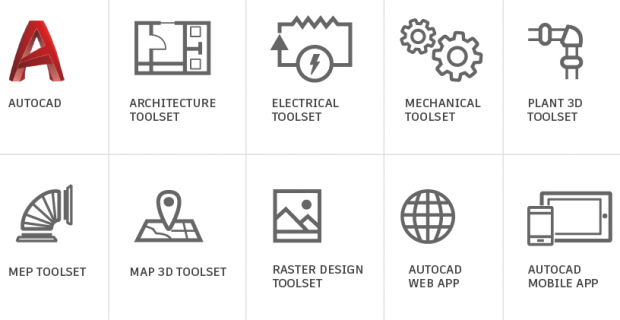 When users subscribe to AutoCAD 2019 including specialized toolsets users will be able to download AutoCAD and the Architecture, Mechanical, Electrical, Map 3D, MEP, Raster Design and Plant 3D toolsets from the Autodesk Account portal or from the Autodesk Desktop App. Image courtesy of Autodesk.
When users subscribe to AutoCAD 2019, they gain access to the following toolsets:
An AutoCAD 2019 or AutoCAD LT 2019 subscription also includes access to the new AutoCAD web app and the AutoCAD mobile app.
The AutoCAD web app enables users to access AutoCAD directly in a web browser via web.autocad.com. Simply log in to your Autodesk account and quickly access Trusted DWG files, core 2D drafting and editing tools, including Xref support, and layer management.
Make edits on the go. With the AutoCAD mobile app, you can view, edit, create, and share CAD drawings anytime, anywhere. Download DWGs to a device to access them even when without WiFi. Available across Windows, Android and iOS devices, AutoCAD mobile app is also optimized for the iPhone X, iPad Pro and Windows Surface.
For more details on this release, visit Autodesk.
Sources: Press materials received from the company.


DE's editors contribute news and new product announcements to Digital Engineering. Press releases may be sent to them via [email protected].
Follow DE






About Us · Contact Us · Editorial Team · Advertising · Privacy Policy · Subscriber Services · © 2026 Digital Engineering 24/7 · Peerless Media