Helping design and engineering professionals discover, evaluate and specify technologies and processes that shorten the design cycle and enable success.



May 2026 Special Focus: Artificial Intelligence in Design and Simulation
In this Special Focus Issue, learn about the latest developments in the integration of artificial intelligence into engineering workflows.

April 2026 Special Focus Issue: Generative Design
In this Special Focus Issue, Digital Engineering takes a look at how generative design solutions can be used across different types of design problems and with a variety of manufacturing approaches to accelerate design space exploration, and…
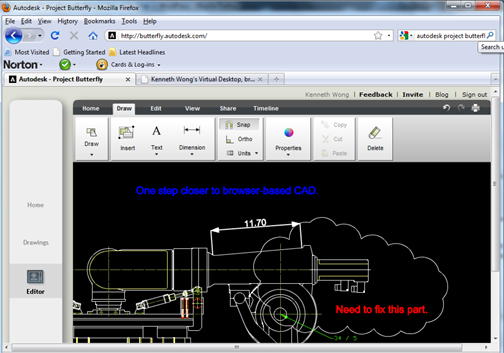
Need to edit, review, annotate, or share DWG files? Don't bother launching AutoCAD. Just launch Internet Explorer or Mozilla Firefox.
Last week, Autodesk Project Butterfly took flight, fluttering towards the computing cloud to join its cousin Project Twitch. Like its predecessor, Project Butterfly teases us with the the promise of browser-based CAD. According to Amjad Hanif, Autodesk's senior director of product management for emerging products, nearly 4,500 people rode on the wings of Butterfly during the week it emerged from the development cocoon.
Made possible by Autodesk's acquisition of VisualTao, Project Butterfly lets you upload a DWG file into a remote server, then edit, annotate, and review it with a number of collaborators. The preview code is stable and easy to run. It works like a simplified version of AutoCAD or AutoCAD LT embedded inside a browser window. Familiar commands and functions -- zoom extent, rectangle select, polyline, to name but a few -- are arranged in the ribbon-bar menu. The absence of File > New suggests that, at least in this early stage, the technology is not recommended for creating a drawing from scratch; it's better suited for editing, redlining, and annotation.
While snapping to the objects' corners or edges is relatively easy, snapping to midpoints of lines or centers of arcs proves challenging, because inference lines (the dotted lines that automatically appear to guide you with your placements in AutoCAD and AutoCAD LT) don't always appear.
In my test run, I encountered a few noticeable moments of latency, especially when executing higher-level commands like Mirror or Scale. (The delayed response made the mouse seems sticky.) Hanif said studying the latency issue is a priority for the development team.
To test out the co-editing function, I teamed up with DEVELOP3D's Martyn Day, a fellow CAD reporter. Most viewing and markup programs facilitate collaboration sessions involving more than one user, but they generally let one user control the session while others remain idle (that is, one person edits while the others watch). By contrast, Butterfly lets both Martyn and I edit the same drawing simultaneously.
Butterfly is a technology still in metamorphosis, so subsequent updates are destined to be nimbler and faster. In time, it may develop into a new specie of CAD, free to float in the cloud and land on a browser upon request, unencumbered by hardware requirements.
For more, watch the video clip below (where Martyn Day put in a cameo appearance in the form of a gray mouse).


Kenneth Wong is Digital Engineering's resident blogger and senior editor. Email him at [email protected] or share your thoughts or suggestions at digitaleng.news/facebook.
Follow DE
Join over 90,000 engineering professionals who get fresh engineering news as soon as it is published.






About Us · Contact Us · Editorial Team · Advertising · Privacy Policy · Subscriber Services · © 2026 Digital Engineering 24/7 · Peerless Media