Helping design and engineering professionals discover, evaluate and specify technologies and processes that shorten the design cycle and enable success.



May 2026 Special Focus: Artificial Intelligence in Design and Simulation
In this Special Focus Issue, learn about the latest developments in the integration of artificial intelligence into engineering workflows.

April 2026 Special Focus Issue: Generative Design
In this Special Focus Issue, Digital Engineering takes a look at how generative design solutions can be used across different types of design problems and with a variety of manufacturing approaches to accelerate design space exploration, and…
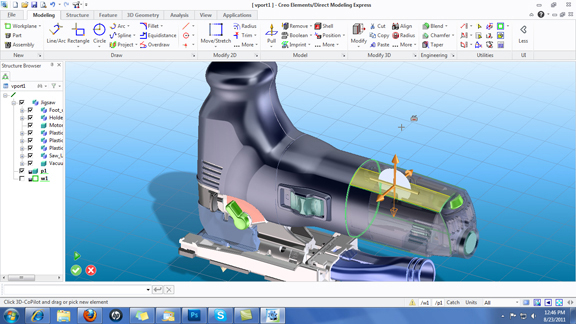
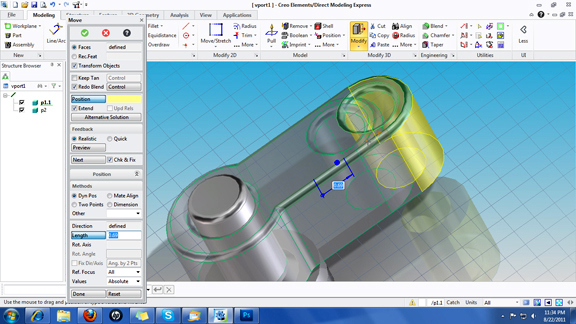
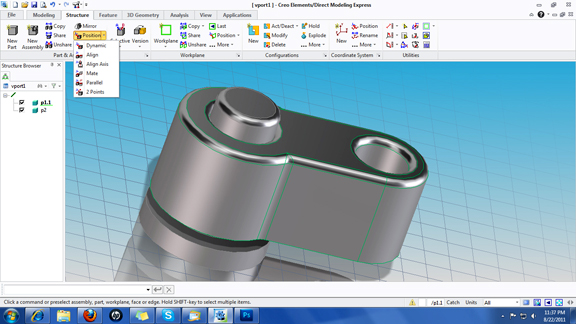
A few weeks ago, we got the first glimpse of a PTC Creo app, in the form of a free paint and draw program called Creo Sketch. This week, PTC comes out swinging again, with a free direct editing application called Creo Elements/Direct Modeling Express (CE/Direct Modeling Express).
If you’ve seen or used Co/Create, PTC's push-pull CAD modeler, you’ll find yourself in semi-familiar territory. CoCreate's Copilot (the control arrows for moving and rotating features) greets you from its new home, CE/Direct Modeling Express. You may think of CE/Direct Modeling Express as a trimmed down version of CoCreate, derived from the same underlying technology. The software allows you to push, pull, rotate, and move faces and features with little or no concerns for feature history or parametric history -- a freedom that's ideal for exploring design concepts before committing to production or manufacturing.
CE/Direct Modeling Express's flexible modeling approach is not just for 3D modeling; it extends to 2D sketching as well. The software is quite good at guessing your desired constraints, so if you push lines and arcs around in 2D, you’ll find nearby segments reshaping according to how you’re moving the geometry.
In CE/Direct Modeling Express, part modeling and assembly modeling are just a tab away. The software makes little or no distinction between the two. You can, for instance, create a new part within the assembly environment by sketching a profile on a new work plane and extruding it into a solid. It's a lot easier to design interlocking parts (for instance, creating a shaft that must fit into a hole in an existing part) when you don't need to launch a new modeling window to create a new part.
The software’s present import, or 3D reading, is limited to neutral formats mostly. So if you want to work on a SolidWorks, Inventor, or Solid Edge file, you'll have to convert it from its native format to a neutral format (IGES, STEP).
CE/Direct Modeling Express has Realism Enhancement options for you to activate ground reflections, shadows, background colors, and rendered surfaces. It's not as refined as ray-traced rendering, but it's sufficient to give you a good idea of the finished product's aesthetic appeal.
CE/Direct Modeling Express and its predecessor Creo Sketch serve as proof of PTC's plan to drastically reform its CAD and PLM strategy, shifting from an all-inclusive package to a series of standalone modules. For quick concepts in 3D, or quickly reshaping imported 3D CAD data through a neutral file format, CE/Direct Modeling Express offers more than enough functions -- far more than what you could rightfully expect from a free program. There is, however, a limit to the number of parts you can work with in assembly -- it’s 60.
The limit is removed once you upgrade to the commercial version, Creo Elements/Direct Modeling. The commercial version also gives you sheet metal tools, along with decal (embedding 2D images in your design), photorealistic rendering, and exporting STEP and IGES files.
For more, watch the video report below:


Kenneth Wong is Digital Engineering's resident blogger and senior editor. Email him at [email protected] or share your thoughts or suggestions at digitaleng.news/facebook.
Follow DE
Join over 90,000 engineering professionals who get fresh engineering news as soon as it is published.






About Us · Contact Us · Editorial Team · Advertising · Privacy Policy · Subscriber Services · © 2026 Digital Engineering 24/7 · Peerless Media