Helping design and engineering professionals discover, evaluate and specify technologies and processes that shorten the design cycle and enable success.


Alert!
Digital Engineering ceased publication on July 1, 2026. This website remains available as an archive of engineering content.
For inquiries or information, please email [email protected].
Sponsored

May 2026 Special Focus: Artificial Intelligence in Design and Simulation
In this Special Focus Issue, learn about the latest developments in the integration of artificial intelligence into engineering workflows.

April 2026 Special Focus Issue: Generative Design
In this Special Focus Issue, Digital Engineering takes a look at how generative design solutions can be used across different types of design problems and with a variety of manufacturing approaches to accelerate design space exploration, and…
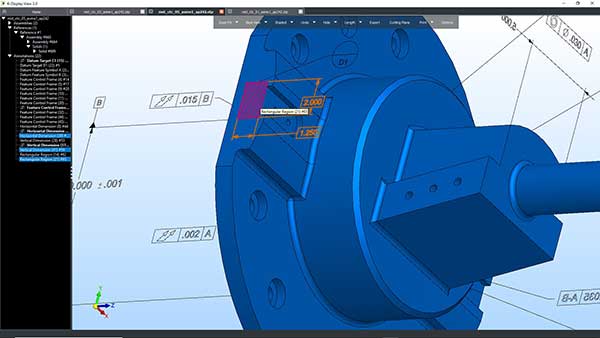
Kubotek3D introduces the 3.0 update of K-Compare and K-Display, tools for CAD interoperability. The company says this major release provides updates to its STEP and CAD file readers, several improvements to user interface elements, and new functions specific to each product. Each product consists of two modules. There is K-Compare Revision and K-Compare Validate; K-Display View and K-Display Convert.
All updated products are enhanced with support for STEP AP 242, the current version of the neutral CAD data format used by virtually all CAD vendors for support of model-based definition (MBD). Kubotek3D says STEP AP 242 defines critical manufacturing annotations including geometric dimensioning and tolerancing (GD&T), including the unambiguous relationship to the faces of the 3D model. MBD provides process efficiency by eliminating the need to translate the design into detail drawings. It also provides improved support automation of downstream activities such as NC machining and inspection.
The new STEP compression format—.stpZ—is also included in this release. Compressing STEP files into the stpZ format improves transfer of large data sets. For engineers receiving compressed stpZ files, K-Display Convert can uncompress them to standard stp files readable by most CAD programs.
The newest versions of leading CAD software products are now supported in this release, including:
Kubotek3D says it is now easier to compare two sets of hierarchical assembly CAD files, with support for quick side-by-side 3D graphical viewing of the entire assembly or just a set of paired parts. In the graphical view users can browse the difference results tree details and see face highlighting on the impacted parts.
There is a new automatic Locator View option in the K-Compare Revision report creation mode. Kubotek3D says this feature saves users time when creating and annotating extra explanatory views, by providing a quick frame of reference for views that are zoomed up on a part detail. A dynamically linked rectangle over the locator view indicates where on the part the main view window is displaying.
The company says K-Display 3.0 introduces basic feature recognition capabilities to help users quickly evaluate part details based on geometry. This feature works with all supported CAD formats. During file read K-Display scans the face geometry and topology to build lists of all machined holes, constant radius fillets, and general chamfers. It also includes a folder for each of these in the part tree. Data under each feature folder lists relevant sizes such as diameter and depth of a blind hole. Hovering the cursor over the faces of these geometric features also provides a ToolTip, which displays size information, aiding the user in process planning and selection of tools for NC programming.
Kubotek3D says K-Display View and Convert products allow anyone to open nearly any CAD file and re-publish models to standard formats. A new user option added to the K-Display products support the choice to read all non-primary variants of 3D data in CAD files. Examples include additional part configurations in a SolidWorks file, or screens saved as part of a Catia 5 file. Kubotek3D says having the option to decide on the reading of variants is important because for many user applications this data is unnecessary and can slow down file read. Yet in other cases having access to this variant data can be crucial to fully understanding the design.
Sources: Press materials received from the company and additional information gleaned from the company’s website.

Kubotek Kosmos serves stakeholders across the digital manufacturing & engineering space with 3D CAD and MBD-based software for end-users, as well as component technologies available for license by other developers of engineering software. Its…

DE's editors contribute news and new product announcements to Digital Engineering. Press releases may be sent to them via [email protected].
Follow DE






About Us · Contact Us · Editorial Team · Advertising · Privacy Policy · Subscriber Services · © 2026 Digital Engineering 24/7 · Peerless Media