Helping design and engineering professionals discover, evaluate and specify technologies and processes that shorten the design cycle and enable success.




Cut Retrieval-Augmented Generation (RAG) Hallucinations by 50%
Most teams hit the same wall with enterprise AI: LLMs that hallucinate, pipelines that don’t scale, and infrastructure that’s harder to design than the models themselves.

What Is Intelligent BOM Management? A Guide to Smarter Product Development
Learn how intelligent Bill of Materials (BOM) management helps teams collaborate, reduce errors, and bring innovative products to market faster with cloud-based PLM tools.
Professional workstations have come a long way over the past 5 years, thanks to advancements in GPU and CPU capacity, new cooling innovations and more. For design and engineering users, the advent of high core count chips and GPU (graphics processing unit) acceleration support within software products have helped improve productivity.
But there are a lot of hardware choices out there, including fast gaming PCs and consumer-grade devices that some design and engineering users have found to be effective tools at a lower price.
We spoke to a number of workstation vendors and consultants about the professional workstation landscape, the benefits of these devices and workflows where users might be able to use other types of computer hardware.
What distinguishes a “professional workstation” from a gaming or consumer-style computer?
Josh Covington, Managing Director, Marketing & Sales, Velocity Micro: Different builders will define it in different ways, but for us it’s a few key things.
One is the motherboard. Consumer-grade boards tend to use lower-grade capacitors, fewer VRMs [voltage regulator modules] and are often less feature-rich than workstation-class motherboards. This generally makes them less durable long term, especially when higher-end hardware is used.
Another is cooling. Consumer systems either don’t emphasize thermal dissipation at all, or in the case of gaming systems, often use those fans more for aesthetics than airflow. A true workstation needs to move air—ideally from front to back—and will need a number of high [cubic feet per minute] fans to do so. Our primary workstation chassis supports up to 15x120 mm fans, for example.
The graphics card also helps define a true professional workstation. Though workstations can certainly utilize—and depending on the application, actually benefit from—a consumer Geforce card, PCs with Pro cards can be classified as nothing but workstations.
CPUs can also distinguish pro workstations with AMD Threadripper and Intel Xeon W designed for those types of workloads. Similar to GPU though, there is definitely a place for consumer chips like AMD Ryzen and Intel Core in the workstation space too, depending on application.
MingYao Ding, Principal and VP of Engineering, Ozen Engineering: Although most professional engineering software can run on both professional workstations and gaming computers, there are significant usage differences to consider.
The three big areas to consider are RAM, reliability and cooling.
RAM often sets a practical limit on how big of a model you can work on in numerical simulation or CAD. Knowing the size of the largest model you work on and the RAM requirements will help you decide your RAM needs. In simulation, we typically try to predict the mesh size and memory needed per million cells to come up with a minimum RAM requirement. Today, 64GB of memory is a minimum starting point, and 256GB is typically considered to be a nicely provisioned machine.
Engineering workloads can often take hours or days of intensive computation to complete. This means a professional engineering workstation needs to be reliable and cooled efficiently for many days. Cooling and reliability are tightly related because the most common failure for electronics components is thermal cycling and overheating. Computational engineering work relies on a huge amount of computing. This means if a simulation project takes days to run, we expect the machine to be at maximum performance for that entire time. Insufficient cooling means the computer will throttle the CPU/GPU, which slows down the computer. Reaching the thermal limit also means the life of the computer is reduced.
A system that has good RAM, reliability and cooling is essential to getting computational engineering work done. However, you will often notice some additional differences geared towards gaining hire performance.
For example, professional CPUs are engineered with higher memory bandwidth, which means they scale much better at higher core counts than consumer CPUs. Very few consumer software products can make use of 32 or 128 cores effectively, but engineering simulation software will take maximum advantage of every physical core on a CPU. Similarly, professional engineering work often results in 100 GB or even 1 TB files, and reading or writing this data to an SSD [solid-state drive] can be a time-consuming process.
GPUs are becoming more and more prominent in engineering simulations as well. Here, the key deciding factor is the GPU memory size. A GPU with 2x memory will allow you to solve a problem 2x as big, and problems get bigger and bigger every year. Consumer-grade GPUs will greatly limit the problems you can solve.
Chris Ruffo, Worldwide Segment Lead, Architecture, Engineering and Product Development, Lenovo: Gaming systems are designed to deliver thrilling experiences when playing consumer games, which translate to fast graphics and performance for a short period of time. When subjected to intense industry workloads, gaming solutions often cannot maintain high levels of performance over extended periods. We have had customers come to us complaining that third-party gaming solutions overheated when subjected to intense design and engineering workloads. A Lenovo workstation on the other hand is purposely built for engineering workloads. Unlike gaming solutions, Lenovo P Series Workstations are certified from independent software vendors (ISVs) to ensure that the most critical applications will run intense workloads all day long on chosen hardware, providing optimal performance and a high-quality user experience.
All computers are made of discrete components, CPUs, memory, storage and with the case of workstations, a discrete GPU. How these components are engineered together has a profound impact on performance and reliability of the solution. Thermal management is a critical engineering consideration for all workstations. From our tri-channel cooling system in many ThinkStations to heat dissipation technology deployed in our ThinkPads, thermals are managed to ensure maximum performance of all discrete components and overall health and reliability of the workstation system.
Carl Osterwisch, Abaqus Support Manager, GoEngineer: There are many similarities between a workstation and a gaming/consumer-grade computer. Professional-grade workstations tend to use high-end components, and rigorous testing/certification processes to provide robust performance, and prioritize support issues with major software solution providers.
It is easy to spend the same amount of money or get the same superficial specs in a gaming machine and not experience professional results. Professional workstations tend to (or should):
Do your customers generally have a preference? What questions/concerns do they typically have when selecting hardware for their application, and the price/performance trade-offs involved?
Covington, Velocity Micro: We typically see professionals start in the workstation category and gamers/consumers/enthusiasts start with those types of builds, but often similar hardware is available for each. Most customers focus more on overall performance and value for their work than defining what type of PC they’re buying.
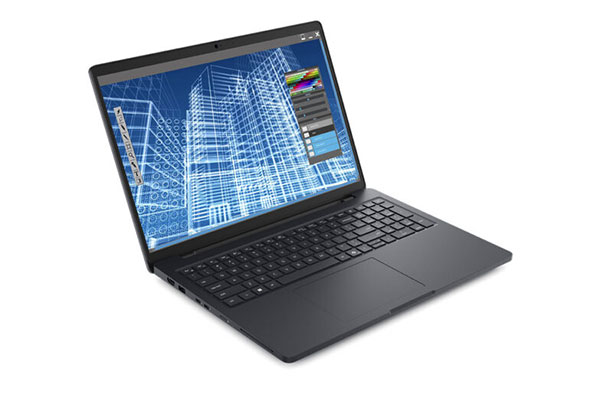
The Dell Pro Max 16 offers built-in AI support. Image courtesy of Dell Technologies.
For those workstation shoppers, we always ask what specific applications they are using. This helps us choose between Geforce and Pro GPUs and high core count versus high core frequency CPUs. Final choices often come down to budget constraints though, rather than the dream machine for their application. Not everyone can afford a $15,000 AMD Threadripper Workstation, even if that may be the best choice for them.
MingYao Ding, Ozen: We work with engineering teams where simulation is essential to reducing their product development time. This means fast and reliable simulation is very important to them and they always go with professional workstations.
However, with the vast selections of computers available, they always have lots of questions on how to select the right hardware for their application.
The first step is always figuring out the typical size of the problem faced by the customer. Fortunately, simulation tools will run on any modern hardware so most customers will first install the simulation software on their current hardware to get a feel for the problem size. From this information we can calculate the size of memory needed. The trade-off our customers work on is between speed and cost. The more CPU cores/GPU a system has, the faster it runs, but the cost can increase dramatically. Some software runs only on CPU, others on the GPU, and still others a mix. Some CPUs have more cores; others have higher clock speed or memory bandwidth.
We, along with our partners, run extensive benchmarks of CPU and GPU scaling to provide reliable recommendations to our customers. The good news is with the new generation of products from NVIDIA, AMD and Intel, we now have workstations with the same power as a cluster from just a few years ago, at a fraction of the price.
Ruffo, Lenovo: Design and engineering professionals in the architecture, engineering and construction (AEC) and manufacturing sectors typically look for a workstation with the highest clock speed CPU. High clock speed CPUs (Intel Core i7 and i9 series, for example) deliver the best performance for solid modeling solutions like CATIA and SOLIDWORKS, as well as BIM [building information modeling] solutions like Revit. Memory is next on the list. A minimum of 32GB is now the standard recommendation from software developers like Autodesk and Dassault Systèmes. Many users will opt for 64GB and even higher depending on the size and complexity of their data sets. In addition, fast storage is a requirement to open and save large datasets quickly and easily. From there, users will look at form factor.
The engineering sector typically works from mobile workstations for general solid modeling and BIM. However, high-performance compute workloads are on the rise—from CAE simulation to pro visualization, reality capture, AI, etc. These workflows perform best on our ThinkStation desktop workstations—for example, the ThinkStation P7 with Intel W series processors and the ThinkStation P8 with AMD Threadripper Pro. Depending on the software solution and solver, these workflows can be multi-core CPU intensive, GPU intensive or leverage both CPU and GPU.
Bryan Pawlak, Senior Application Engineer, GoEngineer: Our customers that primarily work with CAD often mention cost as one of the main factors when considering what workstation they choose. Customers want a fast system with the least amount of stability issues. They also want a system that will last several years. They usually ask if adding more RAM will make it faster. Different programs utilize RAM differently and just adding more RAM may not make it faster. Once the system has enough RAM, you cannot force it to use more, but having too little RAM can make it slower.
Is a bigger graphics card going to speed up my system? For CAD, the graphics card generally will not make the models load or save faster since those operations are CPU dependent. The graphics card affects how the model behaves on screen, which can be impacted by model size and complexity.
Osterwisch, GoEngineer: Our CAE customers ask many questions about their licensing and how many cores are needed to support it (or vice versa, how many cores their licensing will allow them to utilize), how their licenses will work with graphic cards, HPCs, Threadrippers or other expensive hardware; or even more generally, what do we recommend for a setup based on their current installation. Overall, the question that is being asked without actually being said is: “What is a top-performing hardware option with good durability?”
Unfortunately, there really isn’t any way around being overly vague when answering price/performance trade-offs. Yes, there is some effort required to procure and set up a new machine on-premise, so most individuals are glad to pay a little more for dependable equipment. But some people can leverage a general laptop to accomplish their daily tasks, while others may require a high-cost setup or even rely on cloud computing due to high volume and computation requirements. It all depends on the work being done.
What are the key advantages/benefits of these pro-grade workstations?
Covington, Velocity Micro: Durability and scalability. Pro-grade workstations tend to be under heavier load for longer periods of time than even the most robust gaming PCs, so quality of components, durability of the motherboard and thermal dissipation are very important for overall longevity.
MingYao Ding, Ozen: Key advantages of pro-grade workstations are:
Osterwisch, GoEngineer: Professional-grade workstations offer greater reliability. Performance-related issues, such as those involving drivers or BIOS settings, receive higher priority and are resolved more quickly compared to consumer-grade machines.
Are there application instances where a gaming or consumer PC can still fit the bill, when it comes to design/engineering?
Covington, Velocity Micro: Many CAD applications are actually either single or lightly threaded, meaning high core frequency CPUs generally used for gaming will perform better than 24+ core workstation processors. Obviously if the end user’s workflow is primarily 2D design rather than 3D rendering, GPU matters much less and can typically be accomplished with a gaming/consumer build. Even for heavy renderers, GeForce cards can often be the best option, though that does depend on the specific render engine.
MingYao Ding, Ozen: Gaming and consumer PCs can run all of the modern engineering software so they are definitely a good place to start.
Typically if you need less than 16 cores and 64GB of memory, most modern machines will do pretty well. However, as an engineer’s computational needs increase to handle larger problems and tighter deadlines, it becomes more important to consider transitioning to a professional-grade system. We, like many organizations, have run into the disappointment of investing in a great machine on paper but not seeing the improvements we expected.

The Lenovo ThinkPad P1 is an example of a professional-grade workstation that offers the necessary CPU and GPU power for engineering workflows. Image courtesy of Lenovo.
Ruffo, Lenovo: Lenovo does not recommend gaming solutions to our engineering customers for the reasons I identified above.
Osterwisch, GoEngineer: Gaming machines offer quick access to “good enough, right now” for smaller businesses and limited tasks. Certain isolated tasks, such as FEA preprocessing or part design, really may not require much hardware to do. When tasks get more sophisticated, performance and stability will become an issue (sometimes hugely so); and in the long term, a consumer-level PC (or its components, especially storage) may die earlier.
On the GPU side, there are classes of pro-GPUs and more gaming/consumer-centric GPUs (i.e., NVIDIA GeForce). What should design/engineering users know about the differences in these graphics cards?
Covington, Velocity Micro: Ultimately it comes down to application—SOLIDWORKS, for example, requires Pro cards only—but there are a few key differences that users should be aware of.
For one, Pro cards come with higher amounts of VRAM, which can really benefit some users. The RTX 6000 ADA has 48GB VRAM for example. With those Pro cards, that VRAM is usually ECC (error-correcting code) memory, which can eliminate glitches and failures, especially during longer renders.
Another factor is the scalability of Pro cards. NVIDIA has eliminated the ability to use NVLink to connect more than one card with the newer GeForce lines but Pro cards can scale up to 4x for the memory pooling that ultra heavy users can need.
MingYao Ding, Ozen: In our experience GPUs have greatly accelerated engineering computing for software designed to do computations completely in the GPU; otherwise, they provide minor acceleration. This means companies should invest in high-performance GPUs only when they have the right software and know that it will be a great benefit.
For those who need high-performance GPUs, we have found consumer-grade/workstation GPUs such as the RTX series to work great. The biggest difference is the amount of GPU memory available. GPU memory determines the size of the problem you can run, so if you don’t have enough GPU memory, you need to shrink down the problem, which is not ideal.
Ruffo, Lenovo: There are significant differences in some cases. The main one is that professional NVIDIA RTX GPUs are designed to run complex workflows reliably and consistently all day long, while gaming GPUs are meant to deliver fast performance on a casual basis for entertainment.
Pawlak, GoEngineer: When utilizing a gaming system for high-end design tasks involving CAD and simulation tools, there’s a risk that future upgrades—whether service packs or new versions—could disrupt your installation. Our recommendation is to stay with supported workstation-class hardware to minimize these issues.
With the advent of modern CAD platforms and cloud-based tools like 3DEXPERIENCE, many applications are now designed to run directly in web browsers. This shift reduces the demand on local hardware, as much of the intensive processing is handled by server farms. It’s important to understand that these tools are not merely traditional applications moved to the cloud; they represent entirely new solutions. Traditional tools, such as SOLIDWORKS, still require installation on local workstations but can integrate seamlessly with these cloud-based tools.
Osterwisch, GoEngineer: For analysts we would look at this on a case-by-case basis. Most FEA/CFD software can’t use GPUs; it depends on the type of math the simulation requires and the scale of the problem. In most cases when GPU acceleration is available, it requires a certain kind of professional GPU (with “double precision” compute) that the vast majority of cards (including all CAD cards) do not possess. Those that do have double precision capability are in limited supply right now, addressing the AI market at very high cost. However, if you do happen to do an analysis that benefits from GPU acceleration, that acceleration is probably massive.
How does the design/engineering software being used affect hardware selection/configuration?
Covington, Velocity Micro: Application usage has a major impact on CPU and GPU selection. Many CAD applications utilize a single CPU core, so choosing a processor with the fastest single core frequency is optimal for that user. On the other hand, applications like video editing and machine learning are very core heavy, so users will benefit by getting the most CPU cores their budget will allow.
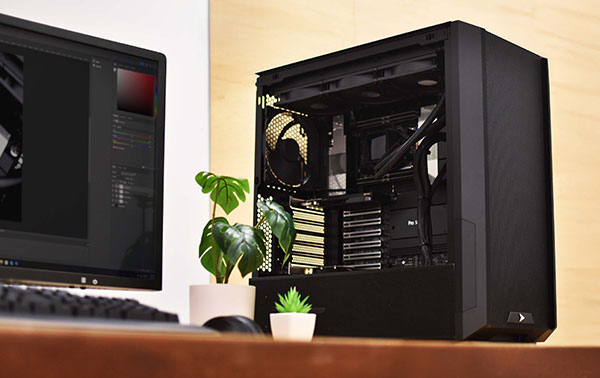
New processors like the AMD Threadripper CPU and advanced NVIDIA GPUs can accelerate typical design and simulation workflows. Images courtesy of Velocity Micro.
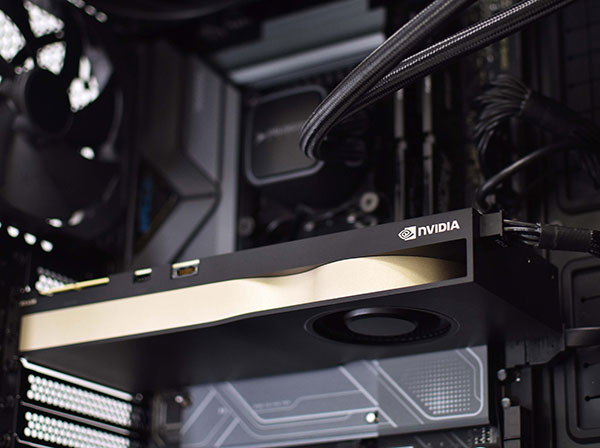
GPU selection can be a little trickier and is often determined by the most used application. Many times, software vendors will approve only a select number of GPUs for official support with their software. So the user will need to make sure they’re selecting one of those qualified parts. That’s where a pre-sales consultation with a hardware expert can be important, saving the user time, money, and headache down the road.
MingYao Ding, Ozen: Design and engineering software vary widely in performance and capabilities. It takes an enormous amount of engineering effort to write software that scales to dozens of cores and even more to hundreds of cores. Deploying a GPU solver typically means a full rewrite of the software, so that’s an even larger project.
The differences between design/engineering software exist just like there are differences between consumer and professional hardware that may not be apparent from a spec sheet. High-end engineering software will take advantage of multi-core and GPU on a system to solve larger problems faster. For example, the ability to handle a design file with a million “vias” on a circuit board has forced some of our customers to change software and increase memory. Similarly, the availability of GPU solvers in Ansys has allowed our customers to deploy advanced GPUs and reduce simulation time by a factor of 20X.
Pawlak, GoEngineer: Programs differ in their ability to use available hardware. Some are single-threaded (CAD design tools) and others are multi-threaded (some simulation tools).
Understanding this is key to selecting the correct hardware to optimize the software performance. Users need to know how much time they spend in a particular program. A CAD designer will tend to go for faster single-threaded performance, while a simulation specialist may choose to go with a lower clock speed but more cores. The size and complexity of the models or simulation study can also impact this decision.


Velocity Micro is the premier high-performance innovator of consumer technology and electronics in North America.

Accelerate workflows and increase efficiency with Velocity Micro’s professional class workstations
If your projects are being bottlenecked by inefficient and ineffectual PC hardware, Velocity Micro’s professional class workstations can directly accelerate your workflows to make your team more efficient. Download this doc to learn more.

Brian Albright is the editorial director of Digital Engineering.
Contact him at [email protected].

Join over 90,000 engineering professionals who get fresh engineering news as soon as it is published.






About Us · Contact Us · Editorial Team · Advertising · Privacy Policy · Subscriber Services · © 2026 Digital Engineering 24/7 · Peerless Media