Helping design and engineering professionals discover, evaluate and specify technologies and processes that shorten the design cycle and enable success.



Digital Engineering April 2026
In the latest issue of Digital Engineering, we take a look at the latest innovations in design for additive manufacturing, including the use of natural language inputs, social media cosplayers, and AI integration. The issue also includes a feature…

January Special Focus Issue: Design for Additive
In this Special Focus Issue of Digital Engineering, learn about the latest advancements in design for additive manufacturing, including new software tools, additive in automotive, custom medical devices, and more.
Geomagic (Research Triangle Park, NC) recently introduced version 12 of its Geomagic Studio reverse engineering software and Geomagic Qualify, its quality inspection software. Both applications now offer a ribbon-style interface similar to Microsoft Office 2007, and both now support Windows 7. Geomagic Qualify now includes a new report generation and publishing engine that enables colorized and annotated 3D models to be embedded directly in PDF. Among the enhancements in Geomagic Stuidio are more flexible workflows that support faster design iterations.
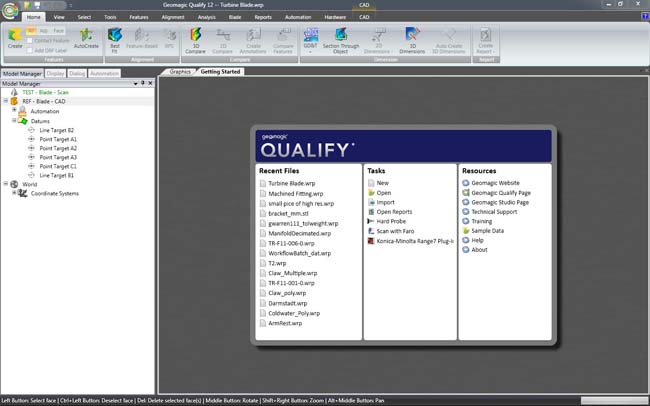 Geomagic Studio 12 and Geomagic Qualify 12 have been redesigned based on the ribbon interface pioneered in Windows Office 2007. The new interface is said to improve the entire user experience and includes a start-up screen that provides resources and shortcuts in a single location. |
Version 12 of Geomagic Studio and Geomagic Qualify have been optimized to run up to 40 percent faster than previous versions, reports the company. A new start page provides access to files, frequently used tasks, and resources such as a technical support knowledge base and sample data.
The new ribbon-style interface is said to provide an efficient, process-oriented workflow through its grouping of functional commands under tabs and sub-modules. “The state-of-the-art ribbon interface in Geomagic Studio and Qualify 12 not only improves the appearance of the software, it makes it more intuitive to learn and use,” says Karl Matthews, vice president of product management at Geomagic, in a press statement.
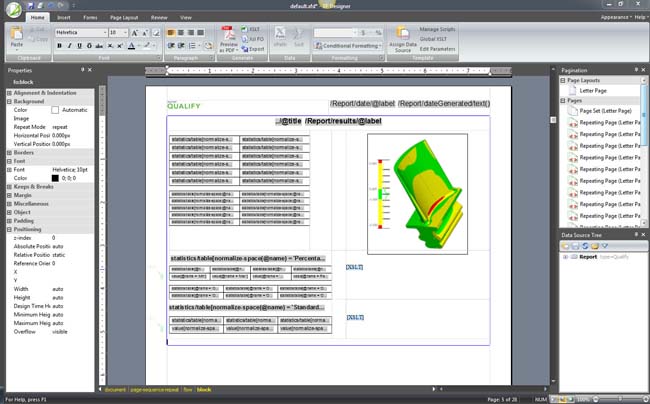 Geomagic Qualify 12 introduces a new report designer with the ability to embed colorized and annotated 3D models directly in a PDF report. |
Geomagic Studio 12's Parametric Exchange enables parametric models created in Geomagic Studio to be transferred directly into such widely deployed 3D mechanical CAD packages as Autodesk Inventor, CATIA, Pro/ENGINEER, Siemens NX, and SolidWorks. Additionally, Geomagic supports a range of scanners and input devices, representing more than 80 percent of all digitizing devices sold, according to the company.
New functionality in Geomagic Studio 12 includes automatic surface and solid trimming via the Parametric Exchange feature. The software's autosurface capabilities enable you to convert polygon meshes into NURBS surfaces with a single mouse click.
A testimonial statement provided by Geomagic Robb Rudluff, a design engineer at pHluid, which provides engineering services that speed product development and improve quality for such customers as Quatro Composites, Edwards Lifesciences, Global Motorsports Group (GMG), and Yamaha Motor Corp., says that “the ability to automatically trim, join, cut or subtract surfaces and solids in Geomagic Studio’s Parametric Exchange further streamlines the process of turning scan data into fully parametric, native-format CAD models that my customers can put to immediate use.”
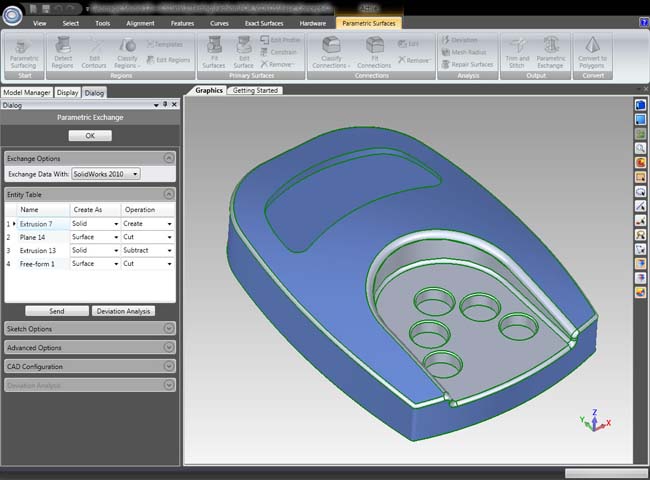 Geomagic Studio 12 features enhancements to Parametric Exchange, which enables parametric models and their editing trees to be transferred directly into CAD software. The company says that Geomagic Studio is the only reverse engineering software to directly integrate with all leading 3D mechanical CAD packages in their native formats. |
Point-cloud handling and polygon mesh processing have also been upgraded in Geomagic Studio 12. Here, the upgrades include a hole-filling feature and improved automatic “healing” of polygon meshes.
Enhancements in Geomagic Qualify include quick feature creation to speed up the creation of inspection plans, new algorithms for aligning test models with reference models, and a WYSIWYG report template designer. Additionally, you can now embed colorized and annotated 3D models directly in a PDF report. This new feature enables a quality inspector, for example, to use Geomagic Qualify to create a PDF report for a design engineer who can then rotate the model inside the PDF, zoom to a highlighted area, or select a predefined view using only the free Adobe Reader.
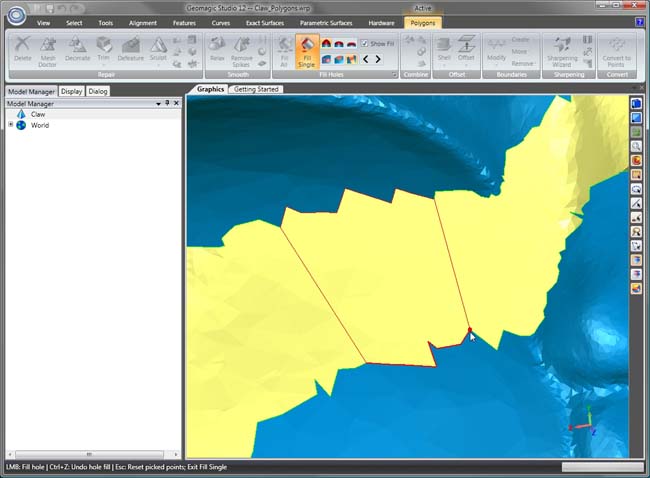 A new interactive command in Geomagic Studio 12 provides visual feedback on the bridge shape before filling in holes. |
“The real bonus in Qualify 12 is the 3D PDF generator,” says Rus Emerick, who leads 3D imaging implementation at Schneider Electric, a global specialist in energy management with operations in more than 100 countries and sales of 15.8 billion euros in 2009, in a testimonial released by Geomagic. “This capability delivers tremendous collaboration power for quality analysis teams throughout the enterprise.”
Geomagic Studio 12 and Geomagic Qualify 12 are scheduled for release in late May. The CD will ship with both 32- and 64-bit editions. Language support is available for English, German, French, Italian, Spanish, Chinese and Japanese. Geomagic representatives will demonstrate Geomagic Studio 12 and Geomagic Qualify 12 at the RAPID 2010 Conference & Exposition (booth 212), May 18-20 in Anaheim, CA.
For more information visit Geomagic.
Click here to go directly to the Geomagic Studio 12 web page.
Watch a registration-free video on Geomagic Studio 12.
Click here to go directly to the Geomagic Qualify 12 web page.
Watch a registration-free video on Geomagic Qualify 12.
See why DE's Editors selected Version of of Geomagic Studio and Geomagic Qualify as their Pick of the Week.


DE's editors contribute news and new product announcements to Digital Engineering. Press releases may be sent to them via [email protected].
Follow DE
Join over 90,000 engineering professionals who get fresh engineering news as soon as it is published.






About Us · Contact Us · Editorial Team · Advertising · Privacy Policy · Subscriber Services · © 2026 Digital Engineering 24/7 · Peerless Media