Helping design and engineering professionals discover, evaluate and specify technologies and processes that shorten the design cycle and enable success.



May 2026 Special Focus: Artificial Intelligence in Design and Simulation
In this Special Focus Issue, learn about the latest developments in the integration of artificial intelligence into engineering workflows.

April 2026 Special Focus Issue: Generative Design
In this Special Focus Issue, Digital Engineering takes a look at how generative design solutions can be used across different types of design problems and with a variety of manufacturing approaches to accelerate design space exploration, and…
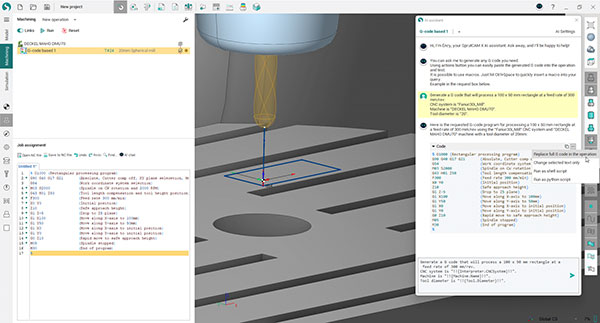
SprutCAM Tech's SprutCAM X 17 and SprutCAM X Robot 17 are CAD/CAM solutions for the next-generation makers and form a complete software ecosystem. SprutCAM X 17 and SprutCAM X Robot 17 are equipped with Éncy, the SprutCAM X virtual artificial intelligence assistant, relatively new to the CAD/CAM industry, which opens opportunities for G-code proficiency.
When iprogramming industrial robots that handle parts of shapes, dimensions and various materials, SprutCAM X Robot, a CAD/CAM/OLP solution, is a robotic milling application. Considering the range of applications of SprutCAM X Robot, including welding, additive manufacturing, pick-and-place, assembly, painting and trimming, the company positions SprutCAM X Robot as an all-in-one CAD/CAM/OLP solution for complex and creative robotic tasks.
SprutCAM X Robot 17 introduces new features:
An updated Point Pick and Place operation for moving objects from one location to another using a robotic arm. Now you can create any number of nodal points and move the end effector through them.
New Spray group operations, including Contour spraying, Surface spraying, Morph Spraying, and Rotary spraying.
Improvements in the Redundant Axes Optimizer function, including the display of periodic axes boundaries on the map.
An innovation in version 17 is Multiproject, which streamlines workflows for greater time efficiency and makes it easy to reuse similar approaches across multiple projects.
Another major addition is the Snapshots feature, which acts like an Undo function for the CAM workflow. It automatically creates event-triggered snapshots, offers quick Undo functionality through the snapshot list, and provides a snapshot manager for convenient previewing.
The Machine Setup File feature is a timesaver, especially for users who work on many projects with standard parts. It enables quick and easy transfer of machine digital twins, settings and tools from a ready-made template.
Sources: Press materials received from the company and additional information gleaned from the company’s website.


DE's editors contribute news and new product announcements to Digital Engineering. Press releases may be sent to them via [email protected].
Follow DE
Join over 90,000 engineering professionals who get fresh engineering news as soon as it is published.






About Us · Contact Us · Editorial Team · Advertising · Privacy Policy · Subscriber Services · © 2026 Digital Engineering 24/7 · Peerless Media