Helping design and engineering professionals discover, evaluate and specify technologies and processes that shorten the design cycle and enable success.


Sponsored
 Dear Desktop Engineering Reader:
If you've ever spent a few tedious hours or days forging models into sweepable volumes then waiting for a mesh so that you can get on with a CFD (computational fluid dynamics) or FEA (finite element analysis) job, you'll be interested in today's Check it Out subject.
You probably know Computational Simulation Software as csimsoft. They develop Trelis, the high-end preprocessor for stunningly complex FEA and CFD simulations. They just released Bolt, an automatic hexahedral mesh generation tool. It sounds like it'll save you a lot of time and boring work. And you can give it a try yourself.As its name and the word “automatic” imply, Bolt is for creating all-hex meshes from complex, arbitrary geometries quickly with little or no fussing around. Think irregular topologies, dirty geometries, viscous flows and so on. By the way, you maintain full control. It has options to adjust the mesh, cell size, smoothing and the like. You also have a hex-dominant option that uses tetrahedrals in areas where the hexes fall below a specified threshold.
But you may not want to fiddle much because Bolt is push-button automatic. Here's the workflow: You import a facet model and Bolt automatically calculates settings. You hit mesh. You don't decompose models into sweepable volumes. You don't manually defeature models or fix gaps, overlaps or misalignments. You don't idle. Your mileage may vary depending on your job, but, according to csimsoft, Bolt can return results in minutes.
Bolt, says csimsoft, offers new methods for node smoothing, resolving non-manifold conditions, parallel mesh processing and how the mesh layer between the interior mesh and the model boundary is handled. The company sees Bolt as especially apt for assignments in biomedical or metal forming where interface boundaries are approximations as well as simulations that need minimal topology and feature capture. Its capability for fast, iterative meshing should make it spot on for adaptive manufacturing and rapid prototyping.
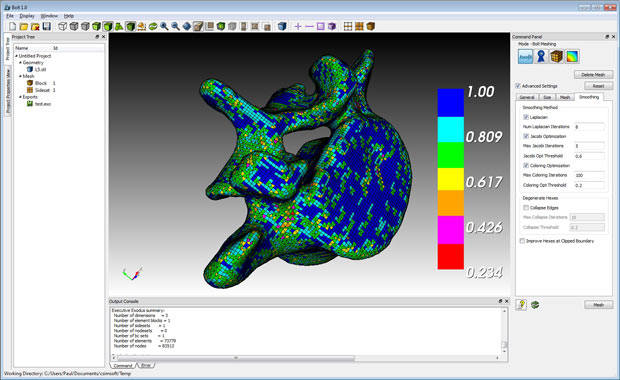 The new Bolt meshing tool provides CFD and FEA analysts automatic mesh-generation of complex arbitrary geometries with minimal or no user interaction and without requiring manual model clean-up. Here, Bolt has color-coded elements to reflect their value. Image courtesy of Computational Simulation Software LLC.
The best way to learn more about what Bolt can do for you is to use it. Hit today's Check it Out link and then sign up for an evaluation copy from the “Get Bolt” link on the webpage. If you'd prefer to see more first, go to the top of the page, hit the Support tab then Tutorials/Bolt and watch the short (registration-free) videos, especially “Introduction to Meshing with Bolt.” Good stuff.
Thanks Pal — Lockwood
Anthony J. Lockwood
Editor at Large, Desktop Engineering


Anthony J. Lockwood is Digital Engineering's founding editor. He is now retired. Contact him via [email protected].
Follow DE
Join over 90,000 engineering professionals who get fresh engineering news as soon as it is published.






About Us · Contact Us · Editorial Team · Advertising · Privacy Policy · Subscriber Services · © 2026 Digital Engineering 24/7 · Peerless Media