Helping design and engineering professionals discover, evaluate and specify technologies and processes that shorten the design cycle and enable success.


Alert!
Digital Engineering ceased publication on July 1, 2026. This website remains available as an archive of engineering content.
For inquiries or information, please email [email protected].

May 2026 Special Focus: Artificial Intelligence in Design and Simulation
In this Special Focus Issue, learn about the latest developments in the integration of artificial intelligence into engineering workflows.

Design & Simulation Software Guide 2025
In this Special Issue, Digital Engineering presents its second annual guide to design and simulation software vendors.
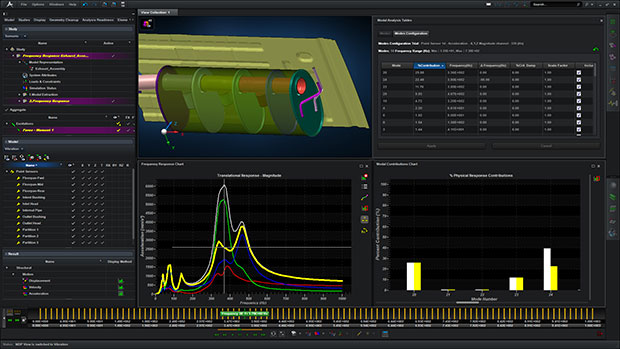 An analysts adjusts the mode contributions to mitigate and control the frequency response of an automotive exhaust. Image courtesy of MSC Software.
Recently I had the chance to sit in on a webinar about the new-features announcement for MSC Software’s Apex product, whose release names are animal-inspired. This version, called Fossa, is the sixth iteration of the company’s intriguing and pointedly user-friendly approach to mechanical modeling and structural analysis—a kind of hip younger brother to classic MSC Nastran software and traditional analysis workflows. It helps users quickly validate an FEA (finite element analysis) model—its mesh, properties and boundary conditions—to sift out the best-performing part models prior to creating a large assembly for more sophisticated analyses.
Although the Apex Fossa Modeler release includes dozens of user-friendly enhancements for model preparation, meshing, editing and export (e.g. mirror an entire CAD model), I found the most interesting addition to be that of dynamic frequency response in the Apex Structures add-on module. MSC Software clearly understands that when designers move from linear statics to dynamic analyses, they move into territory that may test their comfort level, so here is where Structures shines.
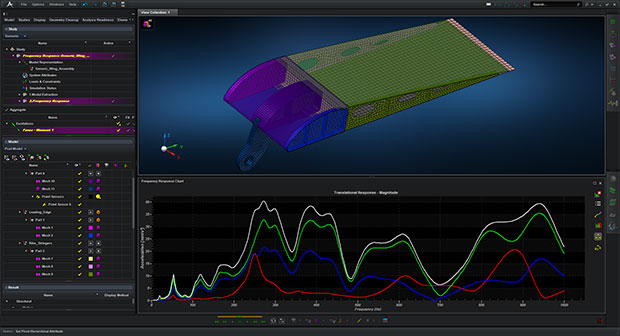 A plot is shown and represents the acceleration response of an aircraft wing structure subjected to loading frequencies between 0 and 1000Hz. Image courtesy of MSC Software.
For starters, the interactive and incrementally based functions found in Modeler extend into the simulation module for improving vibration behavior. Users can specify a multi-step frequency response analysis, looking at 1. pre-stiffening (optional), 2. normal modes and 3. frequency response. Then the results view presents everything you need to know, such as mode contributions, stress values and “hot spots” of critical displacements. Users can animate deformed shapes, interactively switch between normal modes, and toggle among Cartesian, cylindrical or spherical coordinate systems.
By creating “sensors,” users can monitor frequency responses (displacement, velocity, acceleration) at specific points on the geometry and identify the highest contributing modes. The key innovation with Apex Fossa is the ability for the user to interactively modify the modal frequency, modal damping and modal contribution, and get sensor output values to update in real time. This helps the user run plenty of what-if scenarios and gain valuable insight before committing to a more computationally expensive design change. They can then make changes in the geometry, loads (separate x, y or z forces or force moments), and/or boundary conditions and see the effects automatically with results updates. Designers can also make changes in the entire assembly (such as connection type, with respect to damping or stiffness) and again see the effects on vibration behavior. The software even lets users import an Excel profile of excitation values. A Study Manager function allows users to manage all of these scenarios (model representations, output requests and analysis types) while the Results Manager permits viewing the analysis per part, assembly or result type.
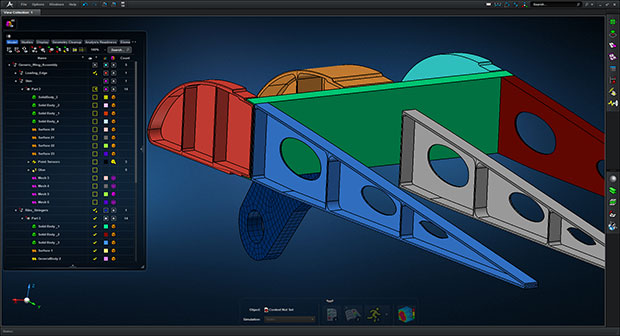 A new component, colored in gray, is added within minutes and will reduce the amount of vibration the structure experiences for a loading frequency range. Image courtesy of MSC Software.
A fossa is a cat-like mammal related to the mongoose; I expect the product naming reflects sleekness and speed, both appropriate to this release. Apex Fossa offers fast, easily viewed and organized tactics for what-if vibration explorations. I’m looking forward to even more options in the next release, and to learning the name of another swift-moving creature.
For more information, visit MSCApex.com.


Pamela Waterman worked as Digital Engineering's contributing editor for two decades. Contact her via DE-Editors@ digitaleng.news.
Follow DE
Join over 90,000 engineering professionals who get fresh engineering news as soon as it is published.






About Us · Contact Us · Editorial Team · Advertising · Privacy Policy · Subscriber Services · © 2026 Digital Engineering 24/7 · Peerless Media