Helping design and engineering professionals discover, evaluate and specify technologies and processes that shorten the design cycle and enable success.


Corel Corp. (Ottawa, Ontario) announced CorelCAD 2013, the latest version of its 2D/3D CAD design solution. Introducing full compatibility with the new AutoCAD DWG 2013 file format, CorelCAD version 2013 is described as providing engineers, designers, and architects 2D drafting capabilities and a variety of customizable 2D design and 3D solid modeling tools. Key new features in version 2013, according to the company, include new alignment and revision tools, DGN Underlay functionality, and in-place text editing.
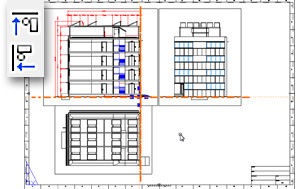 CorelCAD 2013’s new Align Viewport tool enables users to arrange elements of drawings, which is said to provide a more accurate alignment in sheets. The viewports are aligned by the geometry on the inside of the viewport. Image courtesy of Corel Corp. |
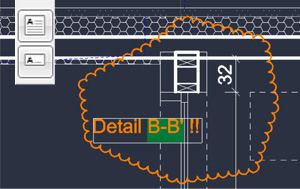
The Align Viewport tool is said to allows users to arrange the elements of a drawing to gain better, more accurate alignment in sheets; the viewports are aligned by the geometry on the inside of the viewport. The new Revision Cloud tool lets users simplify the review and revision process by using the Cloud command to create revision clouds that highlight areas to be edited.
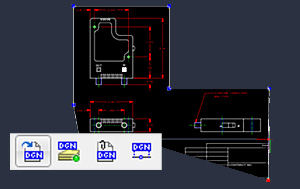 The new DGN Underlay functionality in CorelCAD 2013 lets users specify layer visibility of a DGN Underlay that is a referenced DGN file in a drawing. Image courtesy of Corel Corp. |
The company says that as with the software’s PDF Underlay functionality, the new DGN Underlay lets users insert Bentley MicroStation DGN files as referenced drawings, specify layer visibility, clip (mask) DGN Underlay, and align new drawing elements to objects in a DGN Underlay. CorelCAD 2013’s new in-place text editing capability enables users to edit text directly on screen. Users can modify the definitions of components and view the changes in real-time, says the company.
Other new features of CorelCAD 2013 include a VSTA (Microsoft Visual Studio Tools for Applications) Manager toolbar that lets users record, edit, and run VSTA macros to perform repetitive tasks or automate command sequences. A new ExplodeX command lets CorelCAD 2013 users convert ellipses and splines into polylines, and the VoiceNotes feature lets users add recorded messages directly in a drawing.
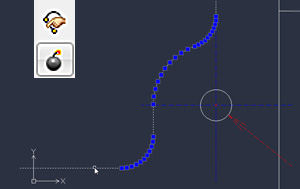 A new ExplodeX command lets CorelCAD 2013 users convert ellipses and splines into polylines. Image courtesy of Corel Corp. |
CorelCAD 2013 also has been updated to support Windows 8 and Mac OS X 10.8 (Mountain Lion). A native 64-bit Windows version has been introduced. Overall system performance and speed has been improved to offer up to a 40% reduction in loading times for larger drawings, compared to previous releases.
Minimum specifications for Windows platforms include a 2GHz or faster Intel Pentium 4 platform with 2GB of RAM (4 GB or more recommended), 500MB of disk space, high-color (16-bit) graphics card (3D graphics accelerator card recommended), and Windows 7, 8, Vista, or Windows XP. The 64-bit version of CorelCAD 2013 runs on Windows 8 or Windows 7 platforms.
Apple Macintosh specifications include OS X v10.5.8 (Leopard), v10.6 (Snow Leopard), v10.7 (Lion), or v10.8 (Mountain Lion), 1GB of RAM (2GB recommended), 500MB of hard-disk space, and a 1024 x 768 display (1280 x 800 recommended) with 16-bit video card.
 In-place text editing in CorelCAD 2013 allows on-screen text editing in CAD drawings instead requiring a separate dialog for editing text. Image courtesy of Corel Corp |
Both the Macintosh and Windows versions of CorelCAD 2013 require a mouse or tablet, CD-ROM for installation from CD, and an Internet connection for installation from download, product activation, and access to the plug-in store.
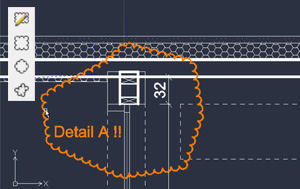 The Revision Cloud command lets users highlight areas in CAD drawings that require or contain revisions. Image courtesy of Corel Corp. |
CorelCAD 2013 is available immediately and is offered in numerous languages. North American pricing is $699. Registered users of the first version of CorelCAD are eligible for an upgrade price of $199. Educational and volume licenses are available. For more details, visit Corel.
Full details on what’s new in CorelCAD 2013, including lots of videos.
See why DE's editors selected CorelCAD 2013 as their Pick of the Week.
Sources: Press materials received from the company and additional information gleaned from the company's website.


Anthony J. Lockwood is Digital Engineering's founding editor. He is now retired. Contact him via [email protected].
Follow DE
Join over 90,000 engineering professionals who get fresh engineering news as soon as it is published.






About Us · Contact Us · Editorial Team · Advertising · Privacy Policy · Subscriber Services · © 2026 Digital Engineering 24/7 · Peerless Media