Helping design and engineering professionals discover, evaluate and specify technologies and processes that shorten the design cycle and enable success.



May 2026 Special Focus: Artificial Intelligence in Design and Simulation
In this Special Focus Issue, learn about the latest developments in the integration of artificial intelligence into engineering workflows.

April 2026 Special Focus Issue: Generative Design
In this Special Focus Issue, Digital Engineering takes a look at how generative design solutions can be used across different types of design problems and with a variety of manufacturing approaches to accelerate design space exploration, and…
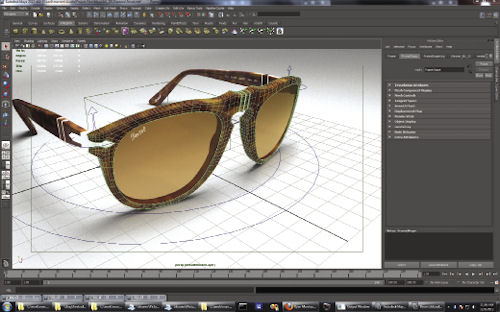 Rendered directly in the viewport with Caustic Visualizer for Autodesk Maya 2013. Triangles: 538,696; LIghts 10 + IBL. Artist: Ryan Montrucchio, model courtesy of Pacific Digital Image Visual Studios. |
But Visualizer is more than just a render preview; it’s a fully functional viewport. You can select and manipulate geometry and lighting--do anything, in fact, that you would do in any viewport, but with the added benefit of interactive ray tracing.
Similarly, Neon for Rhino is a fully ray-traced viewport plug-in for McNeel’s Rhino 5, developed by McNeel in collaboration with Imagination Technologies/Caustic. Like the Caustic Visualizer, the Neon viewport supports all native rendering features while still allowing you to edit your models.
This tightly integrated, interactive ray tracing is cool, but to make it go really fast, you’ll need hardware help in the form of one of Caustic’s ray tracing acceleration cards.
Fundamental Differences
Caustic’s Series2 Ray Tracing Acceleration Boards are not your average graphics processing unit (GPU)-powered cards. Caustic cards are focused on ray tracing, and Caustic has developed a fundamentally different approach to solving the ray-tracing problem.
“GPU companies look at ray tracing as a computing problem: If I just keep adding more cores, I can solve this problem,” notes Imagination Technologies’ director of business development, Alex Kelley. “But that means I’m also adding more power. That’s why you see these GPUs consuming 120W apiece.”
But Kelley says ray tracing turns out to actually be as much a database problem as a computing problem.
Generally speaking, he explains, ray tracing works by casting rays from an imaginary camera, through the pixel plane of the final image and into the scene. When they intersect a surface, the program computes the color of the resulting pixel by combining the surface’s orientation and material properties with incoming light. That incoming light is affected by scene lights, cast shadows, reflective materials and indirect lighting (light bouncing off of other objects in the scene), and more.
It’s simple in principle. You can create a ray-tracing algorithm with astonishingly little code. Here’s a ray tracer that fits on a business card: cs.cmu.edu


Contributing Editor Mark Clarkson is Digital Engineering's expert in visualization, computer animation, and graphics. His newest book is Photoshop Elements by Example. Visit him on the web at MarkClarkson.com or send e-mail about this article to [email protected].
Follow DE
Join over 90,000 engineering professionals who get fresh engineering news as soon as it is published.






About Us · Contact Us · Editorial Team · Advertising · Privacy Policy · Subscriber Services · © 2026 Digital Engineering 24/7 · Peerless Media