Helping design and engineering professionals discover, evaluate and specify technologies and processes that shorten the design cycle and enable success.


Alert!
Digital Engineering ceased publication on July 1, 2026. This website remains available as an archive of engineering content.
For inquiries or information, please email [email protected].
Sponsored

Cut Retrieval-Augmented Generation (RAG) Hallucinations by 50%
Most teams hit the same wall with enterprise AI: LLMs that hallucinate, pipelines that don’t scale, and infrastructure that’s harder to design than the models themselves.

What Is Intelligent BOM Management? A Guide to Smarter Product Development
Learn how intelligent Bill of Materials (BOM) management helps teams collaborate, reduce errors, and bring innovative products to market faster with cloud-based PLM tools.
 With the rapid-fire pace of technology change today, working on a three-year-old workstation is akin to driving a decade-plus clunker--it gets you to your destination, but likely with some major hiccups along the way.
A three-year old workstation might be capable of running the latest versions of CAD or CAE software, but it’s hardly optimized to exploit the tools to their fullest capacity. In fact, an old workstation can be the bottleneck to modern, analysis-led engineering workflows. Older workstations are based on past-generation processor and bus technologies, which have since been updated with new instruction sets and micro architectures that streamline how data is handled. That means a three-year-old workstation based on a 3GHz processor is not the equivalent of a workstation built with a comparable 3GHz processor today.
High-performance workstations based on the latest Intel Xeon processor E5-2600 v2 product family can execute more instructions per second, allowing them to run CAE and CAD software faster. As a result, engineering teams outfitted with the latest workstation models are able to explore a greater number of design concepts up to three times faster and for less money. The ability to conduct more simulation studies means engineering teams can reduce the number of physical prototypes required while arriving at the optimal product design much more quickly.
There’s more to a workstation upgrade than building the case for a high-octane processor, however. Configuring a next-generation workstation today is all about balance, blending the right mix of processor, graphics cards, memory, and storage to create the best experience for CAD and simulation workflows. Workstations that are three years old or later won’t necessarily support the other modern-day components that work together to deliver productivity advances at less cost.
Consider this scenario: Buying one or two frequencies down from the premier CPU clock speed or opting for a less expensive graphics card can generate savings that can be redirected toward additional memory or SSD drives, which can have a greater overall impact on boosting productivity. For example, an investment in twice the memory capacity of the largest CAD model can deliver a performance increase of up to 2X on that model for less money than opting for a workstation based on the highest end CPU.Trading off graphics horsepower for additional SSD storage can deliver similar performance benefits, again at less expense. Entry-level GPUs are sufficient for most CAD users’ needs; in fact, informal testing by CATi, a SolidWorks reseller, found the performance difference between a $150 entry-level graphics card and $1,500 high-end model to be just 6% during the course of an average workday by a typical engineering user.
Also essential to a workstation refresh is running the latest versions of CAD or simulation software fully optimized to exploit the new hardware capabilities, from multiple cores to microarchitectures and faster bus technologies. Consider the example of SolidWorks Simulation 2014 running on an updated workstation with multiple cores. Based on testing by SolidWorks and Intel, multicore support delivered a 2X speed boost to FFEPlus operations. Moreover, because the Large Problem Direct Sparse Solver is much faster than the Direct Sparse Solver for problems with millions of degrees of freedoms (DOFs), solution time for a chassis simulation with 3,360,485 DOFs performed in minutes as opposed to hours.
Holding off an engineering workstation upgrade solely because of the expense of new hardware is short sighted and misguided in terms of total savings. The dollar value associated with the business advantages of effective simulation-based design workflows--specifically, greater exploration of more designs in much shorter timeframes--will universally outweigh any initial investment in new hardware.
 To configure your ideal workstation, go to www.intel.com/content/www/us/en/workstations/workstation-configurator-tool.html.
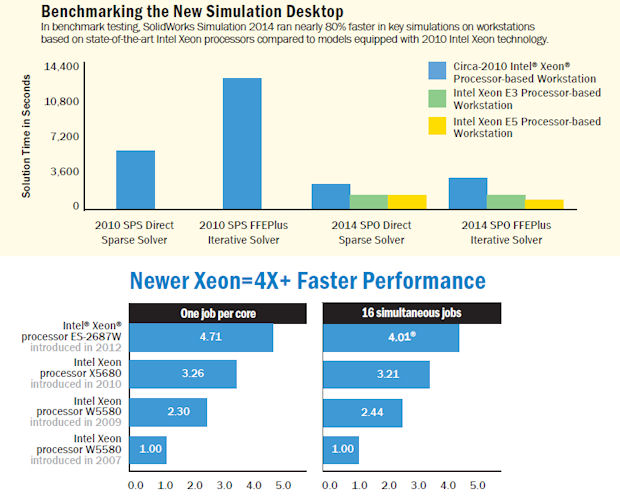 Relative performance of dual-socket workstations running multiple front-end and back-end electronic design automation applications. Based on Intel IT tests applying two different usage approaches, one job per core and 16 simultaneous jobs. Intel internal measurements, January 2012.






About Us · Contact Us · Editorial Team · Advertising · Privacy Policy · Subscriber Services · © 2026 Digital Engineering 24/7 · Peerless Media